Chapter 2. Operating-System Structures
- 과목: Operating System
- 기준 교재: Operating System Concepts 10th
- 관련 페이지: PDF pp. 83-132
- 우선순위: 필수
개요
Chapter 2는 운영체제를 세 관점에서 본다. 첫째, 운영체제가 사용자와 프로그램에 제공하는 services 관점이다. 둘째, user와 programmer가 운영체제에 접근하는 interface 관점이다. 셋째, operating-system designers가 내부 components와 interconnections를 어떻게 구성하는지 보는 structure 관점이다.
Chapter 1이 운영체제의 역할과 하드웨어 기반을 소개했다면, 이 장은 그 역할이 어떤 경로로 사용자 프로그램에 제공되는지 설명한다. 핵심 흐름은 user interface → API/library → system call → kernel service → hardware/resource다. 뒤쪽에서는 이 서비스를 어떤 구조(monolithic, layered, microkernel, modular, hybrid)로 구현할지, OS를 어떻게 boot하고 debug할지까지 이어진다.
핵심 개념
- Operating-system services는 program execution, I/O operations, file-system manipulation, communications, error detection처럼 사용자와 프로그램을 돕는 기능과, resource allocation, logging/accounting, protection/security처럼 시스템 자체를 효율적이고 안전하게 운영하는 기능으로 나뉜다.
- User/OS interface는 command-line interface(CLI), graphical user interface(GUI), touch-screen interface처럼 다양하지만, 이는 실제 kernel structure와는 분리된 앞단이다.
- System calls는 user program이 kernel services를 요청하는 공식 경로다. Application programmer는 보통 system call을 직접 호출하기보다 API와 library를 통해 간접적으로 사용한다.
- Shell(command interpreter)은 명령을 직접 구현할 수도 있고, UNIX처럼 명령 이름에 해당하는 executable file을 찾아 실행하는 방식으로 작게 유지될 수도 있다.
- 단순한 file copy 프로그램도 open, create, read, write, close, error handling, terminate 등 수많은 system calls를 사용한다.
세부 정리
2.1 Operating-System Services
운영체제는 프로그램이 실행될 environment를 제공하며, programs와 users에게 공통 services를 제공한다. 특정 서비스의 세부는 운영체제마다 다르지만, 공통적으로 등장하는 service classes는 비슷하다.
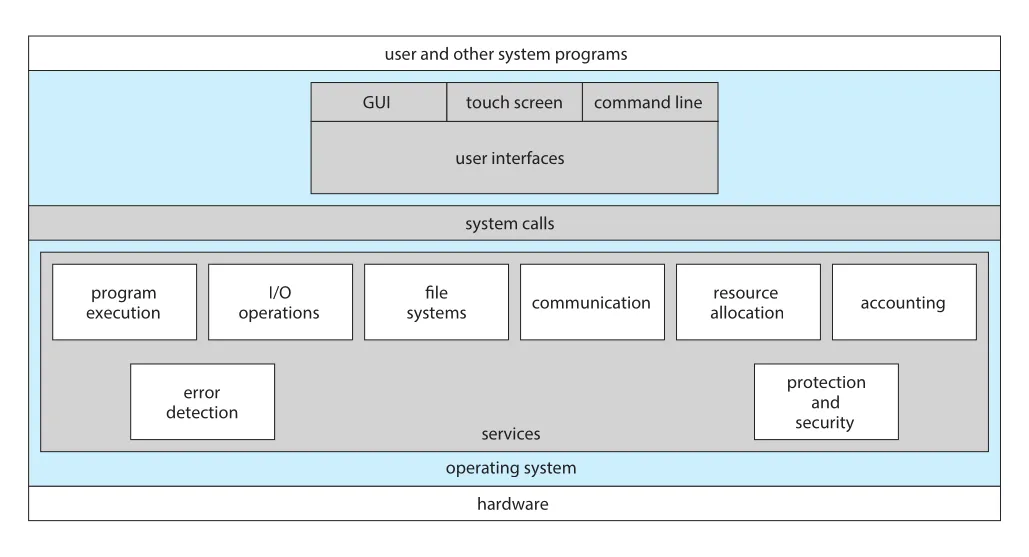
Figure 2.1 · PDF p. 86 · user interfaces, system calls, OS services, hardware의 관계
운영체제 서비스는 크게 두 묶음으로 볼 수 있다.
| 목적 | 서비스 | 핵심 의미 |
|---|---|---|
| 사용자와 프로그램을 도움 | user interface | GUI, touch screen, CLI 등 사용자가 OS와 상호작용하는 방식 |
| 사용자와 프로그램을 도움 | program execution | program을 memory에 load하고 run하며 정상/비정상 종료를 처리 |
| 사용자와 프로그램을 도움 | I/O operations | user가 직접 장치를 제어하지 못하므로 OS가 file/device I/O 수단 제공 |
| 사용자와 프로그램을 도움 | file-system manipulation | file/directory create, delete, read, write, search, list, permission 관리 |
| 사용자와 프로그램을 도움 | communications | same computer 또는 networked systems의 processes 사이 정보 교환 |
| 사용자와 프로그램을 도움 | error detection | CPU, memory, I/O devices, user program error를 감지하고 적절히 조치 |
| 시스템 운영 효율과 안전 | resource allocation | CPU cycles, main memory, file storage, I/O devices 등 자원 배분 |
| 시스템 운영 효율과 안전 | logging/accounting | resource 사용량 기록, billing, statistics, system tuning에 활용 |
| 시스템 운영 효율과 안전 | protection and security | resource access 통제, authentication, invalid access 기록과 방어 |
Communications는 shared memory와 message passing으로 구현될 수 있다. Shared memory는 둘 이상의 process가 같은 memory section을 읽고 쓰는 방식이고, message passing은 predefined format의 packets를 운영체제가 process 사이로 옮기는 방식이다. 이 구분은 Chapter 3의 IPC(interprocess communication)로 이어진다.
Error detection은 단순한 “오류 메시지 출력”이 아니다. Memory error, power failure, disk parity error, network connection failure, printer paper 부족, arithmetic overflow, illegal memory access처럼 계층별로 다른 오류가 발생한다. 운영체제는 상황에 따라 system halt, process termination, error code return 중 하나를 선택해 correct and consistent computing을 유지해야 한다.
Protection and security는 Chapter 1의 개념이 Chapter 2에서 service 관점으로 다시 등장한 것이다. 여러 processes가 동시에 실행될 때 한 process가 다른 process나 OS를 방해하지 못해야 하며, network adapters 같은 external I/O devices도 invalid access attempts로부터 보호되어야 한다. “A chain is only as strong as its weakest link”라는 원문의 표현처럼, security는 한 지점만 튼튼해서 되는 문제가 아니라 시스템 전체에 precautions가 들어가야 한다.
2.2 User and Operating-System Interface
사용자가 운영체제와 접촉하는 기본 방식은 command-line interface(CLI), graphical user interface(GUI), touch-screen interface로 나뉜다. 중요한 점은 user interface가 운영체제 사용 경험에는 중요하지만, 실제 operating-system structure와는 상당히 떨어져 있다는 것이다. 이 책은 UI 디자인보다 user programs에 적절한 services를 제공하는 kernel-level 문제에 집중한다.
Command Interpreters
Command interpreter는 사용자가 입력한 다음 command를 받아 실행하는 프로그램이다. Linux, UNIX, Windows 같은 대부분의 운영체제는 command interpreter를 process 시작 시점이나 user login 시점에 실행되는 special program으로 취급한다. UNIX/Linux 계열에서 여러 command interpreters를 shells라고 부르며, C shell, Bourne-Again shell(bash), Korn shell 등이 예다.
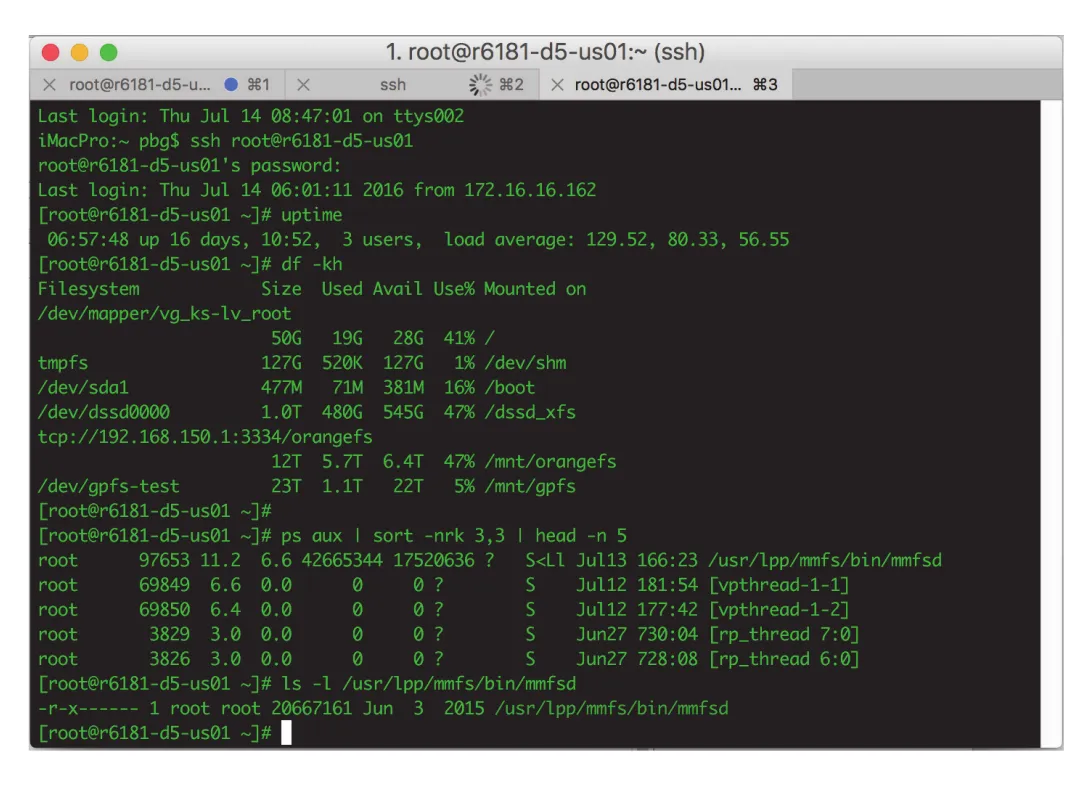
Figure 2.2 · PDF p. 89 · macOS에서 동작하는 bash shell command interpreter
Command 구현 방식은 두 가지다.
| 방식 | 동작 | trade-off |
|---|---|---|
| interpreter 내부 구현 | command interpreter가 각 command 구현 코드를 직접 포함 | command가 많아질수록 interpreter가 커짐 |
| system programs 실행 | command 이름에 해당하는 executable file을 찾아 memory에 load하고 실행 | interpreter는 작게 유지되고 새 command 추가가 쉬움 |
UNIX의 rm file.txt는 두 번째 방식의 대표 예다. Shell은 rm이라는 file을 찾아 load하고, file.txt를 parameter로 전달해 실행한다. 삭제 로직은 shell 안이 아니라 rm executable code 안에 있다. 그래서 새 command는 적절한 program file을 추가하는 방식으로 확장할 수 있다.
Graphical User Interface
Graphical user interface(GUI)는 command를 직접 입력하는 대신 mouse-based window-and-menu system을 사용한다. Desktop metaphor에서 icons는 programs, files, directories, system functions를 나타내고, 사용자는 pointer와 click으로 program을 실행하거나 file/folder를 선택하거나 menu command를 호출한다.
GUI는 사용성을 크게 높였지만, 모든 작업에 최적인 것은 아니다. GUI는 직관적이고 탐색적 작업에 강하지만 반복 자동화나 저수준 관리 작업은 CLI가 더 효율적일 수 있다.
Touch-Screen Interface
Smartphones와 handheld tablets에서는 keyboard/mouse 기반 CLI나 GUI가 비현실적이므로 touch-screen interface가 일반적이다. 사용자는 press, swipe 같은 gestures로 상호작용하고, 물리 keyboard 대신 screen keyboard를 사용한다.
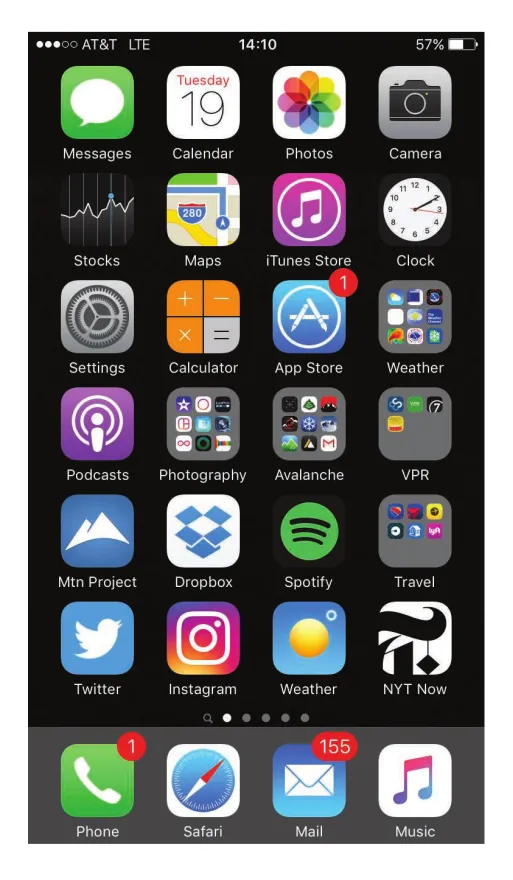
Figure 2.3 · PDF p. 90 · mobile device에서 touch-screen interface가 중심 UI가 되는 예
Touch-screen interface는 mobile computing의 제약과 연결된다. 화면은 작고, 입력 장치는 손가락이며, 대부분의 interaction이 app 중심으로 이루어진다. 따라서 mobile OS는 UI event handling, power constraints, sensor/device integration을 사용자에게 자연스럽게 숨겨야 한다.
Choice of Interface
CLI와 GUI 선택은 대체로 preference와 task 특성의 문제다. System administrators와 power users는 CLI를 자주 사용한다. 이유는 빠른 접근, 더 넓은 system function 접근, 반복 작업 자동화 때문이다. Shell scripts는 command-line steps를 file로 저장해 program처럼 실행하게 하므로 UNIX/Linux 환경에서 매우 흔하다.
반대로 대부분의 desktop users는 GUI를 선호한다. Windows는 GUI 중심이지만 shell도 제공하고, macOS는 historically GUI 중심이었으나 UNIX kernel 기반 macOS 이후 Aqua GUI와 command-line interface를 모두 제공한다.
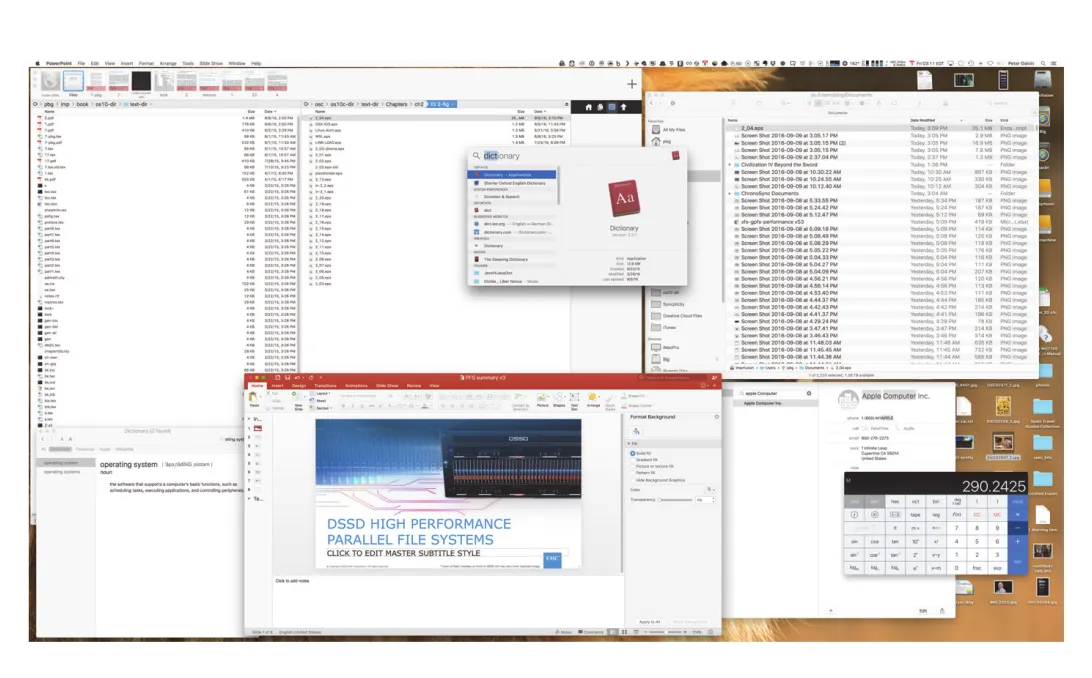
Figure 2.4 · PDF p. 91 · macOS의 GUI 환경 예
운영체제 입장에서는 user programs와 system programs를 본질적으로 구분하지 않는다. 둘 다 OS services를 요청하는 programs이고, 차이는 사용자에게 보이는 역할과 배포 방식에 가깝다.
2.3 System Calls
System calls는 operating system이 제공하는 services에 접근하기 위한 programming interface다. 보통 C/C++ 함수 형태로 제공되지만, hardware에 직접 접근해야 하는 low-level tasks는 assembly-language instructions가 필요할 수 있다.
Example: File Copy
단순한 file copy 프로그램도 많은 system calls를 사용한다. 예를 들어 UNIX command cp in.txt out.txt를 생각하면, 프로그램은 input file name과 output file name을 얻고, input file을 open하고, output file을 create/open한 뒤, loop를 돌며 read와 write를 반복하고, 마지막에 files를 close하고 정상 종료한다.
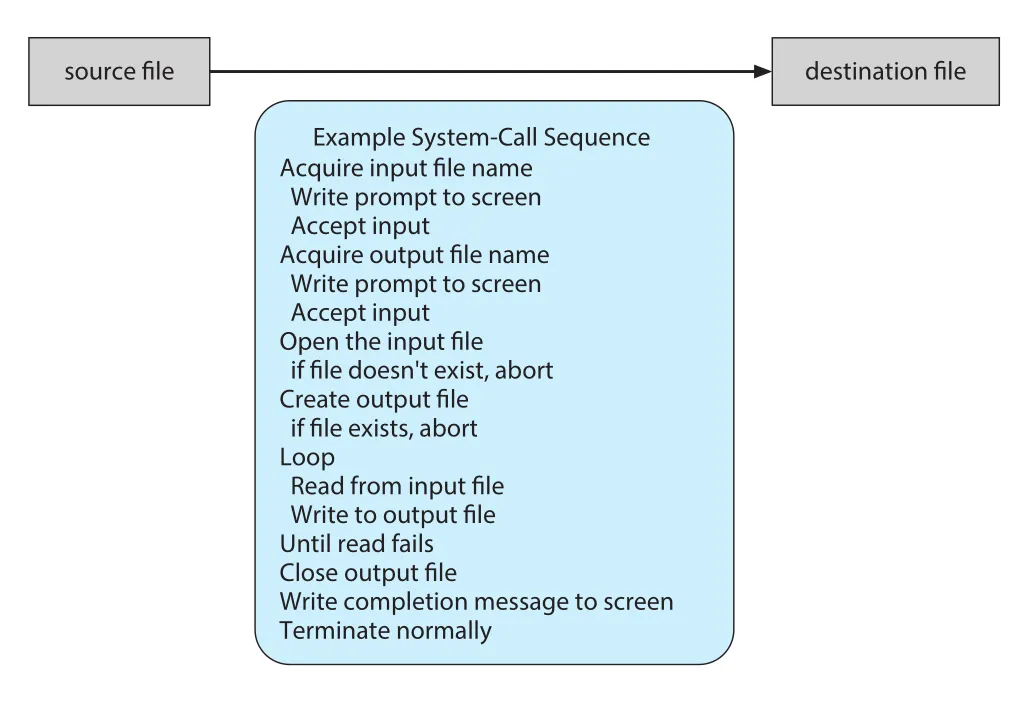
Figure 2.5 · PDF p. 93 · file copy 작업에서 system calls가 순차적으로 사용되는 예
이 과정에서 각 단계는 error handling을 필요로 한다. Input file이 없거나 access가 금지될 수 있고, output file이 이미 있을 수 있으며, disk space가 부족하거나 read 중 hardware failure가 발생할 수 있다. 따라서 system call은 단지 kernel 기능을 호출하는 문법이 아니라, user program과 OS 사이의 오류 계약(error contract)이기도 하다. 호출 결과와 status information을 통해 program은 retry, abort, overwrite, error message 출력 같은 결정을 내린다.
Application Programming Interface
Application programmer는 대부분 실제 system call을 직접 호출하지 않고 application programming interface(API)를 기준으로 프로그램을 작성한다. API는 사용할 수 있는 functions, 각 function에 전달할 parameters, return values를 정의한다. 대표 API에는 Windows API, POSIX API, Java API가 있다.
UNIX/Linux의 read() 예시는 API가 어떤 계약을 제공하는지 잘 보여준다.
#include <unistd.h>

ssize_t read(int fd, void *buf, size_t count);
여기서 fd는 file descriptor, buf는 읽은 data를 담을 buffer, count는 최대 bytes 수다. 성공하면 읽은 bytes 수를 반환하고, 0은 end of file, -1은 error를 뜻한다. 이런 API 문서 덕분에 programmer는 kernel 내부 구현을 모르더라도 file I/O를 사용할 수 있다.
API를 사용하는 이유는 두 가지가 크다.
- Portability: 같은 API를 지원하는 시스템에서는 source program이 compile/run될 가능성이 높아진다. 실제로는 architecture 차이가 있어 완전 자동은 아니지만, native system call을 직접 쓰는 것보다 훨씬 이식성이 좋다.
- Simplicity: actual system calls는 더 자세하고 다루기 어려울 수 있다. API/library가 복잡한 parameter setup과 호출 과정을 감춘다.
Run-time environment(RTE)는 특정 programming language로 작성된 application을 실행하는 데 필요한 compiler/interpreter, libraries, loader 등 전체 software suite다. RTE는 system-call interface를 제공해 API function calls를 가로채고 필요한 OS system calls를 호출한다.
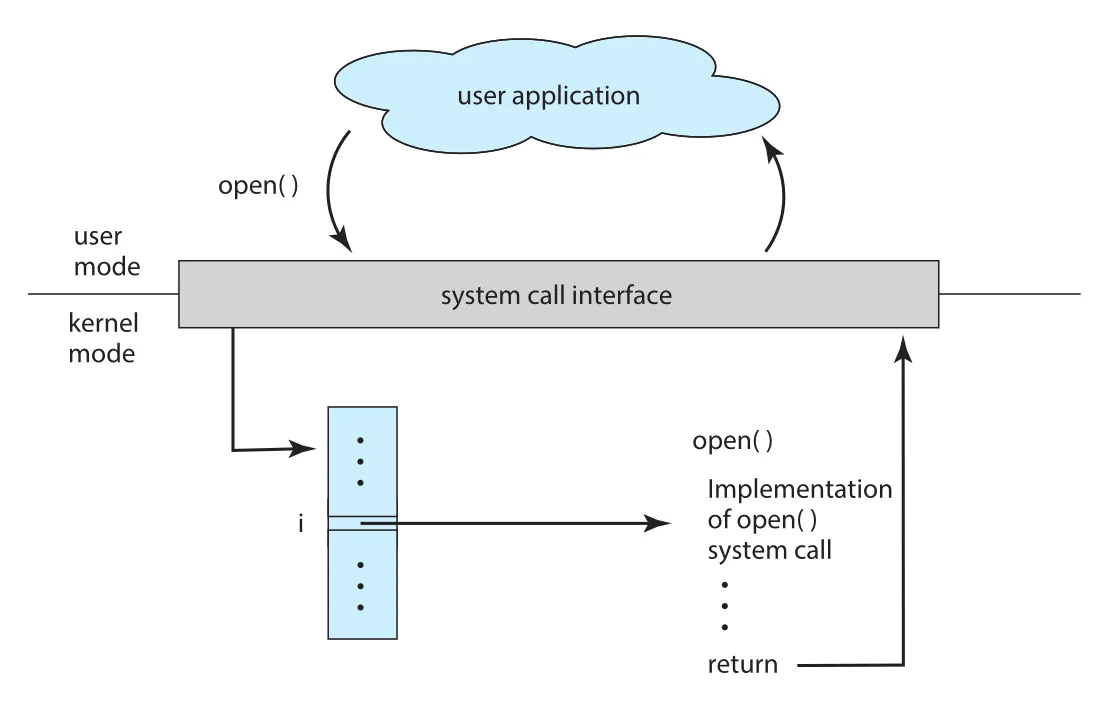
Figure 2.6 · PDF p. 95 · user application의 open() 호출이 system-call interface를 거쳐 kernel의 open() implementation으로 연결되는 흐름
일반적으로 각 system call에는 number가 붙고, system-call interface는 이 번호로 indexing되는 table을 유지한다. User program은 “어떤 kernel code가 어떻게 실행되는지”가 아니라 “API를 어떻게 호출하고, OS가 어떤 결과를 보장하는지”만 알면 된다. 예를 들어 Windows API의 CreateProcess()는 내부적으로 Windows kernel의 NTCreateProcess() system call을 호출한다.
System call parameter passing 방식은 세 가지가 있다.
| 방식 | 동작 | 특징 |
|---|---|---|
| registers | parameters를 CPU registers에 직접 넣음 | 빠르고 단순하지만 register 수에 제한 |
| block/table in memory | parameters를 memory block/table에 넣고 그 address를 register로 전달 | parameter 수나 길이 제한을 완화 |
| stack | program이 parameters를 stack에 push하고 OS가 pop | parameter 수 제한을 줄일 수 있음 |
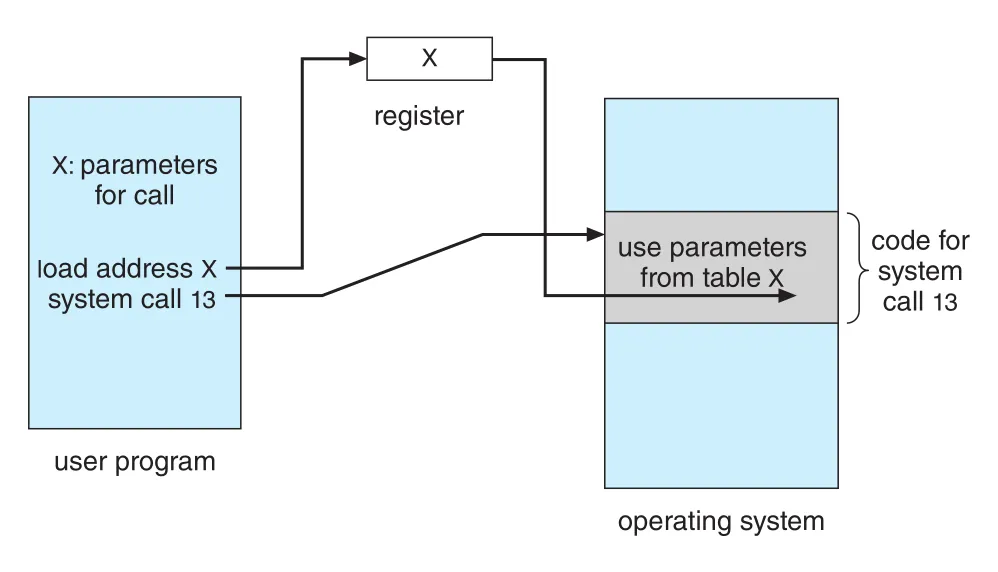
Figure 2.7 · PDF p. 96 · parameters를 memory table에 넣고 table address를 system call에 전달하는 방식
Linux는 register 방식과 block 방식을 조합한다. Parameters가 다섯 개 이하이면 registers를 사용하고, 더 많으면 block method를 사용한다. 이 세부는 암기보다 “user mode에서 kernel mode로 넘어갈 때 data를 안전하고 표준화된 방식으로 전달해야 한다”는 점이 중요하다.
Types of System Calls
System calls는 대략 process control, file management, device management, information maintenance, communications, protection 여섯 범주로 나뉜다.
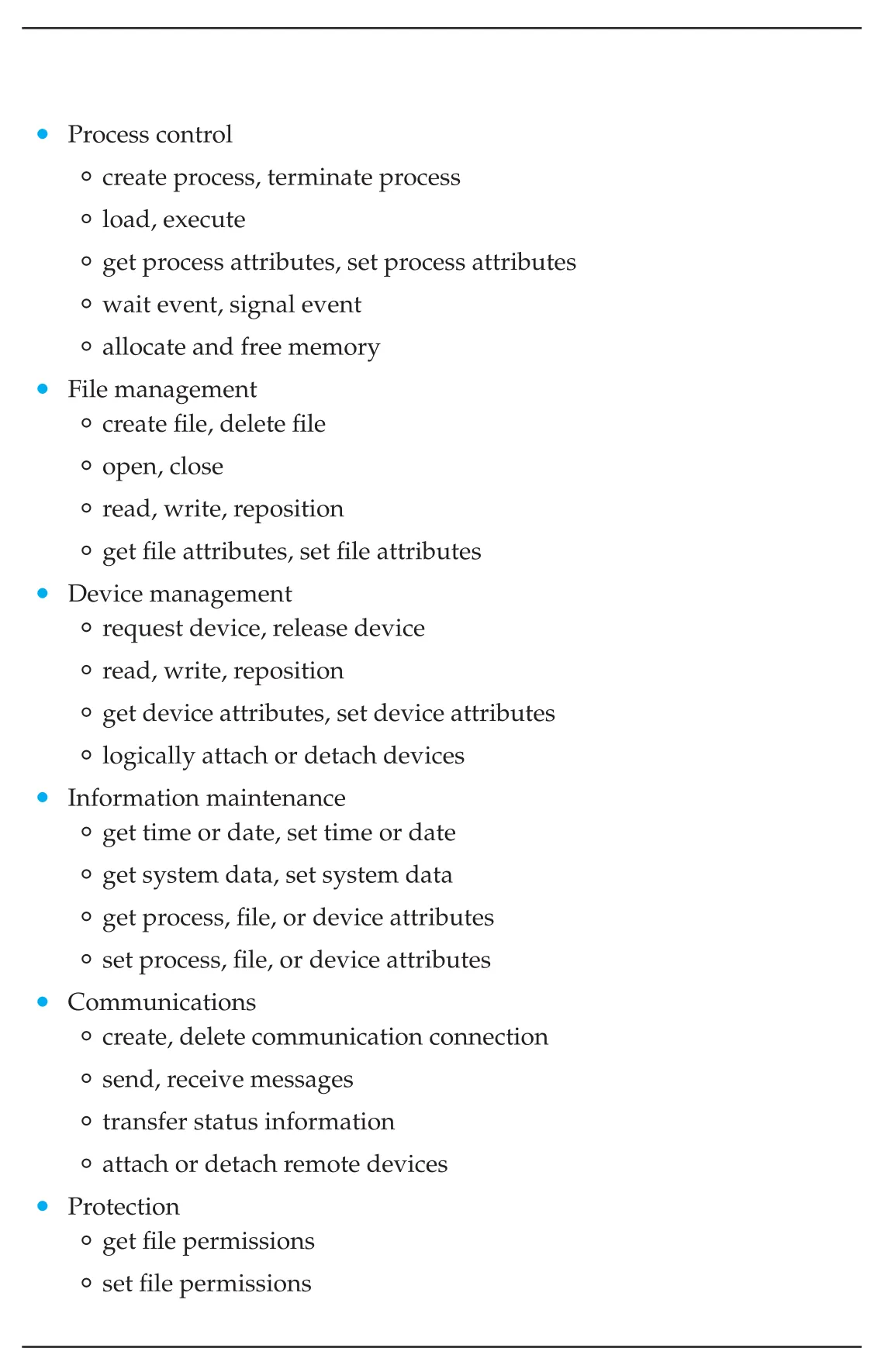
Figure 2.8 · PDF p. 97 · operating system이 일반적으로 제공하는 system call types
| 범주 | 대표 기능 | 뒤 장과 연결 |
|---|---|---|
| process control | create/terminate process, load, execute, wait/signal event, allocate/free memory | Chapter 3 processes, Chapter 5 scheduling, Chapter 6 synchronization |
| file management | create/delete/open/close/read/write/reposition files, get/set file attributes | Chapter 13-15 file systems |
| device management | request/release device, read/write/reposition, attach/detach devices | Chapter 12 I/O systems |
| information maintenance | get/set time, system data, process/file/device attributes | debugging, monitoring, accounting |
| communications | create/delete connection, send/receive messages, attach/detach remote devices | Chapter 3 IPC, Chapter 19 distributed systems |
| protection | get/set permissions | Chapter 16 security, Chapter 17 protection |
Process control system calls는 running program의 normal termination과 abnormal termination을 처리한다. Error trap이 발생하면 memory dump를 disk의 log file에 저장하고 debugger가 이를 분석할 수 있다. 종료 후 control은 command interpreter로 돌아간다. Interactive system에서는 shell이 다음 command를 기다리고, GUI system에서는 pop-up window가 error를 알릴 수 있다. Error level 또는 status code는 다음 action을 자동 결정하는 데 쓰일 수 있다.
Process control의 또 다른 핵심은 load()와 execute()다. 한 program이 다른 program을 load/execute할 때 기존 program으로 돌아갈지, 기존 memory image를 저장할지, 새 process로 concurrent execution할지가 설계 문제가 된다. UNIX/FreeBSD 계열에서는 shell이 fork()로 새 process를 만들고 exec()로 선택한 program을 load/execute한다.
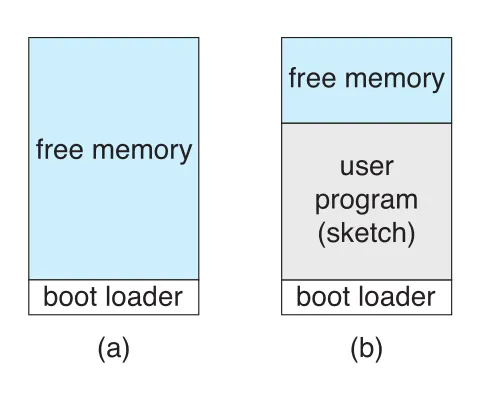
Figure 2.9 · PDF p. 100 · Arduino에서 boot loader가 하나의 sketch를 memory에 올리는 single-tasking 실행 구조
Arduino 예시는 운영체제가 없는 single-tasking system을 보여준다. Boot loader가 sketch를 flash memory에서 특정 memory region에 올리고, 한 번에 하나의 sketch만 존재한다. 새 sketch를 load하면 기존 sketch가 대체된다. 이 구조는 OS가 제공하는 process abstraction, multitasking, user interface가 얼마나 큰 역할을 하는지 반대로 드러낸다.
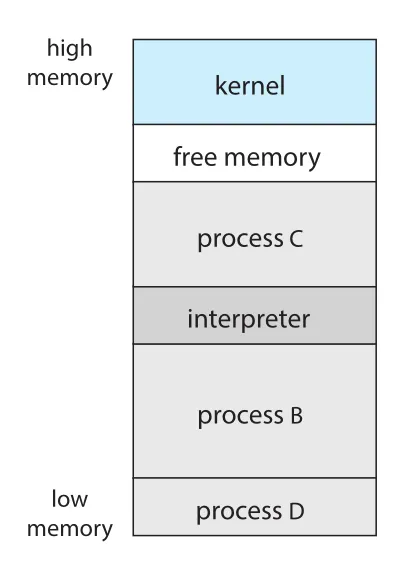
Figure 2.10 · PDF p. 101 · FreeBSD에서 shell과 여러 process가 memory에 함께 존재하는 multitasking 구조
FreeBSD 예시는 multitasking system이다. User가 login하면 shell이 실행되고, shell은 command를 받아 fork()로 process를 만들고 exec()로 program을 실행한다. Foreground process라면 shell이 process 종료를 기다리고, background process라면 shell은 즉시 다음 command를 기다린다. Background process는 keyboard input을 직접 받을 수 없으므로 files나 GUI 등을 통해 I/O를 수행한다. Process가 끝나면 exit() system call로 status code를 반환한다.
File management system calls는 files와 directories의 create, delete, open, close, read, write, reposition, get/set attributes를 제공한다. File attributes에는 file name, file type, protection codes, accounting information 등이 포함된다. 어떤 OS는 move/copy를 system call로 제공하고, 어떤 OS는 API library나 system program이 여러 system calls를 조합해 제공한다.
Device management는 physical devices와 abstract/virtual devices를 다룬다. Multiuser system에서는 device를 exclusive use하기 위해 request()와 release()가 필요할 수 있다. Unmanaged access를 허용하면 device contention이나 deadlock 위험이 생긴다. UNIX처럼 files와 devices를 combined file-device structure로 합치면 같은 read(), write() 계열 호출로 files와 devices를 다룰 수 있다.
Information maintenance system calls는 time/date, OS version, free memory/disk space, process/file/device attributes 같은 정보를 user program과 OS 사이에 전달한다. Debugging을 위한 dump() memory, Linux strace, CPU single step mode, time profile도 이 범주와 연결된다. Time profile은 tracing facility나 regular timer interrupts로 program counter를 주기적으로 기록해 program이 어느 위치에서 시간을 쓰는지 통계적으로 보여준다.
Communication system calls는 message-passing model과 shared-memory model을 지원한다.
| 모델 | 방식 | 장점 | 주의점 |
|---|---|---|---|
| message passing | processes가 direct/indirect mailbox를 통해 messages 교환 | small data 교환에 편하고 protection conflict가 적음, intercomputer communication 구현이 쉬움 | message copy/format overhead |
| shared memory | processes가 shared memory region을 create/attach하고 직접 read/write | 같은 computer 안에서는 memory speed로 빠름 | protection restriction을 의도적으로 완화하므로 synchronization 필요 |
Shared memory는 원래 OS가 막아야 할 “다른 process memory 접근”을 두 process가 합의해 허용하는 구조다. 따라서 data format은 processes가 정하고, 동시에 같은 location에 write하지 않도록 synchronization을 책임져야 한다. 이 문제는 Chapter 6의 synchronization, Chapter 4의 threads로 이어진다.
Protection system calls는 set permission(), get permission(), allow user(), deny user()처럼 resources 접근 권한을 설정하고 확인한다. 예전에는 multiprogrammed multiuser systems에서 특히 중요했지만, networking과 Internet 이후에는 servers부터 mobile devices까지 모든 시스템의 기본 문제가 되었다.
2.4 System Services
System services 또는 system utilities는 program development와 execution을 편리하게 만드는 프로그램 모음이다. 일부는 system calls의 user interface에 가깝고, 일부는 훨씬 복잡한 기능을 제공한다.
| System service 범주 | 예와 의미 |
|---|---|
| file management | files/directories create, delete, copy, rename, print, list, manipulate |
| status information | date/time, available memory/disk, number of users, performance/logging/debugging information |
| file modification | text editors, file content search, text transformation |
| programming-language support | compilers, assemblers, debuggers, interpreters for C, C++, Java, Python 등 |
| program loading and execution | absolute loaders, relocatable loaders, linkage editors, overlay loaders, debugging systems |
| communications | messages, web browsing, e-mail, remote login, file transfer |
| background services | boot time에 시작되어 계속 실행되는 services/subsystems/daemons |
Daemons는 system halt 전까지 계속 실행되는 system-program processes다. Network daemon은 incoming network connections를 기다리고 적절한 process와 연결한다. 그 밖에 process scheduler, system error monitoring service, print server 등이 있다. 어떤 운영체제는 kernel context가 아니라 user context에서 중요한 활동을 수행하기 위해 daemons를 사용한다.
사용자가 보는 운영체제 모습은 actual system calls보다 application programs와 system programs에 의해 정의된다. 같은 physical hardware 위에서도 macOS GUI, UNIX shell, Windows GUI처럼 전혀 다른 interface와 application set이 가능하다. 따라서 “사용자 경험으로서의 OS”와 “system calls와 kernel services로서의 OS”는 구분해서 이해해야 한다.
2.5 Linkers and Loaders
Program은 보통 disk에 binary executable file 형태로 존재한다. 예를 들어 UNIX 계열의 a.out, Windows의 prog.exe처럼 저장되어 있다. CPU에서 실행되려면 이 executable file이 memory로 올라가 process의 address space 안에 배치되어야 한다.
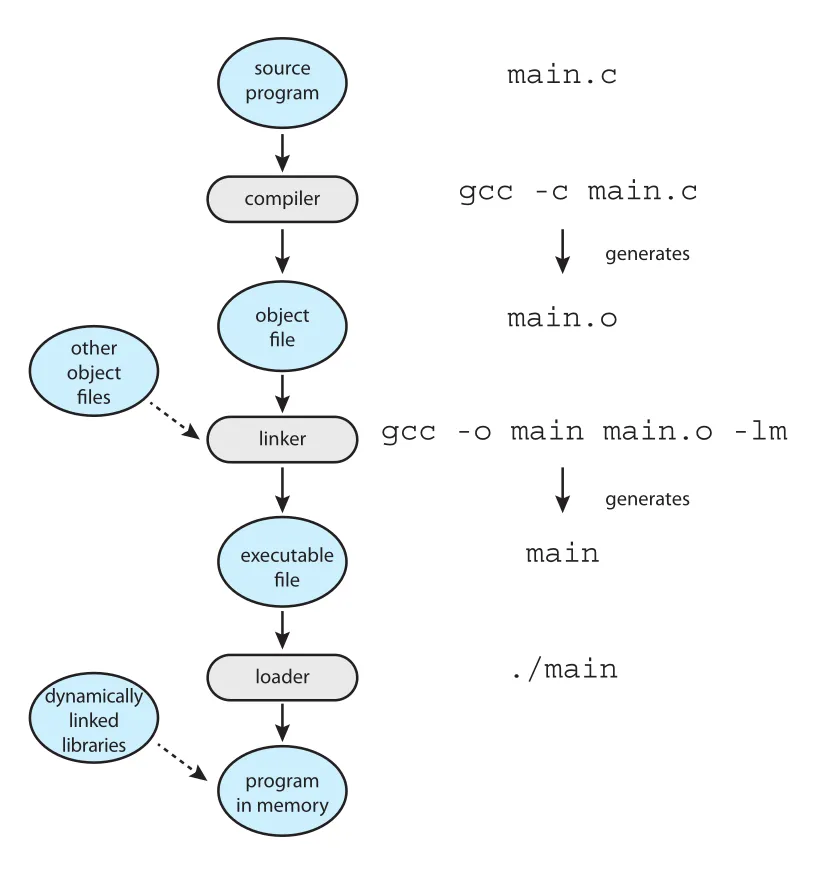
Figure 2.11 · PDF p. 106 · source program이 compile, link, load를 거쳐 memory의 program이 되는 흐름
실행 파일이 만들어지고 실행되는 흐름은 다음과 같다.
- Source file이 compiler에 의해 relocatable object file로 변환된다. 예:
gcc -c main.c→main.o - Linker가 여러 relocatable object files와 libraries를 결합해 하나의 binary executable file을 만든다. 예:
gcc -o main main.o -lm - Loader가 executable file을 memory에 load해 CPU core에서 실행 가능한 상태로 만든다. 예:
./main
Relocation은 program parts에 final addresses를 부여하고, code와 data가 그 addresses에 맞게 조정되도록 하는 작업이다. 그래야 code가 library functions를 호출하고 variables에 접근할 수 있다.
UNIX command line에서 ./main을 실행하면 shell은 먼저 fork() system call로 새 process를 만들고, exec() system call로 loader를 호출해 executable file name을 전달한다. Loader는 새 process의 address space에 program을 load한다. GUI에서 icon을 double-click하는 경우도 내부적으로 비슷한 mechanism으로 loader가 호출된다.
Dynamic linking은 program load 시점 또는 run time에 필요한 library를 조건부로 연결하고 load하는 방식이다. Windows의 dynamically linked libraries(DLLs)가 대표 예다. 이 방식의 장점은 실제로 쓰이지 않을 library를 executable file에 미리 link/load하지 않아도 된다는 것이다. 또한 Chapter 9에서 다루듯 여러 processes가 dynamically linked libraries를 공유하면 memory 사용량을 크게 줄일 수 있다.
Executable/object file은 표준 format을 가진다. UNIX/Linux의 ELF(Executable and Linkable Format)는 compiled machine code와 functions/variables metadata를 담은 symbol table을 포함한다. ELF executable file에는 program entry point, 즉 program이 실행될 때 첫 instruction의 address도 들어 있다. Windows는 Portable Executable(PE), macOS는 Mach-O format을 사용한다.
2.6 Why Applications Are Operating-System Specific
기본적으로 한 operating system에서 compile된 application은 다른 operating system에서 그대로 실행되지 않는다. 이유는 단순히 “OS 이름이 달라서”가 아니라, application이 OS와 CPU의 여러 계약에 의존하기 때문이다.
Cross-platform application을 만드는 대표 방법은 세 가지다.
| 방식 | 원리 | 장점 | 한계 |
|---|---|---|---|
| interpreted language | Python, Ruby처럼 여러 OS에 interpreter를 제공하고 source를 interpreter가 실행 | source portability가 높음 | native application보다 느릴 수 있고 OS feature subset에 묶임 |
| language virtual machine | Java처럼 RTE가 loader, byte-code verifier, virtual machine을 제공 | RTE가 있는 곳에서는 같은 bytecode 실행 가능 | interpreter와 비슷한 overhead/feature limitation 가능 |
| standard language/API 후 porting | POSIX API처럼 source-code compatibility를 유지하고 OS별 binary를 compile | native 성능과 OS feature 활용 가능 | OS/architecture별 porting, testing, debugging 필요 |
Application mobility가 어려운 구체적 이유는 다음과 같다.
- 각 OS는 executable file의 header, instructions, variables layout을 규정하는 binary format을 가진다.
- CPU마다 instruction set이 다르며, application은 해당 CPU가 이해하는 instructions를 포함해야 한다.
- System calls는 OS마다 operands, operand ordering, invocation method, numbering, meanings, return conventions가 다르다.
- GUI libraries나 platform APIs도 다르다. 예를 들어 iOS API에 맞춘 application은 Android가 같은 API를 제공하지 않으면 그대로 실행되지 않는다.
API와 ABI는 구분해야 한다.
| 구분 | 수준 | 정의하는 것 | 예 |
|---|---|---|---|
| API(application programming interface) | source/application level | functions, parameters, return values | POSIX API, Windows API, Java API |
| ABI(application binary interface) | binary/architecture level | address width, system call parameter passing, run-time stack organization, system library binary format, data type sizes 등 | ARMv8 ABI |
ABI는 “이미 compile/link된 binary code components가 특정 OS와 architecture에서 어떻게 맞물리는가”를 정의한다. 특정 ABI에 맞게 compile/link된 binary executable file은 그 ABI를 지원하는 systems에서 실행될 수 있다. 그러나 ABI는 보통 특정 OS와 특정 architecture 조합에 대해 정의되므로, cross-platform compatibility를 완전히 해결하지 못한다.
결국 interpreter, RTE, 또는 binary executable file이 특정 operating system과 CPU type에 맞게 준비되지 않으면 application은 실행되지 않는다. Firefox 같은 browser가 Windows, macOS, 여러 Linux distributions, iOS, Android, x86, ARMv8에서 동작하려면 각 platform에 맞춘 build, porting, testing, debugging이 필요하다.
2.7 Operating-System Design and Implementation
Design Goals
Operating system design의 첫 문제는 goals와 specifications를 정하는 것이다. Hardware 선택과 system type, 즉 desktop/laptop, mobile, distributed, real-time 여부가 최상위 설계 방향을 바꾼다.
Requirements는 크게 user goals와 system goals로 나눌 수 있다.
- User goals: convenient, easy to learn/use, reliable, safe, fast.
- System goals: easy to design/implement/maintain, flexible, reliable, error free, efficient.
문제는 이런 목표가 모두 중요하지만 구체적 설계 기준으로는 모호하다는 점이다. 예를 들어 embedded real-time OS인 Wind River VxWorks와 enterprise multiaccess OS인 Windows Server는 둘 다 reliable하고 efficient해야 하지만, 실제 우선순위와 설계 선택은 매우 다르다. 따라서 operating-system design은 정답 하나가 있는 문제가 아니라, environment와 goal에 맞는 trade-off 선택이다.
Mechanisms and Policies
운영체제 설계에서 중요한 원칙은 mechanism과 policy의 분리다.
- Mechanism: 어떻게 할 것인가(how)를 결정하는 구현 장치.
- Policy: 무엇을 할 것인가(what)를 결정하는 선택 기준.
예를 들어 timer는 CPU protection을 가능하게 하는 mechanism이다. 하지만 특정 user나 process에게 timer interval을 얼마나 줄지는 policy다. Mechanism과 policy를 분리하면 flexibility가 높아진다. Policy는 장소와 시간에 따라 바뀔 가능성이 크므로, policy가 바뀔 때마다 underlying mechanism을 고쳐야 한다면 시스템이 경직된다.
CPU scheduling에서도 같은 구분이 중요하다. “Priority를 반영할 수 있는 scheduling mechanism”은 공통으로 두되, “I/O-intensive programs를 CPU-intensive programs보다 우선할 것인가, 반대로 할 것인가”는 policy로 바꿀 수 있다.
Microkernel-based operating systems는 이 분리를 극단적으로 밀어붙여 policy가 거의 없는 primitive building blocks를 제공하고, 더 고급 mechanisms와 policies를 user-created kernel modules나 user programs로 추가하게 한다. 반대로 Windows, macOS, iOS 같은 상업 OS는 global look and feel과 application interface 일관성을 위해 mechanism과 policy를 kernel/system libraries에 더 강하게 결합하는 경향이 있다. Linux는 standard kernel scheduler가 특정 policy를 구현하지만, open-source이므로 scheduler를 수정하거나 교체할 수 있다는 점에서 다른 flexibility를 제공한다.
Implementation
초기 operating systems는 assembly language로 작성되었지만, 현대 OS는 대부분 C 또는 C++ 같은 higher-level languages로 구현하고, lowest-level kernel 부분에만 일부 assembly language를 사용한다. Android는 kernel을 주로 C와 일부 assembly로, system libraries를 C/C++로, application frameworks를 Java 중심으로 구성하는 좋은 예다.
Higher-level language로 OS를 구현하는 장점은 다음과 같다.
- Code를 더 빠르게 작성할 수 있다.
- Code가 더 compact하고 이해/디버깅하기 쉽다.
- Compiler 기술 향상만으로 generated code 품질이 좋아질 수 있다.
- 다른 hardware로 port하기 쉽다.
단점으로는 reduced speed와 increased storage requirements가 있을 수 있지만, 현대 시스템에서는 결정적 문제가 아닌 경우가 많다. 큰 OS에서 성능은 전체를 assembly로 쓰는 것보다 data structures와 algorithms를 잘 선택하는 데 더 크게 좌우된다. 실제로 고성능이 중요한 부분은 interrupt handlers, I/O manager, memory manager, CPU scheduler처럼 상대적으로 일부다. 시스템이 correct하게 동작한 뒤 bottlenecks를 찾아 refactoring하는 방식이 현실적이다.
2.8 Operating-System Structure
현대 operating system은 너무 크고 복잡해서 하나의 덩어리로 다루기 어렵다. 그래서 task를 well-defined interfaces와 functions를 가진 components 또는 modules로 나누어 설계한다. 프로그램을 main() 하나에 모두 쓰지 않고 여러 functions로 나누는 것과 같은 원리다.
Monolithic Structure
Monolithic structure는 kernel의 모든 기능을 하나의 static binary file에 넣고, single address space의 kernel mode에서 실행하는 구조다. Original UNIX는 kernel과 system programs로 크게 나뉘고, kernel 내부에는 system-call interface 아래 file system, CPU scheduling, memory management, device drivers 등이 들어 있다.
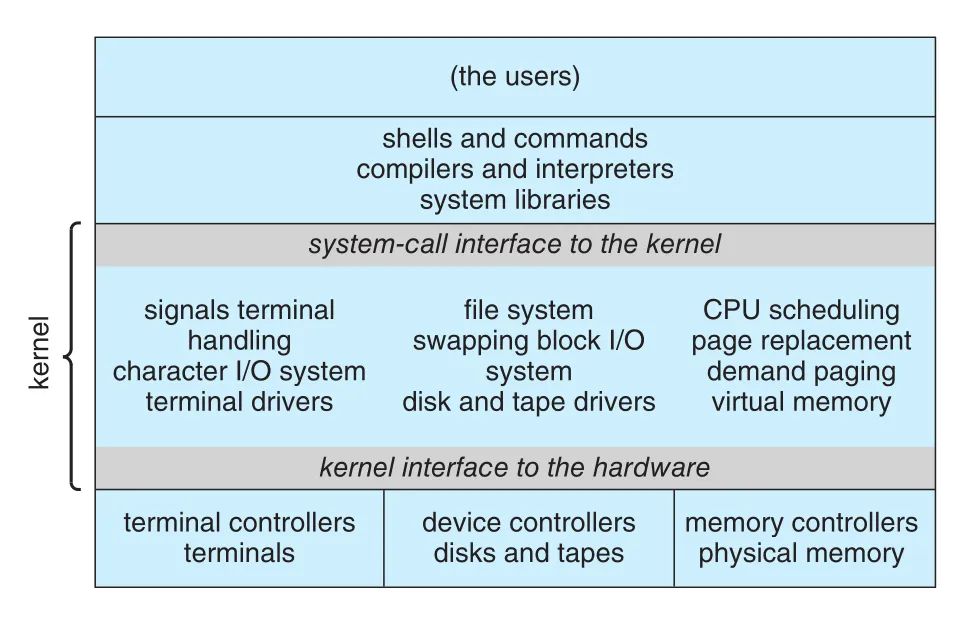
Figure 2.12 · PDF p. 112 · system-call interface 아래 대부분의 OS 기능이 kernel에 들어 있는 traditional UNIX system structure
Linux도 UNIX 기반으로 유사하게 구성된다. Applications는 보통 glibc standard C library를 통해 kernel의 system-call interface와 통신한다.
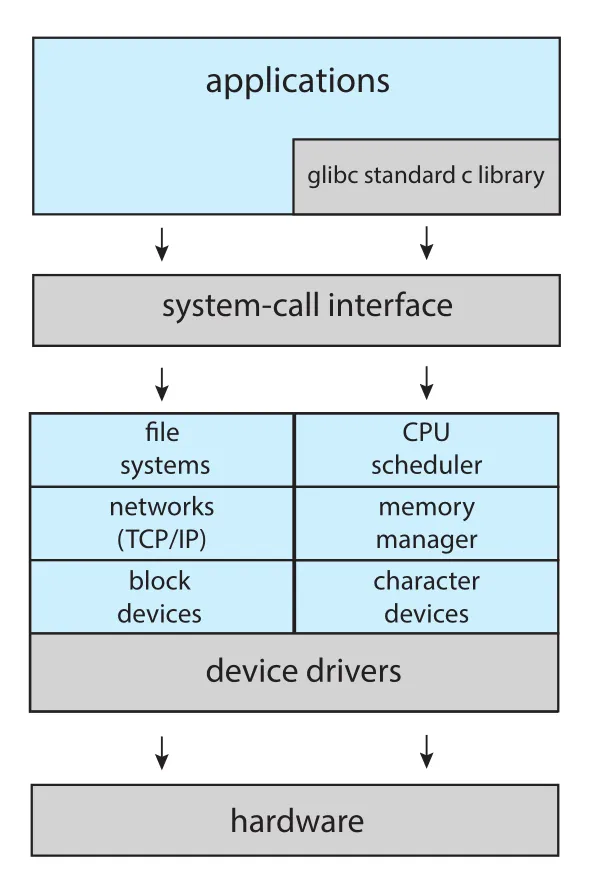
Figure 2.13 · PDF p. 113 · applications, glibc, system-call interface, Linux kernel subsystems, device drivers, hardware의 구조
Monolithic kernel의 장점은 performance다. System-call interface overhead가 작고 kernel 내부 communication이 빠르다. 단점은 implementation과 extension이 어렵다는 점이다. 하나의 address space에 많은 기능이 들어 있으므로 변경 영향 범위가 커질 수 있다. UNIX, Linux, Windows에 monolithic 흔적이 여전히 남아 있는 이유는 이 performance advantage가 크기 때문이다.
Layered Approach
Monolithic approach는 tightly coupled system이다. 한 부분의 변화가 다른 부분에 넓게 영향을 줄 수 있다. 반대로 loosely coupled system은 kernel을 작고 제한된 기능의 components로 나눈다.
Layered approach는 OS를 여러 layers로 나누는 방식이다. Layer 0은 hardware, 가장 높은 layer N은 user interface다. 각 layer는 data structures와 functions를 가진 abstract object처럼 동작하고, higher-level layers는 lower-level layers가 제공하는 operations만 사용한다.
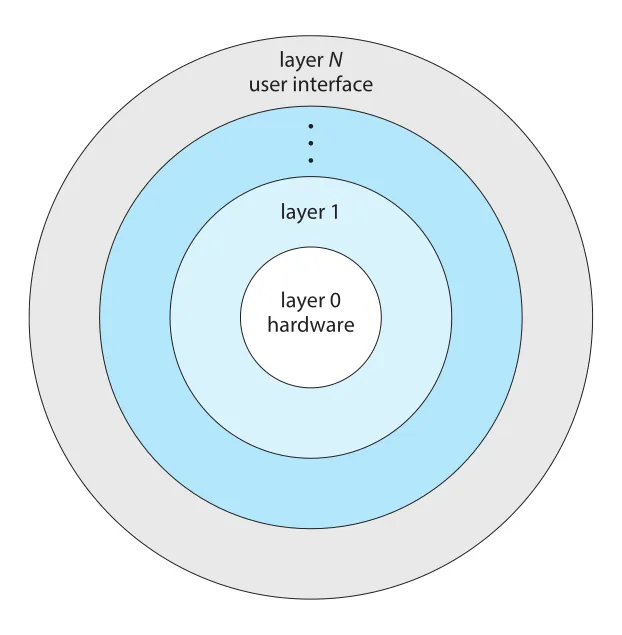
Figure 2.14 · PDF p. 114 · hardware에서 user interface까지 계층화된 layered operating system
Layered approach의 장점은 construction과 debugging이 단순해진다는 것이다. Layer 1은 hardware만 사용하므로 다른 layers를 신경 쓰지 않고 debug할 수 있고, Layer 1이 correct하다고 가정한 뒤 Layer 2를 debug하는 식으로 올라갈 수 있다. Error가 특정 layer에서 발견되면 아래 layers는 이미 debug되었으므로 문제 범위를 좁힐 수 있다.
단점은 layer functionality를 적절히 나누기 어렵고, user program이 OS service를 얻기 위해 여러 layers를 거치면서 overhead가 생긴다는 점이다. 그래서 pure layered OS는 드물고, 현대 OS는 일부 layering만 적용해 modularized code의 장점을 얻으면서 layer interaction 비용은 줄이는 방향을 택한다.
Microkernels
Microkernel approach는 kernel에서 nonessential components를 제거하고, 가능한 많은 services를 user-level programs로 옮기는 방식이다. Kernel은 작아지고, 일반적으로 minimal process management, memory management, communication facility 정도만 제공한다.
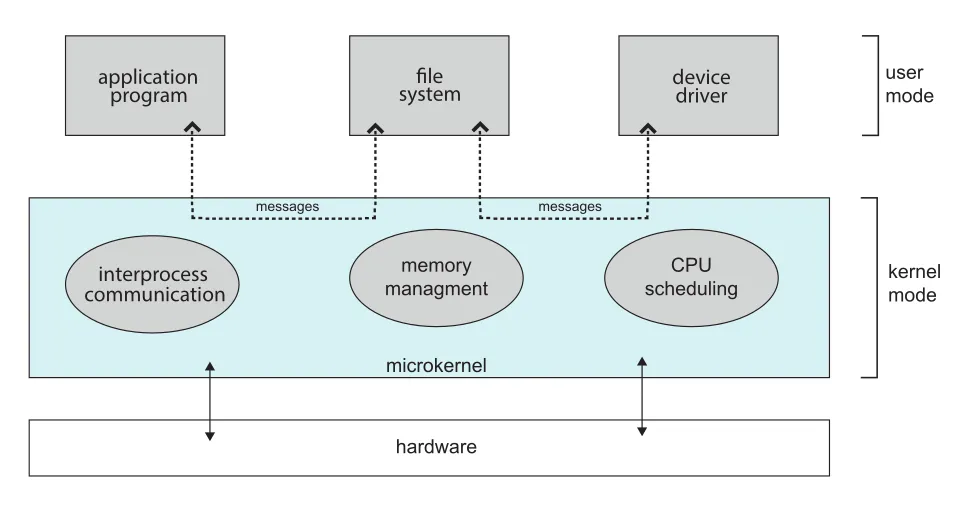
Figure 2.15 · PDF p. 115 · application, file system, device driver가 user space service로 존재하고 microkernel이 IPC를 중재하는 구조
Microkernel의 핵심 기능은 client program과 user space services 사이의 communication이다. 예를 들어 client program이 file access를 원하면 file server와 직접 상호작용하지 않고, microkernel을 통한 message passing으로 간접 통신한다.
Microkernel의 장점은 다음과 같다.
- Extension이 쉽다. 새 service를 user space에 추가하면 kernel modification이 줄어든다.
- Kernel이 작아 porting이 쉽다.
- 대부분 service가 user process로 실행되므로 security와 reliability가 좋아진다.
- 하나의 service가 실패해도 kernel 전체나 다른 services가 덜 영향을 받는다.
단점은 performance overhead다. User-level services 사이 communication은 messages를 separate address spaces 사이에 copy해야 하고, process switching이 필요할 수 있다. 이 message copying과 context switching 비용이 microkernel-based OS 확산의 큰 장애였다. Windows NT 초기 layered microkernel 구조가 Windows 95보다 느렸고, 이후 Windows NT 4.0과 Windows XP로 가며 더 monolithic하게 변한 사례가 이 trade-off를 보여준다.
Modules
Loadable kernel modules(LKMs)는 현대 OS 설계에서 매우 실용적인 방식이다. Kernel은 core components를 가지고, 추가 services는 boot time 또는 run time에 modules로 link한다. Linux, macOS, Solaris, Windows가 이런 방식을 사용한다.
Modules 방식의 핵심은 core services는 kernel에 두고, device drivers나 file systems 같은 기능은 dynamic하게 추가하는 것이다. 새 기능을 kernel에 직접 넣으면 변경마다 kernel recompilation이 필요하지만, module로 만들면 실행 중에도 load/unload가 가능하다.
Modules는 layered system과 microkernel의 장점을 일부 결합한다.
| 비교 대상 | modules와의 관계 |
|---|---|
| layered system | 각 kernel section이 defined/protected interfaces를 갖는다는 점은 비슷하지만, module이 다른 module을 직접 call할 수 있어 더 flexible |
| microkernel | primary module이 core functions와 load/communication 지식을 갖는다는 점은 비슷하지만, message passing 없이 kernel address space에서 통신하므로 더 efficient |
| monolithic kernel | single kernel address space 성능을 유지하면서 run-time extensibility를 얻음 |
Linux LKMs는 주로 device drivers와 file systems 지원에 쓰인다. USB device가 실행 중인 system에 연결되었는데 필요한 driver가 kernel에 없다면 dynamically loaded될 수 있다. 필요 없어지면 run time에 kernel에서 제거할 수도 있다.
Hybrid Systems
실제 운영체제는 한 가지 구조만 엄격하게 따르지 않는다. Performance, security, usability를 동시에 만족시키기 위해 여러 구조를 섞은 hybrid systems가 많다. Linux는 single address space 성능 때문에 monolithic이지만, new functionality를 dynamically add할 수 있어 modular하다. Windows도 performance 때문에 largely monolithic이지만, user-mode subsystems와 dynamically loadable kernel modules를 지원한다.
macOS and iOS
macOS는 desktop/laptop용, iOS는 iPhone/iPad용 mobile OS지만, architecture는 공통점이 많다.
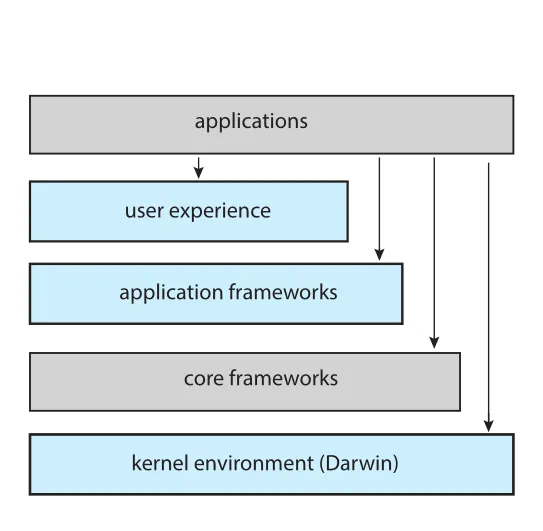
Figure 2.16 · PDF p. 117 · applications, user experience, application frameworks, core frameworks, Darwin kernel environment로 구성된 Apple OS architecture
Apple OS 계층은 다음처럼 볼 수 있다.
| 계층 | 역할 |
|---|---|
| user experience layer | macOS의 Aqua, iOS의 Springboard처럼 사용자가 장치와 상호작용하는 software interface |
| application frameworks layer | Cocoa/macOS, Cocoa Touch/iOS가 Objective-C와 Swift API 제공 |
| core frameworks | graphics, media, QuickTime, OpenGL 등 지원 |
| kernel environment(Darwin) | Mach microkernel과 BSD UNIX kernel을 포함 |
macOS와 iOS의 차이도 있다. 원문 기준으로 macOS는 desktop/laptop을 대상으로 Intel architectures에 맞춰 설명되고, iOS는 mobile devices와 ARM-based architectures를 대상으로 설명된다. iOS kernel은 power management와 aggressive memory management처럼 mobile needs에 맞게 수정되어 있고, security settings도 더 엄격하다. 또한 iOS는 macOS보다 developer 접근이 제한적이며 POSIX/BSD APIs 접근도 더 제한된다.
Darwin은 Mach microkernel과 BSD UNIX kernel을 주축으로 하는 layered hybrid structure다.
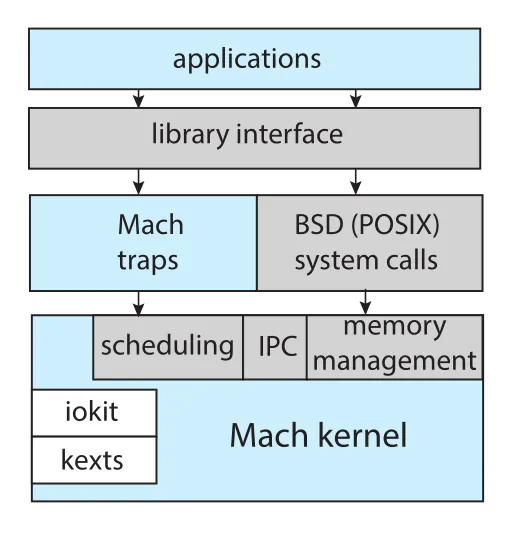
Figure 2.17 · PDF p. 118 · Mach traps와 BSD(POSIX) system calls를 함께 제공하는 Darwin 구조
Darwin은 일반 UNIX/Linux처럼 단일 system-call interface만 제공하지 않고, Mach system calls(traps)와 BSD system calls(POSIX functionality)를 함께 제공한다. Mach는 memory management, CPU scheduling, IPC(message passing, RPCs) 같은 기본 services를 제공하고, tasks, threads, memory objects, ports 같은 kernel abstractions를 사용한다. 예를 들어 application이 BSD POSIX fork()를 호출해 process를 만들면, Mach는 kernel 내부에서 task abstraction으로 이를 표현한다.
Darwin은 순수 microkernel이 아니다. Microkernel의 message passing overhead를 줄이기 위해 Mach, BSD, I/O kit, kernel extensions(kexts)을 single address space에 결합한다. Message passing은 여전히 있지만 같은 address space에 있으므로 copy 비용을 줄인다. 이 선택이 hybrid design의 본질이다.
Android
Android는 Open Handset Alliance와 Google 중심으로 개발된 mobile OS다. iOS가 Apple mobile devices 중심의 closed-source OS인 반면, Android는 다양한 mobile platforms에서 동작하며 open-sourced라는 점이 다르다.
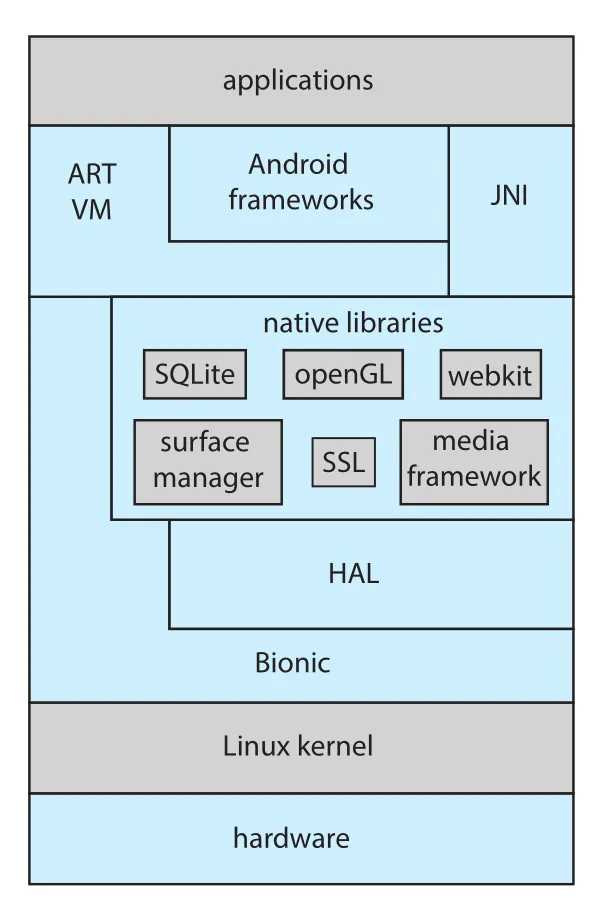
Figure 2.18 · PDF p. 120 · ART VM, Android frameworks, native libraries, HAL, Bionic, Linux kernel로 구성된 Android architecture
Android application은 보통 Java로 작성되지만 표준 Java API가 아니라 Android API를 사용한다. Java source는 bytecode .class file로 compile된 뒤 Android 실행 파일 형식인 .dex file로 변환된다. Android RunTime(ART)은 mobile devices의 limited memory와 CPU processing capabilities에 맞춘 virtual machine이다.
일반 JVM이 just-in-time(JIT) compilation을 많이 사용하는 것과 달리, ART는 ahead-of-time(AOT) compilation을 수행한다. .dex files는 device에 install될 때 native machine code로 compile되어 실행된다. AOT compilation은 application execution 효율과 power consumption 감소에 유리하므로 mobile systems에서 중요하다.
Android의 주요 계층은 다음과 같다.
| 계층/구성 | 의미 |
|---|---|
| Android frameworks | graphics, audio, hardware features를 app 개발자가 사용할 수 있게 제공 |
| JNI(Java native interface) | Java program이 VM을 우회해 특정 hardware features에 접근 가능하게 함. 단, portability가 떨어짐 |
| native libraries | WebKit, SQLite, SSL 등 browser, database, secure networking 지원 |
| HAL(hardware abstraction layer) | camera, GPS, sensors 등 hardware를 추상화해 app에 consistent view 제공 |
| Bionic | Android용 standard C library. glibc보다 memory footprint가 작고 mobile CPUs에 맞게 설계됨 |
| Linux kernel | power management, memory management/allocation, Binder IPC 등 mobile needs에 맞게 수정된 기반 kernel |
Binder는 Android가 추가한 IPC mechanism이며 Chapter 3에서 더 자세히 다룬다. Android 구조에서 핵심은 “다양한 hardware 위에서 app portability를 확보하기 위해 HAL과 framework 계층을 두고, mobile 제약을 위해 ART/Bionic/Linux kernel modifications를 결합한다”는 점이다.
Windows Subsystem for Linux
Windows Subsystem for Linux(WSL)는 hybrid architecture가 application compatibility를 어떻게 다루는지 보여준다. Windows 10은 native Linux applications, 즉 ELF binaries를 Windows 위에서 실행할 수 있게 한다. 사용자가 bash.exe를 실행하면 Linux instance가 만들어지고, init process가 /bin/bash를 실행한다. 이 processes는 Windows Pico process 안에서 동작한다.
Pico process는 Linux binary를 자기 address space에 load하고, Linux system calls를 LXSS/LXCore kernel services에 전달한다. Linux system call과 Windows system call이 일대일로 대응하면 Windows kernel call로 직접 forward되고, 비슷하지만 완전히 같지 않으면 LXSS가 일부 기능을 보완한 뒤 Windows call을 사용한다. 예를 들어 Linux fork()는 Windows CreateProcess()와 비슷하지만 같지 않으므로 LXSS가 차이를 메운다.
2.9 Building and Booting an Operating System
Operating system은 특정 machine configuration 하나만을 위해 만들 수도 있지만, 보통은 다양한 peripheral configurations를 가진 machine class에서 동작하도록 설계된다.
Operating-System Generation
Operating system을 source code에서 build하거나 새 system에 install하려면 일반적으로 다음 흐름을 거친다.
- Operating system source code를 작성하거나 얻는다.
- 실행될 system에 맞게 operating system을 configure한다.
- Operating system을 compile한다.
- Operating system을 install한다.
- Computer와 새 operating system을 boot한다.
Configuration은 어떤 features를 포함할지 정하는 단계다. 이 정보는 보통 configuration file에 저장된다. OS generation 방식은 tailoring 정도에 따라 달라진다.
| 방식 | 동작 | 장점 | 단점 |
|---|---|---|---|
| full system build | configuration file에 맞춰 source code를 수정/compile해 tailored OS 생성 | specific static hardware에 최적화 가능 | 느리고 변경 비용 큼 |
| precompiled object modules selection | library의 object modules 중 필요한 것만 link | build가 빠름 | 지나치게 general할 수 있고 hardware 변경 대응이 제한적 |
| completely modular system | compile/link time이 아니라 execution time에 module 선택 | hardware 변화에 유연 | module infrastructure 필요 |
Embedded systems는 특정 static hardware configuration을 위해 첫 번째 방식을 쓰는 경우가 많고, desktop/laptop/mobile OS는 loadable kernel modules 같은 기법으로 두 번째와 세 번째의 장점을 섞는다.
Linux kernel을 source에서 build하는 원문 흐름은 kernel.org에서 source를 받고, make menuconfig로 .config를 만들고, make로 kernel image인 vmlinuz를 만들고, make modules와 make modules install로 kernel modules를 준비한 뒤, make install로 새 kernel을 설치하는 방식이다. 명령 자체보다 중요한 점은 kernel image와 modules가 configuration parameters에 의해 결정된다는 것이다.
Virtual machine으로 Linux를 설치하는 방법은 host OS 위에서 guest OS를 실행한다는 점에서 Chapter 1의 virtualization과 연결된다. 직접 VM을 만들 수도 있고, 이미 build/configure된 virtual machine appliance를 내려받아 VirtualBox나 VMware에서 실행할 수도 있다.
System Boot
Booting은 kernel을 load해 computer를 시작하는 과정이다. 일반적인 boot process는 다음 순서로 진행된다.
- Bootstrap program 또는 boot loader가 kernel을 찾는다.
- Kernel이 memory에 load되고 시작된다.
- Kernel이 hardware를 initialize한다.
- Root file system이 mount된다.
BIOS 기반 시스템은 multistage boot process를 사용할 수 있다. 전원이 켜지면 firmware 안의 작은 boot loader가 실행되고, 이 boot loader가 disk의 고정 위치인 boot block에 있는 second boot loader를 load한다. Boot block code는 크기 제약 때문에 단순한 경우가 많고, 나머지 bootstrap program의 disk address와 length만 알고 있을 수 있다.
UEFI(Unified Extensible Firmware Interface)는 BIOS를 대체하는 더 현대적인 firmware interface다. 64-bit systems와 larger disks 지원이 좋고, single complete boot manager로 동작하므로 multistage BIOS boot보다 빠를 수 있다.
Bootstrap program은 kernel file을 memory에 load하는 것 외에도 diagnostics를 실행해 memory, CPU, devices 상태를 확인하고, CPU registers, device controllers, main memory contents를 initialize할 수 있다. Root file system이 mount되고 OS가 시작된 뒤에야 system이 running 상태라고 볼 수 있다.
Linux/UNIX의 GRUB은 open-source bootstrap program이다. GRUB configuration file은 boot parameters를 설정하며, boot time에 kernel parameters를 바꾸거나 여러 kernels 중 하나를 선택할 수 있다. Linux kernel image는 boot time과 공간 절약을 위해 compressed file로 저장되고, memory에 load된 뒤 extract된다.
Linux boot 과정에서 initramfs는 temporary RAM file system이다. 실제 root file system을 mount하기 전에 필요한 drivers와 kernel modules를 담고 있다. Kernel이 시작되고 필요한 drivers가 설치되면 root file system을 temporary RAM location에서 실제 root file system location으로 전환한다. 이후 Linux는 initial process인 systemd를 만들고 web server, database 같은 services를 시작한 뒤 login prompt를 보여준다.
Android boot는 전통적 PC와 다르다. Android kernel은 Linux 기반이지만 GRUB을 쓰지 않고 vendor-provided boot loader를 사용한다. Android도 compressed kernel image와 initial RAM file system을 쓰지만, Linux가 initramfs를 discard하는 것과 달리 Android는 initramfs를 device의 root file system으로 유지한다. Kernel과 root file system이 준비되면 Android는 init process와 여러 services를 시작하고 home screen을 표시한다.
Recovery mode 또는 single-user mode는 Windows, Linux, macOS, iOS, Android 등에서 hardware diagnosis, corrupt file system 수정, OS reinstall을 위해 제공된다.
2.10 Operating-System Debugging
Debugging은 hardware/software errors를 찾아 고치는 활동이다. Performance problems도 bugs로 간주할 수 있으므로 debugging에는 performance tuning, 즉 processing bottlenecks 제거도 포함된다.
Failure Analysis
User-level process가 실패하면 OS는 보통 error information을 log file에 기록한다. 또한 core dump, 즉 process memory capture를 file로 저장해 나중에 debugger로 분석할 수 있게 한다. Debugger는 failure 시점의 code와 memory를 탐색하게 해 준다.
Kernel failure는 crash라고 부른다. Kernel debugging은 user-level process debugging보다 어렵다. Kernel은 크고 복잡하며 hardware를 직접 제어하고, user-level debugging tools를 그대로 쓰기 어렵기 때문이다. Crash가 발생하면 error information은 log file에 저장되고, memory state는 crash dump로 저장된다.
특히 file-system kernel code가 실패한 경우, kernel이 자기 상태를 file system에 저장하려고 하면 위험하다. 그래서 common technique은 file system이 없는 reserved disk area에 kernel memory state를 먼저 저장하고, reboot 후 별도 process가 그 data를 모아 crash dump file로 file system에 기록하는 것이다.
Performance Monitoring and Tuning
Performance tuning은 bottleneck을 찾아 제거하는 일이고, 이를 위해 OS는 system behavior를 측정하고 표시할 수 있어야 한다. Monitoring tools는 per-process observations와 system-wide observations를 제공할 수 있으며, 구현 방식은 counters와 tracing으로 나뉜다.
Counters는 kernel이 유지하는 현재 통계값을 읽는다. Linux tools 예시는 다음과 같다.
| 범위 | 도구 | 의미 |
|---|---|---|
| per-process | ps | 단일 process 또는 processes 선택 정보 |
| per-process | top | current processes의 real-time statistics |
| system-wide | vmstat | memory-usage statistics |
| system-wide | netstat | network interfaces statistics |
| system-wide | iostat | disk I/O usage |
Linux의 많은 counter-based tools는 /proc file system에서 statistics를 읽는다. /proc은 disk에 실제 파일로 존재하는 것이 아니라 kernel memory에 존재하는 pseudo file system이다. /proc/<pid> 형식의 directory는 해당 process의 per-process statistics를 담고, kernel statistics용 entries도 존재한다.
Windows Task Manager는 current applications, processes, CPU/memory usage, networking statistics를 제공하는 대표 monitoring tool이다.
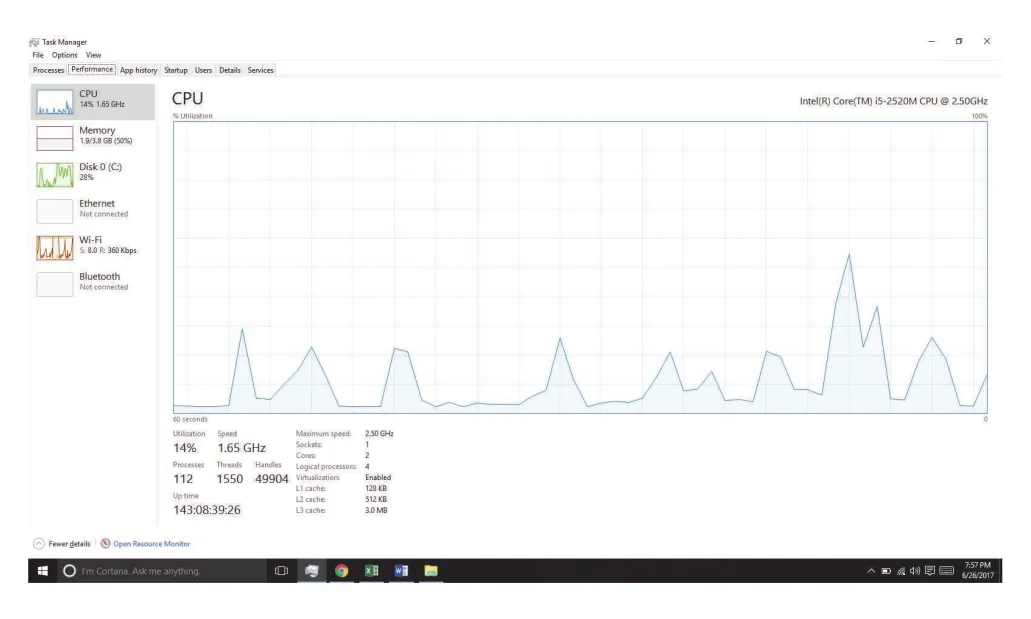
Figure 2.19 · PDF p. 127 · process와 resource usage를 보여주는 Windows 10 Task Manager
Tracing
Tracing tools는 counters처럼 현재 값만 묻는 것이 아니라, 특정 event의 실행 흐름을 수집한다. 예를 들어 system-call invocation의 단계, network packets, function calls, disk I/O latency를 event 기반으로 따라갈 수 있다.
| 범위 | 도구 | 의미 |
|---|---|---|
| per-process | strace | process가 호출하는 system calls 추적 |
| per-process | gdb | source-level debugger |
| system-wide | perf | Linux performance tools collection |
| system-wide | tcpdump | network packets 수집 |
Tracing은 시스템을 이해하고 debug하기 강력하지만, 운영체제와 사용자 코드의 상호작용을 모두 이해하는 toolset이 필요하다. 특히 production system에서는 reliability와 performance impact가 중요하다.
BCC and eBPF
BCC(BPF Compiler Collection)는 Linux systems를 위한 tracing toolkit이며, eBPF(extended Berkeley Packet Filter)의 front-end interface다. eBPF programs는 C subset으로 작성되어 eBPF instructions로 compile되고, running Linux system에 dynamic하게 삽입될 수 있다.
eBPF는 특정 event, 예를 들어 특정 system call 호출이나 disk I/O latency 같은 성능 정보를 capture할 수 있다. Kernel에 삽입되기 전에 verifier가 eBPF instructions를 검사해 system performance나 security를 해치지 않도록 확인한다.
BCC는 eBPF의 C interface를 직접 다루기 어렵다는 문제를 줄이기 위해 Python front-end를 제공한다. BCC tool은 Python으로 작성되고, 내부에 eBPF instrumentation과 연결되는 C code를 embed한다. 이 C program은 eBPF instructions로 compile되어 probes 또는 tracepoints를 통해 kernel events를 추적한다.
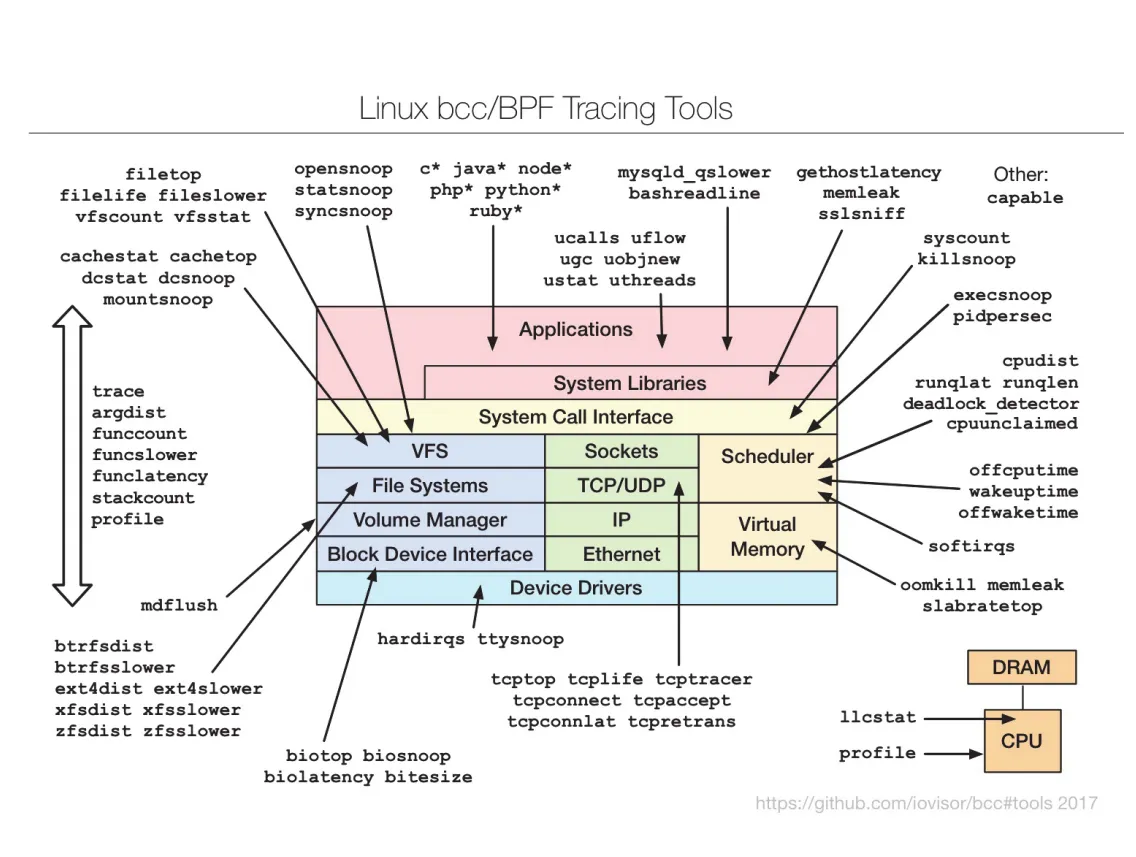
Figure 2.20 · PDF p. 129 · Linux kernel의 다양한 영역을 추적하는 BCC와 eBPF tracing tools
예를 들어 BCC disksnoop.py는 disk I/O activity를 추적해 timestamp, read/write 여부, bytes, latency(LAT)를 보여준다. opensnoop -p 1225는 process ID 1225가 수행하는 open() system calls만 추적한다. BCC의 강점은 live production systems에서 critical applications를 실행 중인 상태로도 비교적 안전하고 낮은 overhead로 bottlenecks나 security exploits를 관찰할 수 있다는 점이다.
연결 관계
| Chapter 2 개념 | 이어지는 주제 |
|---|---|
| system calls, API, RTE | Chapter 3 process creation, Chapter 12 I/O, Chapter 13 file-system interface |
| process control system calls | Chapter 3 fork(), exec(), wait(), process lifecycle |
| communication system calls | Chapter 3 IPC, Chapter 4 threads, Chapter 6 synchronization |
| protection system calls | Chapter 16 security, Chapter 17 protection |
| linker, loader, dynamic linking, ELF | Chapter 9 memory, address space, shared libraries |
| mechanism vs policy | Chapter 5 scheduling policy/mechanism, Chapter 10 memory replacement |
| monolithic/layered/microkernel/modules/hybrid | Chapter 20 Linux, Chapter 21 Windows case studies |
| boot loader, initramfs, systemd | Chapter 11 storage, file systems, OS startup internals |
| counters, tracing, BCC/eBPF | OS performance analysis, debugging, systems programming |
오해하기 쉬운 내용
- GUI가 곧 운영체제 구조는 아니다. GUI, CLI, touch-screen interface는 user/OS interface이고, kernel services와 system-call interface는 그 아래에서 동작한다.
- API와 system call은 같지 않다. API function은 library/RTE를 통해 하나 이상의 actual system calls를 호출할 수 있다.
- System call은 단순 함수 호출이 아니라 user mode에서 kernel mode로 넘어가는 보호된 interface다.
- System programs와 application programs는 사용자 입장에서는 다르게 보이지만, OS 입장에서는 둘 다 services를 요청하는 programs다.
- Dynamic linking은 실행 파일을 “불완전하게 만드는 것”이 아니라, 필요한 library를 load/run time에 연결해 memory와 load 비용을 줄이는 전략이다.
- POSIX API를 쓴다고 binary가 모든 UNIX-like OS와 CPU에서 그대로 실행되는 것은 아니다. Binary format, ABI, instruction set이 맞아야 한다.
- Monolithic kernel은 “나쁜 구조”가 아니라 성능상 강점이 있다. 다만 확장성과 유지보수에서 비용이 생긴다.
- Microkernel은 “무조건 더 안전하고 좋은 구조”가 아니다. Message passing과 context switching overhead가 큰 trade-off다.
- Modules는 microkernel과 다르다. Module은 kernel address space에서 동작해 효율이 높지만, 그만큼 잘못된 module이 kernel stability에 영향을 줄 수 있다.
- Booting은 kernel을 load하는 것만이 아니라 hardware initialization, root file system mount, initial process/services startup까지 포함한다.
- Counters와 tracing은 다르다. Counters는 현재 통계값을 읽고, tracing은 특정 events의 실행 흐름을 관찰한다.
면접 질문
- Operating-system services를 사용자 편의용과 시스템 운영용으로 나누어 설명하라.
- CLI shell이 command를 직접 구현하는 방식과 system program을 실행하는 방식의 차이는 무엇인가?
- 단순 file copy 프로그램이 어떤 system calls를 필요로 하는지 순서대로 설명하라.
- API, system-call interface, RTE, actual system call의 관계를 설명하라.
- System call parameters를 registers, memory block, stack으로 전달하는 방식의 trade-off를 설명하라.
- Process control system calls에서
fork(),exec(),exit(),wait()가 어떤 역할을 하는가? - Message passing과 shared memory IPC의 장단점을 비교하라.
- System services/system utilities는 system calls와 어떻게 다른가?
- Linker, loader, relocation, dynamic linking의 역할을 각각 설명하라.
- ELF, PE, Mach-O 같은 binary format이 application portability에 미치는 영향을 설명하라.
- API와 ABI의 차이를 설명하라.
- Mechanism과 policy를 timer 또는 CPU scheduling 예로 설명하라.
- Operating system을 higher-level language로 구현할 때의 장단점을 설명하라.
- Monolithic, layered, microkernel, modular kernel 구조의 핵심 trade-off를 비교하라.
- Darwin이 순수 microkernel이 아니라 hybrid structure인 이유를 설명하라.
- Android에서 ART, HAL, Bionic, Linux kernel modifications가 필요한 이유를 설명하라.
- WSL이 Linux system calls를 Windows 위에서 처리하는 방식을 설명하라.
- BIOS multistage boot와 UEFI boot manager의 차이를 설명하라.
- Linux boot 과정에서 GRUB,
vmlinuz, initramfs,systemd의 역할을 설명하라. - Core dump와 crash dump의 차이를 설명하라.
- Counter-based monitoring과 tracing의 차이를 예시 도구와 함께 설명하라.
- BCC/eBPF가 production system debugging에 유용한 이유를 설명하라.