Chapter 21. Windows 10
- 과목: Operating System
- 기준 교재: Operating System Concepts 10th
- 관련 페이지: PDF pp. 963-1038
- 우선순위: 보류
개요
Chapter 21은 Windows 10을 case study로 삼아 modern client operating system이 security, reliability, compatibility, performance, portability, extensibility, power management를 어떻게 동시에 만족시키려 하는지 보여 준다. Windows 10은 Microsoft의 NT code line에 기반한 preemptive multitasking client OS이며, Intel IA-32, AMD64, ARM, ARM64 ISA를 대상으로 설계되었다. Server counterpart인 Windows Server 2016은 같은 code base를 공유하지만 server workloads와 64-bit AMD64 중심으로 구성된다.
핵심 관점은 두 가지다. 첫째, Windows는 user-mode services와 kernel-mode executive를 나눈 layered architecture를 통해 기능 확장과 안정성을 확보한다. 둘째, 오랜 application ecosystem을 유지해야 하므로 새로운 security/performance mechanisms를 도입하면서도 legacy Win32 applications, 16-bit/32-bit compatibility, Linux binaries, virtual machines까지 끌어안는 compatibility architecture를 유지한다.
핵심 개념
| 개념 | 핵심 의미 |
|---|---|
Windows NT | Windows 10의 기반이 되는 Microsoft의 portable, preemptive, protected OS code line. |
Win32 API | NT의 native user-facing Windows programming interface로 자리 잡은 32-bit Windows API 계열. |
Windows-as-a-Service(WaaS) | Windows 10의 지속 업데이트 모델. Feature rollups, updates, telemetry, A/B testing을 통해 OS를 계속 조정한다. |
Windows Insider Program(WIP) | Upcoming Windows releases를 public preview로 배포해 feedback/telemetry를 얻는 release channel. |
UWP(Unified Windows Platform) | Desktop, IoT, Xbox, Phone, Mixed Reality 등 여러 Windows device families를 목표로 하는 application platform. |
Windows Desktop Bridge | Legacy Win32 applications를 Windows Store/package model로 가져오기 위한 compatibility/packaging mechanism. |
Pico Provider, LxCore, Windows Subsystem for Linux(WSL) | Non-Windows binaries의 system calls/faults 등을 provider driver가 처리해 Windows에서 Linux ELF binaries를 실행하게 하는 구조. |
Windows Terminal Services, fast user switching | Multiple GUI sessions 또는 remote sessions를 통해 multiuser access를 제공하는 mechanism. |
DWM(Desktop Window Manager), DirectX, Win32k, CoreUI | Windows GUI rendering path를 구성하는 user/kernel graphics components. |
integrity level, ACL, ABAC, CABC, DAC | Windows access control을 discretionary ACL에서 mandatory integrity와 attribute/claim-based control로 확장하는 security model. |
BitLocker | Secondary storage volume/removable storage encryption 기능. |
DEP, ASLR, CFG, ACG, CET | Exploit mitigation mechanisms. Data execution 차단, layout randomization, indirect branch validation, executable/writeable transition 차단, hardware control-flow protection을 담당한다. |
code integrity, Device Guard, Code Integrity Guard | Digital signature 기반으로 kernel/user binaries와 allowed code loading을 검증·제한하는 mechanisms. |
shim engine, SwitchBranch, WoW32, WoW64, WoWA64 | Older Windows applications와 다른 ISA binaries를 실행하기 위한 compatibility layers. |
SMP, SMT, processor group, logical processor | Windows scalability와 scheduling에서 processor를 표현하고 확장하는 개념. |
queued spinlock, pushlock, lock-free | Multiprocessor scalability를 위해 Windows가 사용한 synchronization optimizations. |
UMS(User-Mode Scheduling) | User-mode scheduler가 application tasks를 available CPUs에 배치하게 하는 scheduling mechanism. |
DirectCompute, GPU thread scheduler, GPU memory manager | GPU를 graphics뿐 아니라 general computation에 활용하도록 지원하는 Windows graphics/compute infrastructure. |
executive, HAL(Hardware Abstraction Layer), HAL Extensions | Windows kernel-mode services와 hardware/chipset dependency를 분리하는 핵심 layers. |
ALPC(Advanced Local Procedure Call), RPC, DCOM, WMI, WinRM | Local/remote process communication과 management extensibility를 제공하는 Windows infrastructure. |
NLS API, UNICODE, UTF-16LE, MUI | Internationalization/localization을 위한 Windows character and resource model. |
PLM(Process Lifetime Manager), DAM(Desktop Activity Moderator), Connected Standby | UWP/Modern application suspension, timer coalescing, low-power idle을 위한 energy-efficiency mechanisms. |
PnP(Plug and Play), dynamic device support | Device plug/unplug 시 driver discovery, install, load/unload를 자동화하는 Windows device-management model. |
VTL(Virtual Trust Level), VSM(Virtual Secure Mode), Trustlet | Hyper-V 기반으로 Normal World와 Secure World를 분리해 credentials/code integrity를 보호하는 isolation model. |
SLAT(Second Level Address Translation), Credential Guard | Secure World memory를 Normal World에서 볼 수 없게 하고 enterprise credentials를 보호하는 hardware-assisted mechanism. |
dispatcher, IRQL, APC, DPC, ISR, IPI | Windows kernel scheduling, interrupt prioritization, deferred execution을 구성하는 핵심 mechanisms. |
ready, standby, waiting, transition | Windows thread lifecycle에서 scheduling 가능성, selected processor, event wait, resource wait를 나타내는 states. |
dispatcher object, event, mutex, semaphore, timer | Threads가 wait/signal할 수 있는 Windows synchronization objects. |
object manager, handle, handle table, reference count | Kernel objects를 user/kernel mode에서 안전하게 참조하고 lifetime/security/quota를 관리하는 executive service. |
SRM(Security Reference Monitor), access mask | Object open 시 access check를 수행하고 granted rights를 handle에 cache하는 security component. |
MM(Memory Manager), section object, view, VAD | Windows virtual memory, shared memory, mapped files, virtual address ranges를 관리하는 executive component와 structures. |
PDE, PTE, PML4, PML5, TLB, PFN database | Windows page-table translation과 physical page tracking에 쓰이는 memory-management structures. |
working set, LRU, standby list, page-file PTE | Physical memory reclaim, page aging, invalid PTE encoding을 설명하는 Windows paging concepts. |
SuperFetch, compression store manager, memory compression process | Usage prediction과 compressed standby pages로 application launch latency와 paging I/O를 줄이는 Windows MM features. |
job object, silo, PEB, TEB | Process groups, containers/resource limits, process/thread user-mode management data를 나타내는 process-manager concepts. |
svchost.exe, MS-RPC, ALPC port, data view attribute | Windows service hosting과 client-server message passing을 구성하는 mechanisms. |
I/O manager, IRP(I/O request packet), I/O stack, filter driver, minifilter | Windows device/file I/O request가 driver stack을 통과하며 처리되는 구조. |
WDM, KMDF, UMDF, Windows Driver Foundation | Windows driver programming models. Kernel-mode/user-mode driver authoring과 reliability trade-off를 담는다. |
cache manager, VACB, fast I/O, write-back caching, DMA interface | Logical file-level caching, mapped file views, fast cached path, flush control을 담당하는 Windows cache concepts. |
security token, SID, DACL, SACL, impersonation, AppContainer | Windows SRM access checks와 packaged app sandboxing의 핵심 security structures. |
registry, hive, configuration manager, system restore point | Windows configuration namespace와 consistency/recovery mechanisms. |
UEFI, Secure Boot, SMSS, lsass, csrss, winlogon, Hybrid Boot | Windows boot chain, first system/user-mode processes, fast boot mechanism. |
NTFS, volume, cluster, LCN, MFT, file reference | Windows native file system의 allocation, metadata, file identity structures. |
NTFS log file, redo, undo, checkpoint | NTFS metadata transaction recovery를 구성하는 logging concepts. |
mount point, symbolic link, hard link, change journal, volume shadow copy | NTFS namespace flexibility, change tracking, snapshot 기능. |
NDIS, TDI, SMB/CIFS, TCP/IP, PPTP, WebDAV, named pipe, RPC, COM/DCOM | Windows networking interfaces and protocols. |
redirector, MUP(Multiple UNC Provider), DFS, CSC(Client-Side Caching), domain, Kerberos realm | Remote file access, distributed namespace, offline files, network security administration. |
Win32 API, CreateXXX, CloseHandle, DuplicateHandle, CreateProcess(), CreateThread() | Windows programmer interface의 kernel object/process/thread API patterns. |
critical section, SRW lock, condition variable, thread pool, fiber | Win32 synchronization and user-mode concurrency tools. |
Winsock, WOSA, SPI, Windows messaging, WM_COPYDATA | Win32 networking/messaging IPC interfaces. |
VirtualAlloc(), VirtualFree(), CreateFileMapping(), MapViewOfFile(), heap, TLS, AWE | Win32 memory-management API families. |
세부 정리
21.1 History
Windows 10은 Windows 95/98 계열이 아니라 Windows NT 계열의 후손이다. NT는 1980년대 후반 Microsoft가 IBM과의 OS/2 공동 개발에서 벗어나 독자적인 portable operating system을 만들기로 하면서 시작되었다. Dave Cutler가 합류했고, 초기 목표는 OS/2와 POSIX APIs를 지원하는 “new technology” OS였다.
개발 과정에서 NT의 native environment는 OS/2 API가 아니라 Win32 API로 바뀌었다. Windows NT 3.1은 16-bit Windows 3.1과 version number를 맞추어 출시되었고, NT 4.0은 Windows 95 user interface를 채택했다. NT 4.0은 performance를 위해 user-interface routines와 graphics code를 kernel로 옮겼는데, 이는 성능에는 유리했지만 reliability와 security에는 부담을 주었다. Windows 2000은 Active Directory, improved networking/laptop support, plug-and-play, distributed file system, more processors/memory support를 추가하며 enterprise OS로 성숙했다.
21.1.1 Windows XP, Vista, and 7
Windows XP는 Windows 2000 desktop의 update이자 Windows 95/98 replacement였다. GUI refresh, automatic repair features, networking/device experience, zero-configuration wireless, streaming media, digital media support가 추가되었다. Server counterpart인 Windows Server 2003은 large multiprocessor systems의 performance, reliability, security를 개선했다.
Windows Vista는 많은 내부 개선을 담았지만 sluggishness와 compatibility problems 때문에 좋게 받아들여지지 않았다. Vista의 실패는 Microsoft가 engineering process를 개선하고 hardware/application vendors와 더 긴밀하게 협력하게 만든 계기가 되었다.
Windows 7은 event tracing을 적극 사용해 system behavior를 분석했다. Counters/profiling만이 아니라 process startup/exit, file copy, web-page load 같은 scenarios를 상시 tracing하고, 실패하거나 느린 scenario의 trace를 분석해 원인을 찾는다. 이 접근은 이후 Windows의 telemetry-driven reliability/performance improvement와 연결된다.
21.1.2 Windows 8
Windows 8은 mobile computing과 app ecosystem으로의 전환을 목표로 했다. 새 UI인 Metro, 새 programming model인 WinRT, Windows Store 중심의 package system과 sandbox mechanism을 도입했다. Security, boot, performance improvements도 들어갔고, 과거 Windows의 “subsystems” concept는 제거되었다.
Windows 8은 32-bit ARM으로 port되었고, power management와 hardware extensibility가 크게 바뀌었다. 그러나 tablet-oriented Metro UI가 desktop users의 작업 방식을 크게 흔들었고, Start menu를 touchscreen tiles로 대체했으며 keyboard input support가 약했다. Windows Store application 부족도 phone/tablet market failure로 이어졌다. Windows 8.1은 keyboard/mouse usability를 회복하고 Metro 회피 경로를 제공했지만, mobile app ecosystem 부족과 desktop/server programmer 소외 문제는 남았다.
21.1.3 Windows 10
Windows 10은 2015년 7월 release되었고, Windows Server 2016은 2016년 10월 release되었다. 가장 큰 변화는 Windows-as-a-Service(WaaS) 모델이다. Windows 10은 monthly feature rollups와 더 큰 feature updates를 받고, upcoming releases는 Windows Insider Program(WIP)으로 public preview된다. Telemetry와 tracing은 feature를 A/B testing하고, compatibility issues를 관찰하며, hardware support를 추가하거나 제거하는 데 쓰인다.
User experience 측면에서 Windows 10은 Start menu와 keyboard support를 되돌리고, full-screen applications/live tiles 중심성을 낮췄다. Metro는 Modern으로 재설계되어 Windows Store packaged applications가 legacy desktop applications와 나란히 desktop에서 실행될 수 있게 되었다. Windows Desktop Bridge는 Win32 applications를 Windows Store에 올릴 수 있게 해 Store application 부족을 완화했다.
UWP(Unified Windows Platform)는 Windows Desktop, Windows IoT, Xbox One, Windows Phone, Windows 10 Mixed Reality 같은 device families를 대상으로 application을 작성하게 한다. 여기서 중요한 점은 Windows 10이 desktop-only OS가 아니라 multiple device categories와 cloud/mobile usage를 염두에 두는 platform으로 설계되었다는 것이다.
Windows 10은 Windows 8에서 제거된 multiple subsystems 개념을 Pico Providers로 대체했다. Pico Provider는 다른 OS용 unmodified binaries를 Windows에서 native처럼 실행하게 하는 mechanism이다. 2016 Anniversary Update에서 이 구조가 Windows Subsystem for Linux(WSL)로 사용되어 Linux ELF binaries를 unmodified Ubuntu user-space environment에서 실행할 수 있게 했다.
Windows 10은 power, performance, scalability도 강화했다. Windows 10 IoT Edition은 Raspberry Pi 같은 environments를 목표로 하고, Docker for Windows를 통한 containerization support와 built-in Hyper-V virtualization이 제공된다. Windows Server Nano는 containerized/cloud workloads에 맞춘 low-overhead server OS다.
Windows 10은 multiuser OS다. Server editions는 Windows Terminal Services를 통해 simultaneous terminal server sessions를 지원하고, desktop editions는 keyboard, mouse, monitor를 logged-on users의 virtual terminal sessions 사이에서 multiplex한다. fast user switching은 사용자가 log off/log on 없이 console에서 서로 preempt할 수 있게 한다.
GUI stack도 진화했다. NT 4.0에서 performance를 위해 GUI가 kernel mode로 이동했고, Vista에서는 user-mode DWM(Desktop Window Manager)이 DirectX 위에서 Windows look-and-feel을 제공했다. DirectX와 Win32k(User/GDI)는 여전히 kernel 쪽과 깊게 연결되어 있고, Windows 10은 CoreUI rendering layer로 legacy applications도 DirectX-based rendering의 이점을 일부 얻도록 했다.
64-bit transition도 핵심이다. NTFS와 Win32 APIs는 내부적으로 64-bit integers를 사용해 왔고, Windows XP부터 IA64/AMD64 64-bit editions가 등장했다. Windows 10 client systems에서는 AMD64 64-bit installation이 사실상 일반적이며, AMD64의 IA-32 process-level compatibility 덕분에 32-bit와 64-bit applications를 섞어 실행할 수 있다. ARM64 port에서는 IA-32 applications compatibility를 emulation과 dynamic JIT recompilation으로 달성하는 흐름이 등장했다.
21.2 Design Principles
Windows design goals는 security, reliability, compatibility, high performance, extensibility, portability, international support였다. 여기에 modern Windows에서는 energy efficiency와 dynamic device support가 더해졌다. Windows 10은 이 목표들을 동시에 달성해야 하므로, 성능과 보안, 호환성과 구조 개선 사이에서 계속 trade-off를 조정한다.
21.2.1 Security
Windows security는 전통적으로 discretionary access control에 기반했다. Files, registry keys, kernel synchronization objects 같은 system objects는 ACL(access-control list)로 보호된다. 하지만 ACL은 user/programmer error에 취약하고, 사용자가 악성 code를 직접 실행하도록 속는 consumer attacks에는 한계가 있다.
Vista 이후 Windows는 integrity levels를 도입했다. Objects와 processes는 no, low, medium, high integrity로 표시된다. Mandatory policy에 따라 process는 자신보다 높은 integrity object를 수정할 수 없고, higher-integrity process memory를 읽을 수도 없다. 즉 ACL이 허용해도 integrity policy가 막을 수 있다.
Windows 10은 ABAC(attribute-based access control)와 CABC(claim-based access control)를 결합해 DAC(dynamic access control)와 Store/Modern packaged applications의 capability-based system을 지원한다. Access decision이 user name/group membership만이 아니라 seniority 같은 user properties(attributes/claims)와 conditional ACE에 기반할 수 있다.
Storage protection에는 BitLocker가 있다. BitLocker는 entire volumes와 removable storage devices를 encryption할 수 있게 해, device theft 상황에서도 secondary storage contents를 보호한다. External USB-based token과 결합하면 offline attack 난도가 더 올라간다.
Exploit mitigation은 Windows 10 security의 큰 축이다.
| mitigation | 목적 |
|---|---|
DEP(Data Execution Prevention) | stack/heap/data-only allocations를 non-executable로 표시해 buffer overflow payload 실행을 차단 |
ASLR(Address-Space Layout Randomization) | executable/data regions 위치를 randomize해 code reuse attack의 주소 예측을 어렵게 함 |
CFG(Control-Flow Guard) | compiler/linker/loader/memory manager와 협력해 indirect branch target이 valid function prologue인지 검증 |
ACG(Arbitrary Code Guard) | executable code는 수정 불가, data는 executable 전환 불가 원칙으로 runtime code injection을 제한 |
CET(Control-flow Enforcement Technology) | hardware shadow stack으로 return-oriented programming 같은 control-flow attacks를 막는 ISA-level mitigation |
이 mechanisms는 완벽하지 않다. 예를 들어 ASLR은 local attack이나 information leak attack에 약해질 수 있다. 그래서 Windows는 여러 mitigations를 겹쳐 사용한다. Windows 10은 전통적 memory corruption exploit을 어렵게 만들었지만, 사용자 행동을 속이는 adware, fraudware, ransomware 같은 attacks는 OS만으로 완전히 막기 어렵다는 현실도 본문이 강조한다.
code integrity는 digital signatures로 OS binaries와 loaded modules가 Microsoft나 trusted company가 만든 것인지 확인한다. Non-IA-32 Windows에서는 boot 시 code integrity module이 kernel modules signatures를 검증한다. Code Integrity Guard는 application이 적절히 signed되지 않은 executable code를 secondary storage에서 load하지 못하게 막을 수 있다. Enterprise editions의 Device Guard는 조직이 allowed signing certificates나 binary hashes를 whitelist/blacklist할 수 있게 한다.
21.2.2 Reliability
Windows reliability는 source-code maturity, stress testing, improved CPU architectures, driver error detection, source-code automatic analysis, driver verifier, user-mode programming error checks 등을 통해 개선되었다. 특히 reliability를 높이기 위한 중요한 방향은 kernel에 있던 code를 user-mode services로 옮기는 것이다. Third-party font renderer와 audio software stack의 많은 부분이 kernel 밖으로 이동한 것이 예다. Kernel bug는 system-wide crash로 이어질 수 있으므로, user mode 격리는 reliability에 직접 기여한다.
Memory diagnostics도 중요하다. Consumer PCs는 error-correcting memory가 없는 경우가 많아 bad RAM이 data를 조용히 바꾸면 불규칙한 crashes가 생긴다. Windows 10은 repeated kernel-mode crashes가 특정 component로 pinpoint되지 않으면 idle periods를 이용해 memory contents를 옮기고 caches를 flush하며 repeated memory-testing patterns를 써 RAM damage를 선제적으로 찾는다.
Windows 7의 fault-tolerant heap은 application crash에서 학습해 use-after-free나 out-of-bounds access 같은 common bugs를 완화할 수 있다. 하지만 보안 관점에서는 heap corruption이 exploitation으로 이어질 수 있으므로 즉시 crash시키는 편이 나을 수 있다. 본문은 이 지점을 reliability/user experience와 security의 trade-off로 제시한다.
대규모 ecosystem도 reliability 문제의 핵심이다. Windows는 수많은 devices, drivers, applications, malware 환경에서 실행된다. 그래서 Microsoft는 customer machines의 telemetry를 활용해 crashes, hangs, feature usage, legacy behavior attempts를 수집하고, software updates와 future release decisions에 반영한다.
21.2.3 Windows and Application Compatibility
Windows compatibility는 단순히 “오래된 API를 유지한다”보다 훨씬 복잡하다. Applications는 specific Windows version을 검사하거나, API quirks에 의존하거나, 이전 OS에서 우연히 가려진 bugs를 가질 수 있다. 다른 instruction set으로 compile되었거나, modern multicore/high-frequency machines에서 timing assumptions가 깨질 수도 있다.
Windows 10은 shim engine이라는 compatibility layer를 Win32 APIs 앞에 둔다. Shim engine은 Windows 10이 이전 Windows versions와 거의 bug-for-bug compatible하게 보이도록 한다. Windows 10은 6,500개 이상의 entries를 가진 shim database를 포함하고, Application Compatibility Toolkit으로 사용자/관리자가 custom shim database를 만들 수 있다. SwitchBranch는 개발자가 Win32 API가 어느 Windows version처럼 동작할지 선택하게 한다.
ISA/API compatibility도 여러 layers로 제공된다.
| layer | 역할 |
|---|---|
WoW32 | 16-bit API calls를 32-bit calls로 변환 |
WoW64 | 32-bit API calls를 native 64-bit calls로 변환 |
WoWA64 | ARM64 Windows에서 IA-32 code를 dynamic JIT recompilation으로 실행 |
| subsystem model | PE applications와 Microsoft compiler를 전제로 다른 OS personalities 일부 지원 |
Pico Provider | Linux-like ABI/system calls/executable format/page fault/I/O/security model 등을 external driver가 담당 |
Hyper-V for Client | Windows XP, Linux, DOS 등을 VM으로 실행해 bug-for-bug compatibility 확보 |
WSL의 LxCore는 Linux kernel code를 공유하지 않는 multi-megabyte Linux kernel reimplementation이다. Windows scheduler와 memory manager를 사용하면서도 Linux ELF binary loading, Linux-specific system calls 일부, Ubuntu/OpenSUSE/CentOS user-mode file system execution을 지원한다. 하지만 Linux kernel drivers는 load할 수 없고, GUI/framebuffer access도 제한되는 등 complete Linux kernel은 아니다.
21.2.4 Performance
Windows는 desktop, server, large multithreaded/multiprocessor environments에서 각각 다른 bottleneck을 가진다. Desktop은 I/O performance, server는 CPU bottleneck, large multiprocessor는 locking performance와 cache-line management가 중요하다. NT는 asynchronous I/O, optimized network protocols, kernel-based graphics rendering, file-system caching, multiprocessor-aware memory/synchronization algorithms를 사용했다.
Windows NT는 처음부터 SMP(Symmetric Multiprocessing)를 목표로 했다. 여러 threads가 동시에 kernel에서도 실행될 수 있고, 각 CPU에서는 priority-based preemptive scheduling을 사용한다. Dispatcher나 interrupt level에서 실행 중인 경우를 제외하면 higher-priority thread가 lower-priority thread를 preempt할 수 있다.
Scalability는 lock design과 함께 발전했다. Windows XP는 critical path를 줄이고 queued spinlocks, pushlocks, lock-free lists/queues, atomic read-modify-write operations를 도입했다. Windows Server 2003은 per-processor data structures, locks, caches, page coloring, NUMA support로 large servers를 겨냥했다.
Windows 7은 processor groups를 도입했다. 기존 processor bitmask는 word size 때문에 64-bit system에서도 64 processors가 한계였다. Processor group은 최대 64 processors를 묶고, 여러 groups를 만들어 더 많은 logical processors를 지원한다. Windows 10은 최대 20 groups, 총 640 logical processors까지 지원한다. 여기서 Windows가 말하는 processor/CPU는 physical core가 아니라 schedulable execution unit인 logical processor다.
많은 CPUs는 scheduler queues, object manager, cache manager, memory manager 같은 global structures의 lock contention을 증가시킨다. Windows 7은 global locks를 smaller data-structure locks로 분해하고 scheduler execution paths 일부를 lock-free로 바꿔 256 logical CPUs에서도 scalability를 높였다.
Parallel computing 변화도 반영되었다. Clock rate 증가 한계 이후 multicore가 일반화되면서 ConcRT, PPL, TBB, OpenMP 같은 parallel programming models가 중요해졌다. Windows 10은 raw performance를 희생하더라도 power efficiency를 얻는 Core Parking, HMP(Heterogeneous Multi Processing) 같은 features도 지원한다.
UMS(User-Mode Scheduling)는 AMD64 Windows 7 이후 task-based parallelism을 지원한다. Program을 tasks로 나누고, kernel이 아니라 user-mode scheduler가 available CPUs에 tasks를 배치한다. GPU 쪽에서는 DirectX의 DirectCompute가 SIMD-style GPU computation을 지원하고, Windows 10은 native graphics stack과 new Windows applications에서 이를 활용한다. DirectX는 자체 GPU thread scheduler와 GPU memory manager를 갖는다.
21.2.5 Extensibility
Extensibility는 OS가 computing technology 변화에 따라 기능을 확장할 수 있는 능력이다. Windows는 layered architecture로 이를 달성한다. Lowest-level kernel executive는 kernel mode에서 basic services와 abstractions를 제공하고, 그 위에 user-mode services가 동작한다. Environment subsystems는 과거 여러 OS personalities를 emulation하는 역할을 했지만 현재는 deprecated되었다.
Kernel 안에서도 Windows는 loadable drivers를 가진 layered design을 사용한다. I/O system에 drivers를 추가하면 new file systems, new I/O devices, new networking support를 system running 중에도 추가할 수 있다. Drivers는 I/O만 담당하지 않는다. Pico Provider나 anti-malware drivers도 loadable driver의 예다.
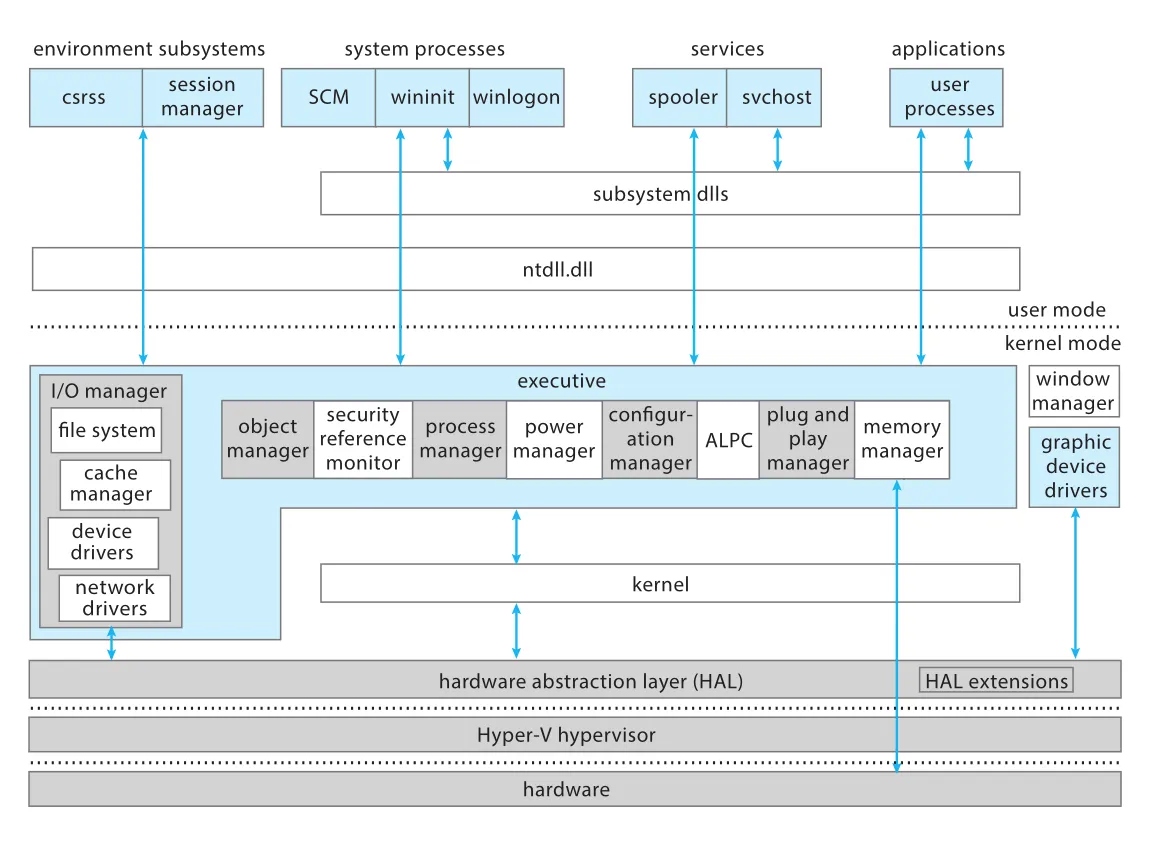
Figure 21.1 · PDF p. 976 · user-mode processes/services와 kernel-mode executive, managers, drivers, HAL, Hyper-V hypervisor의 Windows 10 계층 구조
Figure 21.1은 Windows 10 architecture를 한눈에 보여 준다. User mode에는 environment subsystems, system processes, services, applications가 있고, subsystem dlls와 ntdll.dll을 통해 kernel services에 접근한다. Kernel mode에는 executive와 I/O manager, object manager, process manager, power manager, memory manager, ALPC, plug and play manager, window manager, drivers가 있다. 아래에는 HAL, HAL Extensions, Hyper-V hypervisor, hardware가 놓인다.
Windows는 Mach처럼 client-server model도 사용하고, RPC(remote procedure call)로 distributed processing을 지원한다. Local machine 내부의 scalable process communication은 executive component인 ALPC(Advanced Local Procedure Call)가 담당한다. Network-wide communication에는 TCP/IP packets와 SMB protocol 위 named pipes가 사용된다. 그 위에 DCOM, WMI, WinRM이 올라가 new services와 management capabilities를 빠르게 확장할 수 있게 한다.
21.2.6 Portability
Windows는 portable OS로 설계되었다. UNIX처럼 대부분 C/C++로 작성되며, architecture-specific source code와 assembly code는 상대적으로 적다. Porting은 주로 kernel architecture-specific code, page-table format 같은 major data structure 차이, 그리고 target CPU instruction set에 맞춘 recompilation을 요구한다.
CPU architecture뿐 아니라 chipset과 boot code도 OS porting에 영향을 준다. Chipset은 interrupt delivery, physical system characteristics, error recovery, power management interfaces를 결정한다. Windows는 이 chipset dependency를 HAL(Hardware Abstraction Layer)라는 DLL로 분리한다. Kernel은 chipset detail 대신 HAL interface에 의존하므로, 같은 CPU용 kernel/driver binaries가 다른 chipset에서도 다른 HAL을 통해 동작할 수 있다.
과거에는 많은 architectures와 PC designs 때문에 수백 개 HAL이 있었지만, ACPI 같은 standards와 hardware convergence 덕분에 Windows 10 AMD64 port는 single HAL을 사용한다. Mobile SoC 시장은 더 다양하기 때문에 Windows 8은 HAL Extensions를 도입했다. HAL Extensions는 interrupt controller, timer manager, DMA controller 같은 SoC components를 감지해 HAL이 동적으로 load하는 DLL들이다.
Windows는 IA-32, AMD64, IA64, DEC Alpha, MIPS, PowerPC 등 여러 architectures에 port되었지만, consumer desktop market에서는 IA-32와 AMD64가 중심이 되었다. Windows 8은 32-bit ARM을 추가했고, Windows 10은 ARM64도 지원한다.
21.2.7 International Support
Windows는 international/multinational use를 위해 NLS(national-language-support) API를 제공한다. NLS API는 dates, time, money formatting을 national customs에 맞추고, string comparison도 character set 차이를 고려한다. Windows native character code는 UNICODE이며 구체적으로 UTF-16LE encoding을 사용한다. 이는 Linux/Web의 일반 표준인 UTF-8과 다르다. ANSI characters는 조작 전에 UNICODE로 변환된다.
System text strings는 localization을 위해 resource tables에 보관된다. Vista 이전에는 resource tables가 DLL 안에 들어 있어 language별 executable binaries가 달랐고, 한 번에 하나의 language만 사용할 수 있었다. Vista의 MUI(multiple user interface) support는 resource tables를 language directory의 .mui files로 분리하고, loader가 current language에 맞는 file을 선택하게 했다. 이 덕분에 multiple locales를 concurrent하게 사용할 수 있다.
21.2.8 Energy Efficiency
Energy efficiency는 laptops/mobile devices의 battery life, data-center power/cooling cost, green initiatives와 직접 연결된다. Windows는 CPU clock frequency를 낮추거나, computer 전체를 sleep state로 보내거나, memory를 secondary storage에 저장하고 power off하는 hibernation을 사용한다. 사용자 입장에서는 reboot 없이 이전 state에서 이어서 작업할 수 있다.
CPU가 오래 idle할수록 energy saving이 커진다. 문제는 polling programs와 frequent software timers가 CPU를 깨워 idle time을 짧게 만든다는 것이다. Windows 7은 clock-tick interrupts를 logical CPU 0과 active CPUs에만 전달하고 idle CPUs는 건너뛰며, eligible software timers를 coalescing해 event 수를 줄였다. Server에서는 heavily loaded 상태가 아니면 CPUs를 park한다.
Windows 8은 mobile battery life를 위해 더 강한 정책을 도입했다. WinRT programming model은 guaranteed precise timers를 허용하지 않아 모든 timers가 coalescing 대상이 된다. dynamic tick은 CPU0 고정 clock-owner model을 버리고 last-active CPU가 clock responsibility를 맡게 한다.
PLM(Process Lifetime Manager)는 UWP/Modern application이 idle 상태로 몇 초 이상 지나면 process의 모든 threads를 suspend한다. 이는 polling behavior를 막고, background work를 audio/location/download brokers 같은 system-managed coalescing paths로 보내 battery drain을 줄인다.
DAM(Desktop Activity Moderator)와 Connected Standby는 screen off/power button 상황에서 computer를 사실상 freeze한다. Hardware clock을 멈추고, processes/services를 suspend하며, timer expirations를 30분 delay한다. 완전 sleep은 아니지만 processor와 peripherals가 lowest power state에 가까운 상태로 오래 머물게 한다. 단, 이 mode는 특별한 hardware/firmware support가 필요하다.
21.2.9 Dynamic Device Support
PC 초창기에는 device configuration이 거의 정적이었다. 하지만 laptop docks, PCMCIA cards, USB/peripheral ecosystem이 등장하면서 사용자는 devices를 자주 plug/unplug하게 되었다. Windows의 dynamic device support는 이 변화에 대응한다.
Windows는 device가 연결되면 자동으로 인식하고 적절한 driver를 찾고, 설치하고, load할 수 있다. Device가 제거되면 driver를 unload하고 system execution을 중단하지 않는다. Windows Update는 third-party drivers를 Microsoft 경로로 내려받게 하여 사용자가 manufacturer website나 installation media를 직접 찾는 부담을 줄인다.
Server 환경에서는 dynamic hot-add/hot-replace CPUs/RAM, RAM hot-remove도 지원된다. Physical server에서는 제한적으로 쓰일 수 있지만, cloud/IaaS에서는 중요하다. Hyper-V 같은 hypervisor와 결합하면 service fee나 UI slider에 따라 processor/memory resources를 reboot 없이 동적으로 확장할 수 있다.
21.3 System Components
Windows architecture는 specific privilege levels에서 동작하는 modules의 layered system이다. 기본적으로 CPU가 user mode와 kernel mode의 vertical privilege isolation을 제공한다. Windows 10은 여기에 Hyper-V hypervisor를 사용해 VTL(Virtual Trust Level)이라는 orthogonal security boundary도 추가할 수 있다.
VSM(Virtual Secure Mode)가 활성화되면 system은 두 world로 나뉜다.
| world | 구성 |
|---|---|
Normal World, VTL 0 | 일반 Windows kernel/executive, drivers, user-mode system processes/services/applications |
Secure World, VTL 1 | secure kernel/executive, secure user-mode Trustlets |
| Hyper-V layer | hardware virtualization으로 Normal World와 Secure World boundary를 구성 |
이 구조의 장점은 “isolation이 필요하다고 해서 반드시 높은 privilege를 줄 필요는 없다”는 점이다. 예를 들어 password를 보관하는 secure component는 isolated될 수 있지만, 그 자체가 일반 OS 전체보다 높은 privilege를 가질 필요는 없다. Secure component가 compromised되더라도 피해 범위를 줄이는 방향이다.
21.3.1 Hyper-V Hypervisor
VSM이 활성화된 system에서 Hyper-V hypervisor는 가장 먼저 초기화되는 component다. Hypervisor는 separate virtual machines를 실행하기 위한 hardware virtualization뿐 아니라, VTL boundary와 SLAT(Second Level Address Translation) 기능을 제공한다.
Hypervisor는 AMD SVMX나 Intel VT-x 같은 CPU virtualization extensions를 사용해 interrupt, exception, memory access, instruction, port/register access를 intercept하고 deny, modify, redirect할 수 있다. 또한 hypercall interface를 제공해 VTL 0 kernel, VTL 1 secure kernel, 다른 virtual machine kernels와 통신한다.
21.3.2 Secure Kernel
secure kernel은 VTL 1 user-mode Trustlet applications의 kernel-mode environment 역할을 한다. Trustlet이 system call, interrupt, exception, kernel-mode 진입을 시도하면 regular kernel이 아니라 secure kernel로 들어간다. 그러나 secure kernel은 context switching, thread scheduling, memory management, IPC 같은 일반 kernel tasks를 직접 수행하지 않는다. Kernel-mode drivers도 VTL 1에는 없다.
이 설계는 attack surface를 줄인다. 복잡한 OS management는 Normal World VTL 0에 남기고, Secure World는 privacy와 integrity가 중요한 secrets와 policies를 보호한다. 대신 VTL 0에 의존하므로 denial-of-service에는 취약할 수 있다. 이는 service guarantee보다 data privacy/integrity를 우선하는 trade-off다.
Secure kernel은 boot 시 capture된 hardware secrets, TPM(Trusted Platform Module), code integrity policies에 접근한다. Trustlets는 Normal World가 얻을 수 없는 keys로 encrypt/decrypt하고, Secure World 밖에서 위조할 수 없는 integrity tokens로 reports를 sign/attest할 수 있다. SLAT를 통해 physical pages가 Normal World에서 보이지 않는 virtual memory도 할당할 수 있다. Windows 10의 Credential Guard는 이 기능으로 enterprise credentials를 보호한다.
Device Guard가 활성화되면 digital signature checking이 secure kernel로 이동한다. Normal kernel이 software vulnerability로 공격당해도 unsigned drivers를 load하도록 강제하기 어렵다. VTL 0 kernel-mode page가 executable이 되려면 secure kernel permission이 필요하기 때문이다.
21.3.3 Hardware-Abstraction Layer
HAL(Hardware Abstraction Layer)은 hardware chipset differences를 OS 상위 layers에서 숨긴다. HAL은 kernel dispatcher, executive, device drivers가 사용하는 virtual hardware interface를 export한다. Device drivers는 device를 map하고 직접 access할 수 있지만, memory mapping, I/O bus configuration, DMA setup, motherboard-specific facilities는 HAL interface가 처리한다. Portability section에서 본 것처럼 HAL은 CPU architecture와 chipset variability를 분리하는 Windows의 핵심 장치다.
21.3.4 Kernel
Windows kernel layer는 thread scheduling/context switching, low-level processor synchronization, interrupt/exception handling, user/kernel mode transition, boot loader 이후 OS 진입 초기 code, fatal inconsistency 시 controlled crash code를 담당한다. 대부분 C로 구현되고, assembly는 hardware architecture lowest level과 register access가 필요한 경우로 제한된다.
21.3.4.1 Dispatcher
dispatcher는 executive와 subsystems의 foundation이다. 대부분 paged out되지 않고, execution은 preempt되지 않는다. 주요 책임은 thread scheduling/context switching, synchronization primitives, timer management, software interrupts(APC, DPC), IPI(interprocessor interrupt), exception dispatching, IRQL(interrupt request level) 기반 interrupt prioritization이다.
21.3.4.2 Switching Between User-Mode and Kernel-Mode Threads
Windows의 thread는 user-mode thread(UT)와 kernel-mode thread(KT)라는 두 execution modes를 가진다. Thread는 user-mode stack과 kernel-mode stack을 가진다. UT가 system service를 요청하면 trap instruction으로 kernel mode에 들어가고, kernel trap handler가 UT stack에서 KT stack으로 전환하며 CPU mode를 kernel로 바꾼다. Kernel execution이 끝나면 다시 UT로 돌아간다. Interrupt 발생 시에도 KT switch가 일어난다.
중요한 점은 Windows dispatcher가 별도 scheduler thread가 아니라는 것이다. Dispatcher code는 현재 running user thread의 KT component가 실행한다. System call, interrupt, wait completion 등으로 kernel mode에 들어간 thread가 필요한 kernel work 이후 dispatcher code를 실행해 다음 thread를 고른다.
21.3.4.3 Threads
Windows에서 schedulable unit은 thread이고, process는 threads의 container다. 각 thread는 scheduling state, actual priority, processor affinity, CPU usage information을 가진다. Thread states는 initializing, ready, deferred-ready, standby, running, waiting, transition, terminated의 여덟 가지다.
| state | 의미 |
|---|---|
initializing | thread creation 중, 아직 ready 전 |
ready | 실행 대기 중 |
deferred-ready | 특정 processor에서 run 대상으로 선택되었지만 아직 scheduled되지 않음 |
standby | 해당 processor에서 next thread to run |
running | processor core에서 실행 중 |
waiting | event, I/O completion 같은 dispatcher object signal을 기다림 |
transition | kernel stack page-in 같은 execution resources를 기다림 |
terminated | execution 완료 |
Windows dispatcher는 32-level priority scheme을 사용한다. Priority 1-15는 variable class, 16-31은 static class다. 각 scheduling priority마다 linked list가 있고, 이 lists 집합을 dispatcher database라고 한다. Bitmap은 어떤 priority list에 ready thread가 있는지 표시하므로 dispatcher는 highest set bit를 찾아 constant-time으로 후보를 고를 수 있다.
Large CPU systems에서 global dispatcher database는 contention을 만들었다. Windows Server 2003 이후에는 per-processor databases와 per-processor locks로 나뉘었다. Thread는 ideal processor의 database에 놓이고, dispatcher는 global lock 없이 해당 processor의 highest priority list에서 first thread를 고를 수 있다. 이후 Windows 8+는 global queue와 per-processor queue의 절충으로 topology/server-client 성격에 따라 일부 processors가 shared ready queue를 갖게 했다. 이는 contention과 locality 문제 사이의 균형이다.
Windows scheduling은 always highest-priority ready thread 원칙을 따른다. Quantum이 끝나면 clock interrupt가 quantum-end DPC를 queue하고, DPC는 dispatcher code를 실행시켜 같은 priority의 next ready thread를 round-robin으로 선택한다. 같은 priority에 다른 ready thread가 없으면 lower-priority thread로 내려가지 않고, quantum을 restore한 뒤 같은 thread를 계속 실행한다.
Variable-priority thread가 wait에서 깨어나면 dispatcher가 priority boost를 줄 수 있다. I/O wait에서 깨어난 thread는 device type에 따라 boost가 다르며, sound I/O는 큰 boost, disk I/O는 moderate boost를 받을 수 있다. Mutex/semaphore/event waiters도 latency 감소를 위해 boost된다. Active GUI window thread는 foreground priority separation boost를 받는다. Lock-handoff boost는 releasing owner보다 한 priority 높게 waiter를 올려 lock handoff latency를 줄인다. Boost는 quantum end마다 줄어들어 compute-bound thread가 부당하게 오래 우선권을 갖지 않게 한다.
21.3.4.4 Thread Scheduling
Scheduling은 thread가 ready/waiting state로 들어갈 때, terminate할 때, application이 processor affinity를 변경할 때 발생한다. Higher-priority thread가 ready가 되면 lower-priority running thread는 quantum completion을 기다리지 않고 즉시 preempt된다.
Windows의 특징은 scheduling logic이 여러 kernel functions에 분산되어 있다는 점이다. Lower-priority thread가 I/O completion이나 event signal 같은 state-changing operation을 수행하다가 higher-priority waiter를 깨우면, 그 현재 thread 자신이 dispatcher path를 통해 즉시 context switch를 수행한다. 이 방식은 latency를 줄이지만, I/O와 state-changing operations마다 scheduler work overhead가 들어간다.
Windows는 hard-real-time OS가 아니다. Highest-priority thread라도 특정 time bound 안에 반드시 실행된다는 보장이 없고, DPC와 ISR이 실행되는 동안 threads는 막힐 수 있다. 또한 더 높은 priority thread에 의해 언제든 preempt되거나 equal-priority thread와 round-robin될 수 있다.
CPU accounting은 과거 sampling timer에 기반했지만, Vista 이후 TSC(timestamp counter)를 이용해 더 정확한 execution time 측정이 가능해졌다. Windows 7+는 ISR/DPC execution time도 TSC로 charge하여 Interrupt Time 측정을 개선했다.
21.3.4.5 Implementation of Synchronization Primitives
Windows는 dispatching과 synchronization을 위해 여러 dispatcher objects를 사용한다.
| object | 역할 |
|---|---|
event | event occurrence 기록. notification event는 all waiters, synchronization event는 one waiter signal |
mutex | ownership 개념을 가진 mutual exclusion |
semaphore | resource access 가능한 threads 수를 counter/gate로 제어 |
thread, process | thread/process exit 시 signal되는 waitable entities |
timer | timeout 또는 periodic activity scheduling. notification/synchronization mode 가능 |
User-mode code는 open operation으로 얻은 handle을 통해 dispatcher objects에 wait할 수 있다. 이 점은 Windows object manager와 synchronization model이 서로 연결되는 지점이다.
21.3.4.6 Interrupt Request Levels
Windows는 hardware/software interrupts를 IRQL(interrupt request level)로 prioritization한다. 대부분 ISA에서는 16 levels, legacy IA-32에서는 32 levels가 있다. IRQL 0은 PASSIVE_LEVEL이고 normal threads가 실행되는 기본 level이다. 그 위에 APC/DPC software interrupt levels가 있고, hardware interrupts, clock interrupt, IPI, HIGH_LEVEL이 이어진다.
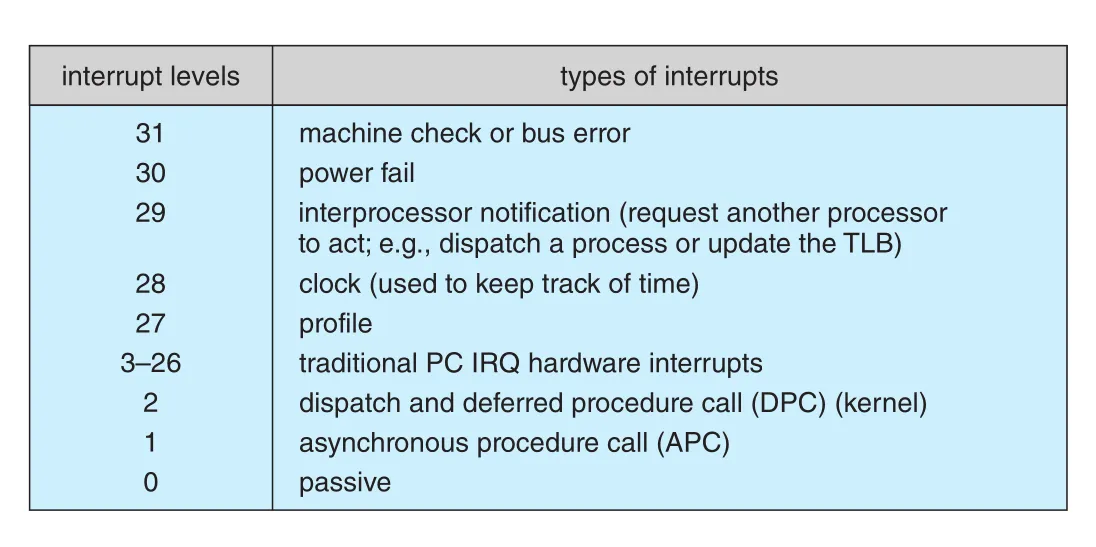
Figure 21.2 · PDF p. 988 · Windows x86 interrupt-request levels에서 passive, APC, DPC, hardware IRQ, clock, IPI, high level의 우선순위
Figure 21.2의 핵심은 IRQL이 “현재 processor가 어떤 interrupt까지 막고 있는가”를 결정한다는 점이다. Processor의 current IRQL 이하 interrupt는 IRQL이 내려갈 때까지 blocked된다.
21.3.4.7 Software Interrupts: APC and DPC
APC(asynchronous procedure call)는 특정 thread에 queue된다. Thread suspend/resume, termination, asynchronous I/O completion notification, running thread context 추출/수정 등에 사용된다. User-mode APC는 thread가 alertable wait 상태일 때만 실행된다. Kernel-mode APC는 IRQL 1(APC_LEVEL) software interrupt로 전달되어 running thread context에서 즉시 실행될 수 있다.
DPC(deferred procedure call)는 interrupt processing을 지연시키는 데 쓰인다. ISR은 urgent device-interrupt processing만 처리하고 나머지는 DPC로 queue한다. DPC는 IRQL 2(DPC_LEVEL)에서 실행되므로 hardware interrupt보다 낮고 standard threads/APCs보다 높다. 그래서 DPC는 device ISRs를 막지 않지만, threads와 APC completion은 막는다. DPC routines는 오래 실행되면 안 되고, page fault나 pageable system service 호출처럼 wait가 필요한 동작을 하면 안 된다. 긴 작업은 executive worker threads에 넘겨 IRQL 0 normal scheduling으로 처리해야 한다.
21.3.4.8 Exceptions, Interrupts, and IPIs
Windows kernel dispatcher는 hardware/software exceptions와 interrupts의 trap handling도 제공한다. Overflow, divide by zero, illegal instruction, privileged instruction, access violation, paging file quota exceeded, debugger breakpoint 등이 architecture-independent exceptions로 정의된다.
Kernel-mode exception에서 handler가 없으면 fatal system error가 발생한다. User-mode exception은 debugger port, exception port, WER(Windows Error Reporting) error port를 거쳐 처리된다. Debugger가 있으면 먼저 전달되고, 처리되지 않으면 process exception handler, environment subsystem, WER로 이어지며, 마지막에는 offending thread/process가 terminate된다.
Interrupt는 device driver가 제공한 ISR(interrupt service routine)이나 kernel trap-handler routine으로 dispatch된다. Interrupt object는 interrupt handling에 필요한 정보를 담는다. Multiprocessor system에서는 processor core마다 별도 IDT(interrupt-dispatch table)가 있고, 각 processor의 IRQL은 독립적으로 설정될 수 있다. Windows는 이 구조로 APCs/DPCs, I/O completion synchronization, thread start, timers 등을 구현한다.
21.3.5 Executive
Windows executive는 environment subsystems가 공통으로 사용하는 services 집합이다. Object manager, virtual memory manager, process manager, ALPC, I/O manager, cache manager, security reference monitor, plug-and-play and power managers, registry, startup 등이 포함된다.
Executive는 object-oriented design principles로 구성된다. object type은 attributes와 methods를 가진 system-defined data type이고, object는 그 type의 instance다. Executive services는 objects의 attributes에 state를 저장하고 methods/services로 behavior를 구현한다.
21.3.5.1 Object Manager
Windows는 kernel-mode entities를 objects로 다룬다. Files, registry keys, devices, ALPC ports, drivers, mutexes, events, processes, threads가 모두 examples다. object manager는 이 objects를 생성, 참조, 이름 관리, handle 관리, security check, quota enforcement하는 executive component다.
User-mode와 kernel-mode code는 opaque value인 handle로 objects에 접근한다. 각 process는 자신이 사용하는 objects를 추적하는 handle table을 가진다. Kernel-mode code는 protected system-wide handle table을 쓰거나, special API를 통해 referenced pointer를 얻어 object에 직접 접근할 수 있다. Handles는 close되어야 하고, referenced pointer도 reference drop API를 호출해야 한다. User process가 exit하면 open handles는 자동 close되지만, driver가 unload될 때 kernel handles는 자동 close되지 않아 leak 위험이 있다.
Object manager는 handle을 생성하는 유일한 entity이므로 security check를 중앙화하기 좋다. Object open 시 SRM(Security Reference Monitor)을 호출해 access rights를 검사하고, 성공하면 granted rights를 access mask로 handle table에 cache한다. 이후 같은 handle로 file write 같은 frequent operation을 할 때마다 security check를 반복하지 않아도 된다. Read-only handle로 write를 시도하면 access mask만 보고 즉시 실패시킬 수 있다.
Object lifetime은 handle count와 reference count로 관리된다. Handle count는 모든 handle tables에서 해당 object를 가리키는 handles 수다. Reference count는 handles plus kernel pointer references다. 이를 통해 object가 아직 사용 중일 때 free되지 않게 하고, handles가 모두 닫히면 name/security descriptor 같은 handle-oriented data는 release할 수 있다.
Windows internal namespace는 UNIX와 다르다. UNIX는 file system이 namespace root지만, Windows는 memory 안의 abstract object manager namespace를 사용한다. Directory object가 other objects를 hash buckets로 담는 hierarchy를 만든다. Named objects만 이 namespace에 있고, threads처럼 unnamed objects도 있다. DOS drive letters도 symbolic links로 구현된다. 예를 들어 \Global??\C:는 \Device\HarddiskVolumeN device object로 향하는 symbolic link다.
File open 과정은 object manager, parse function, I/O manager, file system이 협력하는 좋은 예다. Application이 C:\foo\bar.doc을 열면 object manager는 HarddiskVolume2 device object를 찾고, 그 object type의 parse procedure인 IopParseDevice()를 호출한다. I/O manager parse routine은 volume의 file system에 상대 경로 \foo\bar.doc을 넘기고, file system은 directory parsing으로 file object를 만든다. Object manager는 current process handle table에 file object entry를 만들고 handle을 application에 반환한다.
21.3.5.2 Virtual Memory Manager
MM(Memory Manager)은 virtual address space, physical memory allocation, paging을 관리한다. Windows MM은 hardware가 virtual-to-physical mapping, paging, multiprocessor cache coherence, multiple PTEs mapping same physical frame을 지원한다고 가정한다. Page size는 hardware에 따라 4 KB, 2 MB, 1 GB를 사용한다.
32-bit IA-32/ARM process는 4-GB virtual address space를 갖고, 기본적으로 upper 2 GB는 kernel-mode OS code/data structures 접근에 사용된다. AMD64 같은 64-bit architecture에서는 per-process 256-TB virtual address space가 user 128 TB와 kernel 128 TB로 나뉜다. Kernel code를 각 process address space에 mapping하면 system call이나 interrupt 시 memory-management registers를 저장/복원하거나 cache를 invalidation할 필요가 줄어 user/kernel transition이 빨라진다.
Windows virtual memory allocation은 두 단계다.
| 단계 | 의미 |
|---|---|
| reserve | process virtual address space에서 pages of virtual addresses를 예약 |
| commit | physical memory 또는 paging file space를 할당해 committed memory quota를 소비 |
Process는 더 이상 쓰지 않는 memory를 de-commit해 다른 processes가 쓸 virtual memory space를 돌려줄 수 있다. APIs는 process object handle을 parameter로 받으므로 한 process가 권한이 있다면 다른 process의 virtual memory도 control할 수 있다.
Shared memory는 section object로 구현된다. Process는 section object handle을 얻고, section memory를 address range인 view로 map한다. Section은 paging file이나 regular file에 backed될 수 있고, memory-mapped file처럼 동작할 수 있다. Protection은 read-only, read-write, read-write-execute, execute-only, no-access, copy-on-write 등으로 설정된다.
no-access page는 접근 시 exception을 발생시킨다. Guard pages로 stack overflow를 감지하거나, allocation 끝에 no-access page를 붙여 heap buffer overrun을 잡는 데 쓰인다. copy-on-write는 두 processes가 같은 section object data의 독립 copy를 원할 때 physical memory를 절약한다. 처음에는 shared copy를 mapping하고, write 시점에 MM이 private page를 만든다.
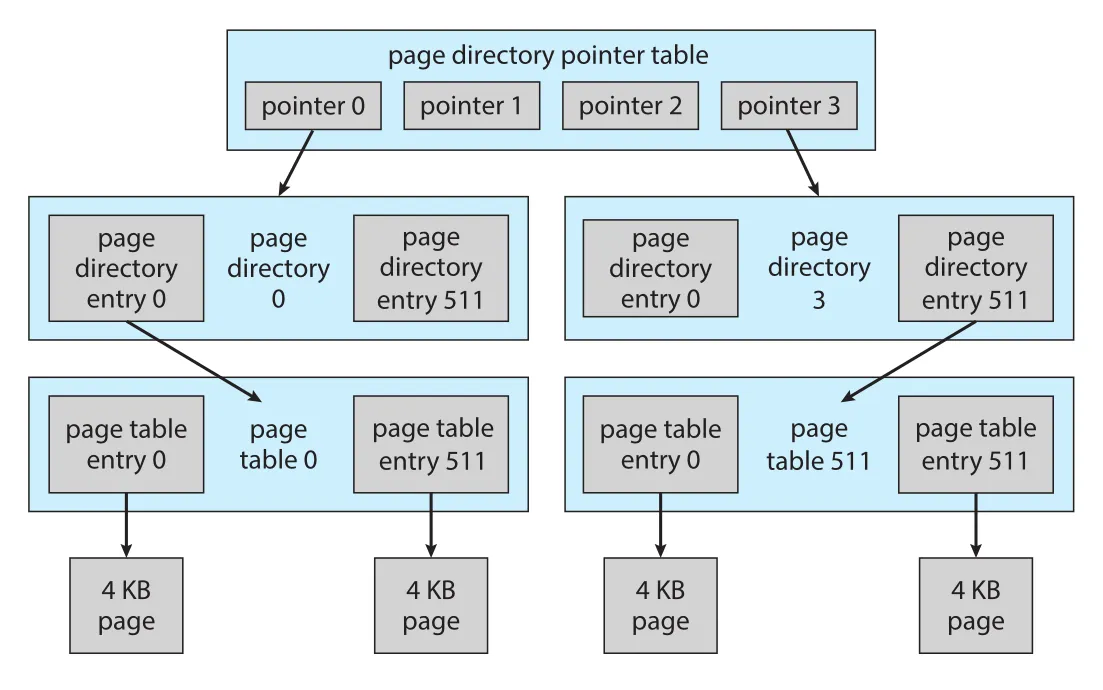
Figure 21.3 · PDF p. 995 · IA-32 PAE/AMD64 계열에서 page directory, PDE, PTE table, PTE가 계층적으로 4 KB pages를 가리키는 구조
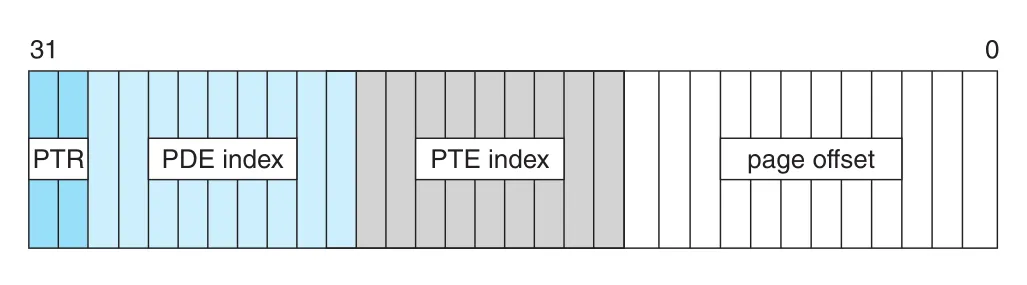
Figure 21.4 · PDF p. 996 · IA-32 virtual address를 top-level pointer, PDE index, PTE index, page offset으로 나누어 physical address를 찾는 방식
Windows는 hierarchical page table을 사용한다. IA-32 PAE/AMD64에서 PDE/PTE는 8 bytes이고, 한 page에 512 entries가 들어간다. IA-32는 top-level 2 bits, second-level 9 bits, PTE index 9 bits, page offset 12 bits로 4 KB page 안 byte를 찾는다. AMD64는 네 levels로 9+9+9+9+12, 즉 48-bit virtual address를 translate한다. Future PML5는 더 큰 virtual address space를 지원한다.
TLB(translation look-aside buffer)는 virtual page to PTE mapping cache다. TLB miss 시에만 MMU가 page table을 walk한다. Large pages는 TLB pressure를 줄인다. PDE가 PTE처럼 동작하도록 표시되면 2 MB page를 map할 수 있고, newer AMD64는 1 GB pages도 지원한다. 하지만 large pages는 external/internal fragmentation 문제를 만들기 쉬워 Windows 자체나 large server applications처럼 boot 초기부터 실행되어 memory fragmentation 전 pages를 확보할 수 있는 components에 더 적합하다.
Windows physical pages는 일곱 states 중 하나를 가진다.
| state | 의미 |
|---|---|
free | available page이지만 stale/uninitialized contents |
zeroed | zero-on-demand fault에 바로 쓸 수 있게 zeroed된 free page |
modified | process가 쓴 page라 secondary storage로 보내야 재사용 가능 |
standby | secondary storage에 이미 있는 information의 copy. prefetch page도 포함 가능 |
bad | hardware error로 unusable |
transition | secondary storage에서 physical frame으로 이동 중 |
valid | process working set page 또는 nonpaged pool 등 system direct use page |
Valid pages는 process page tables에 있고, 다른 states의 pages는 state별 lists에 유지된다. Vista 이후 Windows는 standby pages를 aggressive recycling에서 보호하고 performance를 높이기 위해 eight prioritized standby lists를 둔다. Lists는 PFN(page frame number) database entries를 연결해 만든다. PFN database는 physical pages를 대표하고, PTEs는 virtual pages를 대표한다는 차이를 기억해야 한다.
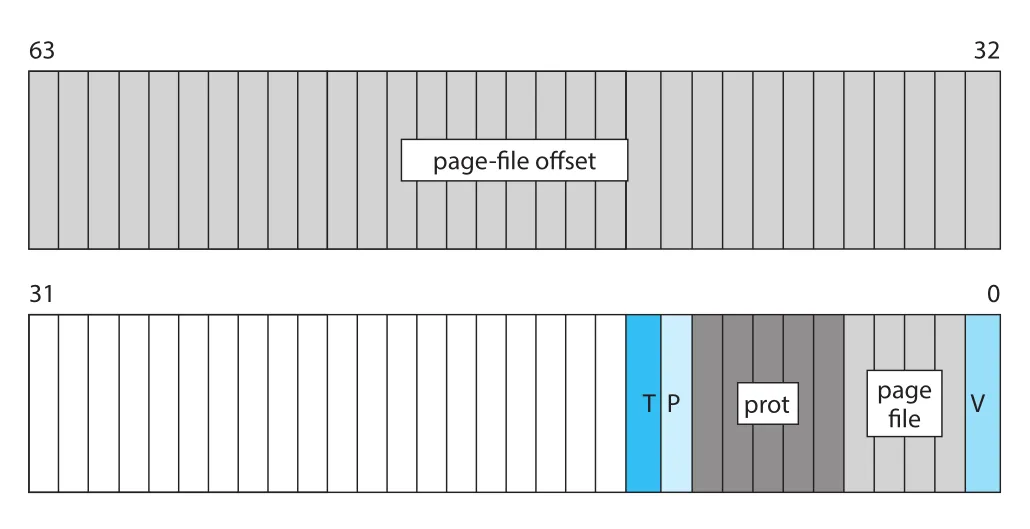
Figure 21.5 · PDF p. 999 · valid bit이 0인 page-file PTE가 protection, page-file offset, page-file selector, bookkeeping bits를 담는 방식
PTE의 valid bit이 0이면 hardware는 나머지 bits를 무시하고 MM이 자체 encoding에 사용한다. Page-file PTE는 protection bits, page-file offset, paging file selector를 담아 secondary storage의 page 위치를 찾게 한다. Zero-on-demand page, section object mapped page, page file에 written page 등이 invalid PTE bits로 표현된다.
Windows page replacement는 per-working-set LRU(least recently used) 정책에 가깝다. Process 시작 시 default minimum working set이 주어지고, memory가 충분할 때는 working set이 성장할 수 있다. Available memory가 critical하게 낮아지면 MM은 working set을 trim하고 older pages를 제거한다. Page age는 memory 체류 시간이 아니라 last reference 기준이다. Windows 7+는 memory가 충분해도 빠르게 growing하는 process를 trim해 system responsiveness를 개선했다.
MM은 user processes뿐 아니라 file cache, pageable kernel heap, pageable kernel/driver code/data, Terminal Services session별 working sets도 관리한다. 또한 locality를 이용해 page fault 시 필요한 page만이 아니라 adjacent pages도 prefetch한다. 이는 page faults 수를 줄이고 I/O reads를 clustering해 performance를 높인다.
Reserved virtual address ranges는 process별 VAD(virtual address descriptor) tree로 관리된다. Faulting address의 PTE가 uninitialized이면 MM은 VAD tree에서 해당 address가 어떤 range/use에 속하는지 찾아 PTE를 초기화하고 page를 가져온다. Section object가 관련된 경우 VAD는 section object pointer를 담고, section object가 shared virtual page 위치를 알려 준다.
Windows Vista 이후 MM에는 SuperFetch가 포함된다. SuperFetch는 user-mode service와 kernel-mode file-system filter를 결합해 paging operations trace를 관찰한다. Application launches, fast user switches, sleep/hibernate 같은 usage patterns를 기반으로 Markov chains로 statistical model을 만들고, 사용자가 곧 필요로 할 pages를 idle time에 low-priority I/O로 standby list에 미리 채운다.
SuperFetch는 latency를 줄이지만 overhead도 만든다. Mechanical drives에서는 seek latency가 크므로 prefetch benefit이 크다. 그러나 server workloads는 random multiuser throughput이 중요하고, SSD/NVM systems는 storage latency가 낮아 monitoring cost가 benefit보다 클 수 있다. 그런 경우 SuperFetch는 disable될 수 있다.
Windows 10의 compression store manager는 memory pressure 상황에서 standby pages나 modified pages를 곧바로 evict하지 않고 compression store에 압축해 보관할 수 있다. 이 store는 memory compression process의 working set 안에 있다. 빠른 multiprocessor와 hardware compression 지원 환경에서는 약간의 CPU cost가 secondary storage I/O cost보다 훨씬 싸므로, paging pressure를 줄이는 실용적 trade-off다.
21.3.5.3 Process Manager
Windows process manager는 processes, threads, jobs의 create/delete/query/manage services를 제공한다. Parent-child hierarchy 자체는 알지 못하지만, job objects로 processes를 group화하고 resource limits나 scheduling attributes를 적용할 수 있다. Thread scheduling 자체는 kernel dispatcher의 일이고, process manager는 priorities/affinities 같은 attributes를 설정한다.
job object는 처음에는 CPU usage, working-set size, processor affinity 같은 resource limits를 multiple processes에 적용하기 위한 data-center feature였다. 이후 security features, CPU throttling, per-user-session fairness, storage/network I/O throttling, nested job hierarchies, power management support까지 확장되었다. Windows Store/UWP processes는 jobs 안에서 실행되고, Connected Standby의 DAM도 jobs를 사용한다. Windows 10 Docker Containers는 jobs를 silos라고 부르며 활용한다.
Win32 process creation은 layered architecture 때문에 복잡하다.
| 단계 | 핵심 동작 |
|---|---|
CreateProcess() | Win32 application이 process creation 요청 |
| Win32 to NT conversion | Win32 parameters/behavior를 NT world로 변환 |
NtCreateUserProcess() | NT executive process manager가 process와 initial thread 생성 |
| object/MM setup | process object, address space, handle table, PEB(Process Environment Block) 초기화 |
| thread setup | thread object, TEB(Thread Environment Block), scheduling attributes 초기화 |
| Win32 subsystem notification | csrss 등 Win32-specific initialization 수행 |
ResumeThread() | suspended initial thread를 깨워 실행 시작 |
ntdll.dll loader | DLL dependencies, initial heap, exception handling, compatibility options 설정 후 main() 호출 |
Windows APIs는 process handle을 받아 virtual memory, threads, handles를 조작할 수 있으므로 subsystem/services가 new process context 안에서 직접 실행되지 않고도 필요한 초기화를 할 수 있다. Windows는 UNIX fork() style creation도 지원하며, WER의 process reflection과 WSL의 Linux fork() implementation이 이 capability를 사용한다.
Debugger support에는 threads suspend/resume, suspended thread creation, thread register context get/set, other process virtual memory access, thread injection이 포함된다. 이 기능은 debugging에는 강력하지만, malware가 cross-process memory allocation/manipulation/injection을 악용할 수 있다는 위험도 있다.
21.3.5.4 Facilities for Client-Server Computing
Windows는 client-server model을 layering mechanism으로 널리 사용한다. Common functionality를 service로 두고, content parsing code와 privileged system-action code를 분리할 수 있다. Web browser가 renderer/parser, broker, services, clients 등 여러 processes로 나뉘는 구조가 대표적이다.
Win32 environment subsystem은 Windows 95/98에서 이어진 Win32 personality를 구현하는 기본 server다. User authentication, network facilities, printer spooling, web services, network file systems, plug-and-play도 services로 구현된다. 여러 services는 historically svchost.exe processes 안에 DLL 형태로 모였지만, debugging/security 문제가 있어 최신 Windows 10에서는 RAM이 충분하면 각 DLL service를 별도 svchost.exe process로 실행한다.
Windows의 recommended client-server communication은 RPC다. Win32 API는 Microsoft의 DCE-RPC 표준인 MS-RPC를 지원한다. Local-only RPC transport로는 ALPC를 사용할 수 있다. ALPC는 UNIX domain sockets와 Mach IPC와 유사한 message-passing mechanism이다.
ALPC flow는 다음과 같다.
| 단계 | 동작 |
|---|---|
| connection port | server가 globally visible connection-port object publish |
| client request | client가 server connection-port handle을 열고 connection request 전송 |
| communication ports | server가 accept하면 ALPC가 client/server pair communication-port objects 생성 |
| message modes | datagram(no reply) 또는 request/reply |
| execution style | synchronous blocking 또는 thread-pool 기반 asynchronous messaging |
ALPC message passing에는 두 techniques가 있다. 64 KB 미만 small/medium messages는 port kernel message queue를 intermediate storage로 사용해 sender process → kernel → receiver process로 copy된다. 단점은 double buffering과 receiver delay 시 kernel memory가 묶인다는 점이다. Larger messages는 port에 shared-memory section object를 만들고, message의 data view attribute가 section object를 가리키게 한다. Receiver가 attribute를 expose하면 virtual address mapping을 통해 physical memory를 공유하므로 large copy와 kernel buffering을 피한다.
21.3.5.5 I/O Manager
I/O manager는 device drivers와 driver communication model을 담당한다. UNIX 계열처럼 Windows도 I/O target을 file object로 본다. Device가 file system이 아니어도 I/O는 file object를 향한다. I/O manager는 drivers가 filter drivers로 stack에 끼어들어 request를 modify/extend/enhance할 수 있게 한다.
File-system drivers는 특별히 중요해서 I/O manager가 loading/management interfaces를 제공한다. I/O manager는 MM과 함께 memory-mapped file I/O를 제공하고, entire I/O system caching을 담당하는 cache manager도 제어한다. Windows I/O는 기본적으로 asynchronous이며, synchronous I/O는 operation completion을 explicit하게 wait하는 방식으로 구현된다.
Device별 drivers는 I/O stack 또는 driver stack을 형성한다. Driver는 driver object로 표현되고, stack 안에서는 device object가 driver object를 가리킨다. Handle이 device object에 열리면 I/O manager는 device handle이 아니라 file object와 file handle을 만든다. 이후 create/read/write 같은 requests를 IRP(I/O request packet)로 변환하고, targeted I/O stack의 first driver로 보낸다. Driver는 IRP를 처리한 뒤 next driver로 넘기거나 operation을 complete한다.
I/O completion은 request가 시작된 context와 다른 context에서 일어날 수 있다. Driver가 오래 block되어야 하면 IRP를 worker thread에 queue하고 original thread는 pending status를 받고 계속 실행할 수 있다. ISR에서 처리된 I/O도 arbitrary process context에서 complete될 수 있으므로, I/O manager는 final completion processing을 originating thread process context에서 수행하기 위해 APC를 사용한다.
Filter drivers는 I/O stack model의 강력함과 위험을 모두 보여 준다. Volume shadow copies와 BitLocker는 volume manager 위 filter drivers로 구현된다. File-system filter drivers는 hierarchical storage management, single instancing, dynamic format conversion, anti-malware tools에 쓰인다. Windows Server 2003+의 filter manager는 file-system filters를 minifilter로 load하고 altitude(relative priority)로 ordering해 filters 간 충돌을 줄인다.
Windows driver models는 다음처럼 층을 이룬다.
| model | 의미 |
|---|---|
WDM(Windows Driver Model) | power/PnP/cancellation/filter layering 등 driver requirements를 정의하는 기본 model |
| port/miniport | class-common operation은 port driver가, hardware-specific operation은 miniport가 담당 |
| class/miniclass | disk/CD/DVD/tape/keyboard/mouse 등 device class common code와 specialized code 분리 |
KMDF | WDM 위 kernel-mode driver programming을 단순화 |
UMDF | kernel reflector driver를 통해 user-mode driver를 작성하게 함 |
Windows Driver Foundation | KMDF와 UMDF를 묶은 driver framework |
UMDF는 kernel mode가 필요 없는 drivers에 권장된다. User-mode driver failure는 kernel crash를 일으키지 않으므로 reliability에 유리하다.
21.3.5.6 Cache Manager
Windows cache manager는 block-device level이 아니라 logical/virtual file level에서 centralized caching을 제공한다. MM과 긴밀히 협력해 I/O manager 아래 모든 components에 cache services를 제공한다. Remote network share의 file, custom file system의 logical file 모두 cache 대상이 될 수 있다.
Cache manager는 private working set을 유지한다. Cache는 256 KB blocks로 나뉘며, 각 block은 file의 memory-mapped view를 담을 수 있다. 각 cache block은 VACB(virtual address control block)로 설명된다. VACB는 view의 virtual address, file offset, view users count를 저장한다.
File read path는 다음처럼 진행된다.
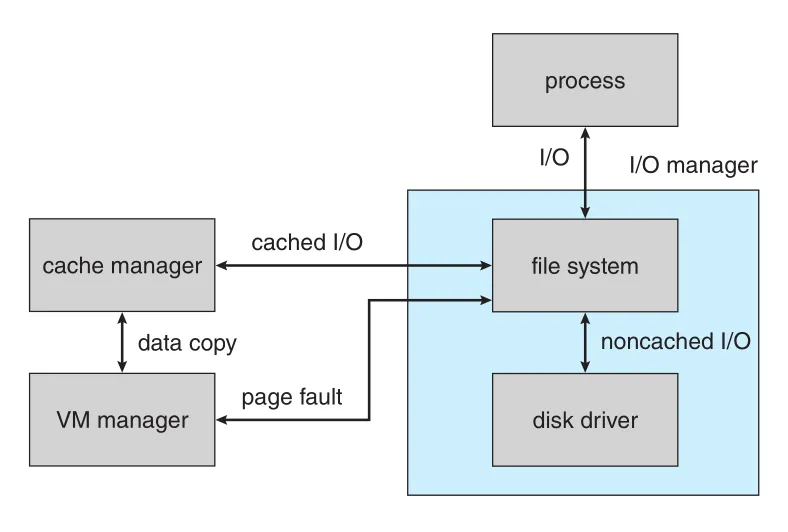
Figure 21.6 · PDF p. 1007 · cached file read에서 I/O manager, file system, cache manager, VM manager, disk driver가 협력하는 흐름
File이 cacheable이면 file system은 cache manager에게 requested data가 cached file views에 있는지 묻는다. Cache miss이면 cache block과 VACB entry를 만들고 view를 map한다. Data copy 중 page fault가 나면 MM이 noncached read request를 I/O manager에 보내고, disk driver stack이 data를 cache manager page에 직접 읽는다. 이후 VACB가 그 page를 가리키고, data가 caller buffer로 copy된다.
Cached synchronous operations는 가능하면 fast I/O path를 사용한다. 이는 IRP를 만들지 않고 driver stack으로 직접 call해 memory/time overhead를 줄인다. 단, 오래 block하거나 worker thread로 queue할 수 없으므로 cache에 data가 없으면 실패하고 normal IRP path로 fallback한다.
Cache manager는 metadata access에도 쓰인다. File-system metadata를 읽을 때 mapping interface를 쓰고, metadata 수정 시 pinning interface로 page를 physical frame에 lock한 뒤 수정한다. 수정 후 unpin하면 page는 dirty로 표시되고 MM이 secondary storage로 flush한다.
Write policy는 기본적으로 write-back caching이다. Writes를 4-5초 모은 뒤 cache-writer thread가 flush한다. Write-through가 필요하면 file open flag나 explicit cache-flush function을 사용한다. Fast writer가 cache pages를 독점하지 않도록 free cache memory가 낮아지면 cache manager는 writers를 temporary block하고 cache-writer thread를 깨운다. Network redirectors는 timeout/retransmission 낭비를 막기 위해 cache backlog limit을 요청할 수 있다.
21.3.5.7 Security Reference Monitor
SRM(Security Reference Monitor)은 protected data structure handle open 시 effective security token과 object security descriptor를 비교해 access를 검사한다. Security descriptor는 DACL(discretionary access control list)와 SACL(system access control list)를 포함한다. SRM은 object manager 중심화 덕분에 user-accessible entities에 uniform runtime access validation과 audit checks를 적용할 수 있다.
Process마다 security token이 있고, login process lsass.exe가 user를 authenticate하면 first process에 token이 attached되고 child processes에 copy된다. Token에는 user SID, group SIDs, privileges, integrity level, attributes/claims, capabilities가 들어 있다. Thread는 기본적으로 process token을 공유하지만, impersonation으로 thread-specific token을 설정해 다른 user를 가장할 수 있다. Client-server service는 이 기능으로 client behalf에서 files/objects를 access한다.
SRM은 privileges도 관리한다. System time 변경, driver load, firmware environment variables 변경에는 special privileges가 필요하다. Backup/restore나 debugging처럼 default access control을 우회하는 강력한 privileges도 token에 표현된다.
integrity level은 token에 저장되는 mandatory label이다. Low-integrity browser/PDF reader가 medium/high integrity objects를 수정하거나 higher-integrity process memory를 읽지 못하게 하여 content parser compromise가 system 전체 장악으로 이어지는 것을 어렵게 한다.
Windows 8의 AppContainer는 packaged application token을 다음처럼 바꾼다. Integrity level을 low로 낮추고, user/group SIDs를 disable하며, 대부분 privileges를 제거한다. Application package identifier의 SHA-256 hash에 대응하는 AppContainer SID를 추가하고, manifest에 적힌 capability SIDs를 추가한다. 이 model은 access를 user/group discretionary model에서 per-application mandatory model로 옮긴다. Resource access 부담은 broker와 capabilities가 완화한다.
SRM의 마지막 책임은 security audit events logging이다. SRM은 access checks를 담당하므로 unauthorized access attempts 추적에 필요한 audit records 대부분을 생성하고, lsass.exe가 이를 security-event log에 기록한다.
21.3.5.8 Plug-and-Play Manager
PnP manager는 hardware configuration changes를 인식하고 system을 적응시킨다. PnP devices는 standard protocols로 자신을 identify한다. PnP manager는 devices를 인식하고, changes를 감지하며, interrupts, DMA channels, I/O memory ranges 같은 hardware resources와 possible alternatives를 추적하고, 적절한 drivers를 load한다.
Dynamic reconfiguration flow는 bus driver가 devices list를 제공하는 것에서 시작한다. PnP manager는 drivers를 load하고 add-device request를 보낸다. Bus driver의 resource arbiters와 협력해 optimal resource assignments를 계산한 뒤 start-device request를 보낸다. Reconfiguration 시에는 query-stop으로 driver가 temporary disable 가능한지 묻고, pending operations를 완료시킨 뒤 stop/start sequence로 새 resources를 적용한다. Query-remove, surprise-remove, remove requests도 지원한다.
Windows 7의 service-trigger mechanism은 PnP notification과 SCM을 연결한다. Device 관련 service가 boot 때 항상 떠 있을 필요 없이, PnP manager가 device arrival을 알릴 때만 SCM이 service를 start할 수 있다.
21.3.5.9 Power Manager
power manager는 CPU/I/O load 같은 current system conditions를 감지하고, 필요가 낮을 때 performance/responsiveness를 낮춰 energy efficiency를 높인다. Sleep, hibernation, Connected Standby도 power manager 정책과 연결된다.
Sleep은 빠르게 들어가고 빠르게 돌아오지만 memory power는 유지해야 한다. Hibernation은 memory contents를 secondary storage로 옮긴 뒤 power off하므로 시간이 더 걸리지만, 전원 손실에도 state를 잃지 않는다. Windows 7의 PPM(processor power manager)은 core parking, CPU throttling/boosting을 구현한다. Windows 8의 PoFX(power framework)는 function drivers가 device internal power states를 노출하게 해 device 전체 on/off보다 finer-grained power control을 가능하게 한다.
21.3.5.10 Registry
Windows configuration information은 registry라고 부르는 internal repositories, 즉 hives에 저장된다. Configuration manager는 executive component로 registry를 관리한다. Hives는 system information, user preferences, software information, security, boot options, AppContainer/UWP application-specific configuration 등으로 나뉜다.
Registry는 keys와 values의 hierarchical namespace다. Win32 API는 values에 UNICODE string, 32-bit integer, binary 같은 type을 부여하지만, registry 자체는 values를 같은 방식으로 저장하고 higher API가 type/size를 해석한다. 이 유연성 때문에 registry는 configuration뿐 아니라 general-purpose database나 IPC처럼 창의적으로 쓰이기도 한다.
Registry는 notifications를 제공한다. Thread는 특정 key/value 변경을 기다릴 수 있고, registry keys는 object manager objects이며 dispatcher event object를 expose한다. Configuration manager가 key/value 변경 시 event를 signal하면 waiting thread가 깨어난다.
Stability를 위해 Windows는 significant changes 전에 system restore point를 만들고, registry hives의 이전 copy로 되돌릴 수 있게 한다. Registry는 self-healing algorithms와 two-phase commit transactional algorithm도 사용하지만, software installation failure로 인한 broader configuration damage recovery에는 system restore가 여전히 중요하다.
21.3.5.11 Booting
Windows boot는 hardware power-on 후 firmware가 ROM에서 실행되며 시작된다. Modern systems는 UEFI를 사용하고, Secure Boot는 firmware와 boot-time components의 digital signature를 검증해 Microsoft boot components와 vendor firmware 외 early third-party code가 load되지 않게 한다.
Shutdown 상태에서는 firmware가 boot device를 찾고 bootmgfw.efi를 실행한다. 이 program은 winload.efi를 load하고, winload는 hal.dll, kernel ntoskrnl.exe, dependencies, boot drivers, system hive를 load한 뒤 kernel로 execution을 넘긴다. Hibernation 상태에서는 winresume.efi가 secondary storage에서 running system을 복원한다.
VSM이 활성화되어 Hyper-V가 켜진 system은 boot chain이 다르다. winload.efi가 hvloader를 load해 hypervisor를 먼저 초기화하고, hypervisor가 VTL 1 Secure World와 VTL 0 Normal World를 설정한다. 이후 secure kernel(securekernel.exe)이 load되어 VTL 1을 초기화하고, 다시 VTL 0 loader가 일반 boot steps를 진행한다.
Kernel initialization 중에는 idle process, system process, Windows 10의 memory compression process, VSM 사용 시 secure system process가 만들어진다. 첫 user-mode process는 SMSS(Session Manager Subsystem)이며, UNIX의 init과 비슷하게 paging files와 initial user sessions를 만든다. Session 0은 lsass와 services 같은 system-wide background processes를 실행하고, login sessions는 csrss.exe, win32k.sys, winlogon, logonui, userinit, explorer로 이어진다.
Boot optimization은 previous boots에서 secondary storage pages를 prefetch하고, boot disk access pattern을 기반으로 system files layout을 조정하는 방식으로 이루어진다. Windows 7은 services를 필요할 때 시작하게 했고, Windows 8은 PnP worker thread pool로 driver loads를 parallelize하고 UEFI를 활용했다. Hybrid Boot는 shutdown 시 user sessions를 logoff한 뒤 logonui prompt 상태에서 hibernation하여 다음 power-on 때 빠르게 logon screen으로 돌아오게 한다.
21.4 Terminal Services and Fast User Switching
Windows는 keyboard, mouse, display를 통한 GUI console을 지원하고, audio/video input도 accessibility와 security에 활용한다. Cortana는 voice recognition/assistant 기능을 제공하고, Windows Hello는 3D heat-sensing, face-mapping cameras/sensors로 password 없이 user identification을 수행한다. Eye-motion sensing hardware는 motor disability users를 위한 accessibility path가 될 수 있다.
Windows는 원래 personal computer 환경에서 출발했지만, multiple users가 같은 PC를 공유할 수 있게 sessions를 제공한다. GUI로 logon한 각 user에는 applications와 GUI environment를 담는 session이 만들어진다. Client Windows는 monitors/keyboards/mice로 구성된 single console만 지원하므로 한 번에 하나의 session만 console에 연결된다. fast user switching은 logoff/logon 없이 console을 다른 session으로 전환하게 한다.
Terminal Services(TS)는 RDP(Remote Desktop Protocol)로 다른 computer의 session을 만들거나 기존 session에 연결하게 한다. Remote desktop은 home PC에서 work PC session에 접속하거나, remote troubleshooting에서 같은 session을 mirror해 다른 user가 보거나 제어하는 데 쓰인다. Data-center terminal servers는 hundreds of remote-desktop sessions를 처리할 수 있고, thin-client computing으로 reliability, manageability, security를 높인다.
21.5 File System
Windows native file system은 NTFS다. Local volumes에는 NTFS가 쓰이고, USB thumb drives/camera flash/external storage는 portability 때문에 FAT로 format될 수 있다. FAT는 많은 systems가 이해하지만 access control이 없으므로, data security는 별도 encryption application에 의존해야 한다.
NTFS는 ACLs로 individual files access를 제어하고, individual files 또는 entire volumes에 implicit encryption을 지원한다. Data recovery, fault tolerance, very large files/file systems, multiple data streams, UNICODE names, sparse files, journaling, volume shadow copies, file compression도 제공한다.
21.5.1 NTFS Internal Layout
NTFS의 fundamental entity는 volume이다. Volume은 logical disk partition에 기반하고, device 일부/전체 또는 여러 devices에 걸칠 수 있다. Volume manager는 RAID levels로 volume contents를 보호할 수 있다.
NTFS는 individual sectors가 아니라 clusters를 allocation unit으로 사용한다. Cluster size는 NTFS format 시 정해지는 power of 2 값이며, 2 GB보다 큰 volumes의 default는 4 KB다. Larger cluster는 performance를 높일 수 있지만 internal fragmentation cost가 증가한다.
Storage addresses는 LCN(logical cluster number)로 표현된다. NTFS는 device beginning부터 clusters를 번호 매기고, physical byte offset은 LCN * cluster size로 계산할 수 있다.
UNIX file이 단순 byte stream인 것과 달리, NTFS file은 typed attributes로 구성된 structured object다. File name, creation time, security descriptor 같은 standard attributes와 user data를 담는 data attributes가 있다. 대부분 traditional data file은 unnamed data attribute 하나에 file data를 담지만, named data streams도 만들 수 있다. file-name:attribute syntax로 접근하며, 일반 file query는 unnamed attribute size만 반환한다.
모든 NTFS file은 special file인 MFT(Master File Table) 안의 one or more records로 설명된다. Small attributes는 MFT record 안에 직접 저장되는 resident attributes이고, large attributes는 device의 contiguous extents에 저장되는 nonresident attributes다. MFT record는 각 extent pointers를 담는다. Highly fragmented file이나 attributes가 많은 file은 base file record가 overflow records를 가리킨다.
각 file은 64-bit file reference를 가진다. 이는 48-bit file number와 16-bit sequence number로 구성된다. File number는 MFT record number이고, sequence number는 MFT entry가 재사용될 때 증가한다. 이 값은 deleted file의 stale reference가 reused MFT entry를 잘못 가리키는 문제를 잡는 consistency check에 쓰인다.
21.5.1.1 NTFS B+ Tree
NTFS namespace는 UNIX처럼 directory hierarchy지만, 각 directory는 file names index를 B+ tree로 저장한다. B+ tree는 root에서 leaf까지 모든 path length가 같고 reorganization cost가 낮다. Large directory에서는 index root가 B+ tree top level을 담고, 나머지 tree는 disk extents에 저장된다.
Directory entry는 file name과 file reference뿐 아니라 MFT resident attributes에서 복사한 update timestamp와 file size도 담는다. 따라서 directory listing을 만들 때 각 file의 MFT entry를 모두 읽지 않아도 되어 효율적이다.
21.5.1.2 NTFS Metadata
NTFS volume metadata는 모두 files로 저장된다. 첫 번째 special file은 MFT이고, 두 번째 file은 MFT damage recovery를 위해 MFT first 16 entries copy를 담는다. 그 외 주요 metadata files는 log file, volume file, attribute-definition table, root directory, bitmap file, boot file, bad-cluster file이다.
| metadata file | 역할 |
|---|---|
| log file | file-system metadata updates 기록 |
| volume file | volume name, NTFS version, consistency check 필요 여부 bit |
| attribute-definition table | volume에서 쓰는 attribute types와 가능한 operations |
| root directory | file-system hierarchy top-level directory |
| bitmap file | allocated/free clusters 표시 |
| boot file | startup code와 MFT physical address |
| bad-cluster file | bad areas 추적 및 error recovery |
Metadata가 실제 files로 저장된다는 점은 cache manager와 연결된다. NTFS metadata도 ordinary file data와 같은 cache mechanisms로 caching될 수 있다.
21.5.2 Recovery
NTFS는 file-system robustness를 위해 metadata updates를 transactions 안에서 수행한다. Data structure를 바꾸기 전에 transaction은 redo/undo information을 담은 log record를 쓰고, 변경 후 commit record를 써 성공을 표시한다.
Crash 후 NTFS는 committed transactions의 operations를 redo해 metadata changes가 실제 structures에 반영되었는지 보장하고, commit되지 못한 transactions는 undo한다. Checkpoint record는 보통 5초마다 log에 기록되며, checkpoint 이전 log records는 recovery에 필요 없으므로 버릴 수 있다. NTFS volume이 system startup 후 처음 access될 때 recovery가 자동 수행된다.
이 scheme은 file-system metadata consistency를 보장하지만 user-file contents가 모두 crash 직전 최신 상태임을 보장하지는 않는다. 즉 NTFS recovery는 “metadata files가 손상되지 않고 crash 전 어느 consistent state를 반영한다”는 것을 보장하는 방향이다.
NTFS log는 volume beginning의 세 번째 metadata file에 저장된다. Fixed maximum size로 만들어지고, circular queue인 logging area와 recovery 시작 위치 같은 context를 담는 restart area로 나뉜다. Restart area는 두 copies를 가져 crash 중 한 copy가 손상되어도 recovery 가능성을 높인다.
log-file service는 log records 작성, recovery actions, log free space tracking을 맡는다. Free space가 너무 낮아지면 pending transactions를 queue하고 NTFS는 new I/O operations를 멈춘다. In-progress operations가 끝나면 cache manager를 호출해 data를 flush하고, log file을 reset한 뒤 queued transactions를 수행한다.
21.5.3 Security
NTFS security는 Windows object model에서 나온다. 각 NTFS file은 owner와 access-control list를 명시하는 security descriptor를 참조한다. 초기 NTFS는 file마다 별도 security descriptor attribute를 가졌지만, Windows 2000부터는 shared copy를 가리키게 해 storage와 cache space를 절약했다. 많은 files가 동일한 security descriptor를 공유하기 때문이다.
일반 동작에서 NTFS는 path traversal 중 directory마다 permission을 검사하지 않는다. POSIX compatibility를 위해 이 checks를 켤 수 있지만 비용이 크다. Windows path parsing은 directory-by-directory traversal이 아니라 prefix matching cache를 사용해 longest matching path prefix에서 깊숙이 시작할 수 있다. Traversal checks를 켜면 각 directory level에서 user access를 검사해야 하므로 이 최적화를 덜 활용하게 된다.
21.5.4 Compression
NTFS는 individual files 또는 directory 안 data files에 compression을 적용할 수 있다. File data는 16 contiguous clusters로 이루어진 compression units로 나뉜다. Write 시 compression result가 16 clusters보다 작으면 compressed version을 저장한다. Read 시 stored compression unit length가 16 clusters보다 작으면 compressed로 판단하고 decompress한다. Contiguous compression units를 읽을 때 NTFS는 prefetch/decompress ahead로 performance를 높인다.
Sparse files에는 zero-only clusters를 실제 storage에 할당하지 않는 방식이 쓰인다. MFT entry의 virtual-cluster number sequence에 gaps를 남기고, read 시 gap을 만나면 caller buffer를 zero-fill한다. 이는 UNIX의 sparse file 기법과 같은 계열이다.
21.5.5 Mount Points, Symbolic Links, and Hard Links
mount point는 NTFS directory-specific symbolic link다. Drive letter 같은 global names보다 flexible하게 storage volumes를 구성하게 한다. Mount point는 true volume name을 담은 associated data가 있는 symbolic link로 구현된다.
Windows Vista는 UNIX-like general symbolic links를 도입했다. Absolute/relative links가 가능하고, 존재하지 않는 objects를 가리킬 수 있으며, files/directories 모두를 대상으로 할 수 있고 volume을 넘을 수 있다. hard link는 같은 volume 안에서 single file이 multiple directory entries를 갖는 구조다.
21.5.6 Change Journal
NTFS change journal은 file system에 일어난 changes를 기록한다. User-mode services는 journal change notification을 받고 journal을 읽어 어떤 files가 바뀌었는지 식별할 수 있다. Search indexer는 re-index 대상 files를 찾고, file-replication service는 network replication 대상 files를 찾는 데 사용한다.
21.5.7 Volume Shadow Copies
volume shadow copy는 volume을 known state로 만든 뒤 consistent view를 backup할 수 있게 하는 snapshot 기능이다. Shadow copy는 copy-on-write 형태다. Snapshot 이후 modified blocks는 original form이 shadow copy 쪽에 보존된다. Consistent state를 만들려면 applications의 cooperation이 필요하다. OS는 application data가 언제 safely restartable한 stable state인지 알 수 없기 때문이다.
Server Windows는 shadow copies로 file servers의 old versions를 효율적으로 유지한다. Users는 backup media를 꺼내지 않고도 accidental deletion을 복구하거나 previous version을 볼 수 있다.
21.6 Networking
Windows networking은 peer-to-peer와 client-server networking을 모두 지원한다. Data transport, IPC, network file sharing, remote printing, network management 기능을 제공한다.
21.6.1 Network Interfaces
Windows networking 내부 interface의 핵심은 NDIS(Network Device Interface Specification)와 TDI(Transport Driver Interface)다. NDIS는 network adapters와 transport protocols를 분리해 adapter나 protocol 어느 한쪽이 바뀌어도 다른 쪽에 미치는 영향을 줄인다. ISO model로 보면 data-link layer와 network layer 사이에 위치하며, 여러 protocols가 여러 network adapters 위에서 동작하게 한다.
TDI는 transport layer와 session layer 사이 interface다. Any session-layer component가 available transport mechanism을 사용할 수 있게 하며, connection-based와 connectionless transport, arbitrary data send functions를 제공한다. UNIX streams와 유사한 설계 이유를 가진다.
21.6.2 Protocols
Windows는 transport protocols를 drivers로 구현한다. Dynamic load/unload가 가능하지만 실제로는 변경 후 reboot가 필요한 경우가 많다.
| protocol/mechanism | 핵심 역할 |
|---|---|
SMB(Server Message Block) | network를 통한 file/printer/shared resource I/O requests |
CIFS(Common Internet File System) | SMB의 published version, 여러 OS에서 지원 |
TCP/IP | Internet de facto standard stack. SNMP, DHCP, WINS 포함 |
IPv4/IPv6 dual stack | Vista 이후 하나의 stack에서 IPv4와 IPv6 지원 |
| software firewall | programs가 사용할 수 있는 TCP ports 제한 |
PPTP | remote-access server/client 사이 encrypted VPN support |
HTTP | kernel-mode driver로 low-overhead web server/network stack connection 제공 |
WebDAV | HTTP-based collaborative authoring. File system redirector로 통합 |
named pipes | file-system interface를 사용하는 connection-oriented messaging |
RPC | local stub/marshaling/network message/server execution을 통한 remote procedure call |
COM/DCOM | Windows IPC object interface와 RPC 기반 distributed extension |
Named pipes는 file object security mechanisms를 그대로 사용한다. SMB가 named pipes를 지원하므로 local processes뿐 아니라 remote systems 사이 communication에도 쓰일 수 있다. Pipe names는 UNC(Uniform Naming Convention) 형식을 따른다. 예: \\server\share\x\y\z.
RPC는 client stub이 arguments를 message로 marshal하고, server가 unpack-call-pack-return하는 구조다. Microsoft Interface Definition Language로 descriptors와 stub code를 생성한다. RPC standard는 data size, byte order 같은 architecture differences를 숨겨 distributed applications portability를 높인다.
21.6.3 Redirectors and Servers
Windows application은 remote files를 local files처럼 Windows I/O API로 access할 수 있다. redirector는 client-side object로 I/O requests를 remote system으로 전달하고, server가 remote side에서 request를 처리한다. Performance와 security 때문에 redirectors와 servers는 kernel mode에서 실행된다.
Remote file open flow는 다음과 같다.
| 단계 | 동작 |
|---|---|
| 1 | Application이 UNC file name으로 I/O manager에 open 요청 |
| 2 | I/O manager가 IRP 생성 |
| 3 | Remote file access임을 인식하고 MUP(Multiple UNC Provider) 호출 |
| 4 | MUP가 registered redirectors에 asynchronous IRP 전송 |
| 5 | 처리 가능한 redirector가 응답하고 MUP는 cache에 mapping 저장 |
| 6 | Redirector가 remote system에 network request 전송 |
| 7 | Remote network drivers가 server driver로 request 전달 |
| 8 | Server driver가 local file-system driver에 request 전달 |
| 9 | Local device driver가 data access |
| 10 | Result가 server driver, redirector, I/O manager를 거쳐 application으로 반환 |
DFS(Distributed File System)는 UNC names가 server name을 명시해야 하는 불편을 줄인다. Network administrator가 multiple servers의 files를 single distributed namespace로 제공할 수 있다.
roaming profiles와 folder redirection은 사용자가 여러 computers를 오갈 때 preferences/documents를 server에 두게 한다. Network disconnected 상태, 예를 들어 laptop을 비행기에서 쓰는 경우를 위해 CSC(Client-Side Caching)가 redirected files의 local copies를 유지한다. Online일 때는 performance를 위해 local copy를 사용하고, changes를 server로 push한다. Offline이면 local copy를 사용하고 update는 다음 online 때 deferred된다.
21.6.4 Domains
Windows domain은 common security policy와 user database를 공유하는 Windows workstations/servers group이다. Windows는 trust/authentication에 Kerberos를 사용하므로, Windows domain은 Kerberos realm과 같다. Related domains 사이 trust는 DNS 기반 hierarchy로 구성되고 transitive trusts가 가능하다. 이 구조는 개의 domains 간 trust relationships 수를 에서 수준으로 줄인다.
Domain workstations는 domain controller가 users access rights를 올바르게 알려 준다고 trust한다. Centralized domain model은 large organizations에서 users, credentials, access policy를 한 곳에서 관리하게 한다.
21.7 Programmer Interface
Win32 API는 Windows capabilities에 접근하는 기본 programmer interface다. 이 절은 kernel objects 접근, objects sharing, process management, IPC, memory management를 중심으로 설명한다.
21.7.1 Access to Kernel Objects
Applications는 kernel services를 kernel objects 조작으로 사용한다. Object XXX에 접근하려면 CreateXXX function을 호출해 instance handle을 연다. Handle은 process-local opaque value다. Handle을 닫을 때는 CloseHandle()을 사용하고, 모든 processes의 handle count가 0이 되면 system이 object를 delete할 수 있다.
21.7.2 Sharing Objects Between Processes
Windows에서 processes가 objects를 공유하는 방법은 세 가지다.
| 방법 | 설명 | trade-off |
|---|---|---|
| inherited handle | parent가 inheritable handle을 만들고 CreateProcess()에서 child inheritance 허용 | parent-child 관계에 적합 |
| named object lookup | first process가 object에 name을 주고 second process가 OpenXXX() 또는 CreateXXX()로 같은 name open | unrelated processes도 공유 가능하지만 global namespace collision 위험 |
DuplicateHandle() | one process의 handle을 다른 process handle table에 duplicate | 별도 IPC로 duplicated handle value를 전달해야 함 |
원문 Figure 21.7-21.9는 semaphore handle을 세 방식으로 공유하는 code fragments다. 최종본에서는 code를 그대로 싣기보다 mechanism 차이를 위 표로 유지한다.
21.7.3 Process Management
Windows process는 loaded application instance이고, thread는 kernel dispatcher가 schedule할 수 있는 executable unit이다. CreateProcess()는 process를 만들고 dynamic link libraries를 load하며 initial thread를 생성한다. Additional threads는 CreateThread()로 만들 수 있다. Thread stack default는 1 MB다.
21.7.3.1 Scheduling Rule
Win32 priorities는 native NT scheduling model 위에 있지만 모든 NT priority를 직접 고르지는 않는다. Win32 API는 six priority classes를 제공한다.
| Win32 priority class | NT priority level |
|---|---|
IDLE_PRIORITY_CLASS | 4 |
BELOW_NORMAL_PRIORITY_CLASS | 6 |
NORMAL_PRIORITY_CLASS | 8 |
ABOVE_NORMAL_PRIORITY_CLASS | 10 |
HIGH_PRIORITY_CLASS | 13 |
REALTIME_PRIORITY_CLASS | 24 |
Foreground responsiveness를 위해 non-realtime processes에는 special rule이 있다. Foreground window process가 되면 그 process의 all threads scheduling quantum이 3배가 된다. CPU-bound foreground threads는 background threads보다 더 긴 quantum을 받아 interactive throughput과 responsiveness를 맞춘다. Server systems는 기본 quantum이 더 길기 때문에 이 foreground boost는 적용되지 않는다.
21.7.3.2 Thread Priorities
Thread initial priority는 class에 의해 결정되며 SetThreadPriority()로 base priority 대비 relative adjustment를 줄 수 있다. THREAD_PRIORITY_LOWEST, BELOW_NORMAL, NORMAL, ABOVE_NORMAL, HIGHEST는 base -2부터 +2까지 조정한다. THREAD_PRIORITY_IDLE은 static-priority thread에서는 16, variable-priority thread에서는 1로 설정한다. THREAD_PRIORITY_TIME_CRITICAL은 real-time에서는 31, variable에서는 15로 설정한다. Variable-class thread는 I/O-bound인지 CPU-bound인지에 따라 kernel이 priority를 동적으로 조정하고, SetProcessPriorityBoost()/SetThreadPriorityBoost()로 이 조정을 끌 수 있다.
21.7.3.3 Thread Suspend and Resume
Thread는 suspended state로 생성되거나 SuspendThread()로 나중에 suspend될 수 있다. ResumeThread()가 호출되어야 dispatcher가 schedule할 수 있다. Suspend/resume은 counter 기반이라 두 번 suspend된 thread는 두 번 resume되어야 실행된다.
21.7.3.4 Thread Synchronization
Windows는 semaphores, mutexes 같은 kernel synchronization objects를 제공하며, threads/processes/files도 dispatcher objects이므로 WaitForSingleObject()와 WaitForMultipleObjects()로 signal을 기다릴 수 있다.
같은 process 내부 exclusive code execution에는 Win32 critical section이 효율적이다. Critical section은 user-mode mutex로, contention이 없으면 kernel에 들어가지 않고 acquire/release될 수 있다. Multiprocessor에서는 먼저 spin하고, 오래 걸리면 kernel mutex를 allocate하고 CPU를 yield한다. 대부분 program mutex가 실제로는 contention되지 않으므로 큰 성능 이점이 있다.
Win32는 user-mode reader-writer locks인 SRW(slim reader-writer) locks도 제공한다. Exclusive/shared acquire/release APIs를 제공하고, condition variables와 함께 사용할 수 있다.
21.7.3.5 Thread Pool
Thread creation/deletion은 비싸므로 Win32 thread pool은 small work units를 처리하는 applications/services에 유리하다. Work requests queue, waitable handle callbacks, timers, I/O completion callbacks를 제공한다. 목표는 runnable threads 수를 줄이면서 CPUs를 충분히 활용하는 것이다. Separate thread를 waitable handle/timer/completion port마다 두는 것보다 memory footprint와 scheduling overhead가 작다.
21.7.3.6 Fibers
fiber는 user-defined scheduling algorithm으로 schedule되는 user-mode code다. Kernel은 fibers 존재를 모른다. Fibers는 Windows threads를 CPU처럼 사용하고 cooperatively scheduled되므로 preempt되지 않으며 직접 yield해야 한다. ConvertThreadToFiber(), CreateFiber(), SwitchToFiber(), DeleteFiber() APIs로 다룬다.
Fibers는 Win32 APIs를 많이 쓰는 code에는 권장되지 않는다. 여러 fibers가 같은 underlying thread의 TEB를 공유하기 때문에, Win32 interface가 TEB에 넣은 per-thread state가 다른 fiber에 의해 덮일 수 있다. Fibers는 Pthreads 같은 user-mode thread model로 작성된 legacy UNIX applications porting을 돕기 위해 포함되었다.
21.7.3.7 User-Mode Scheduling UMS and ConcRT
UMS(User-Mode Scheduling)는 fibers의 한계를 해결하려고 Windows 7에서 도입되었다. UMS는 Windows thread를 KT(kernel thread)와 UT(user thread)의 결합으로 본다. 각 UT는 자체 stack/registers와 TEB를 가지고, user-mode scheduler가 UT와 TEB를 바꿔 가며 schedule할 수 있다.
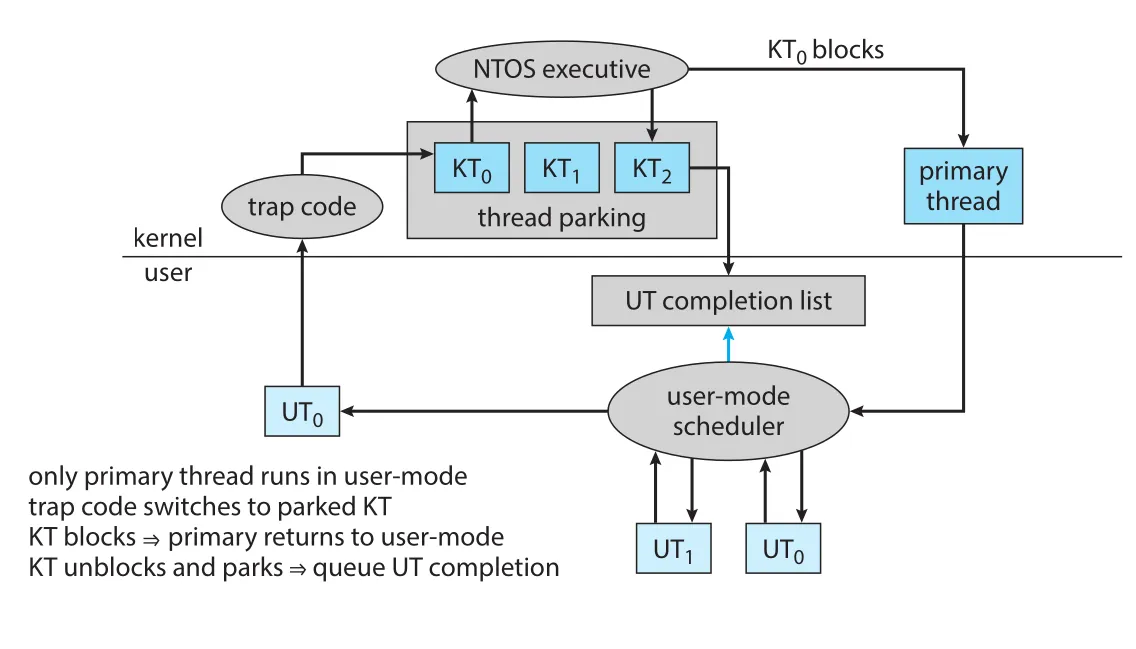
Figure 21.10 · PDF p. 1033 · UT가 kernel에 진입해 KT가 block될 때 primary thread가 user-mode scheduler로 돌아가 다른 UT를 고르는 UMS 구조
UMS에서 UT가 kernel에 들어가 KT가 block되면, kernel은 primary thread라는 scheduling thread로 switch하고 user-mode scheduler로 되돌아가 다른 UT를 고르게 한다. Blocked KT가 완료되면 대응하는 UT가 user-mode completion list에 queue된다. Scheduler는 다음 UT를 고를 때 completion list를 확인할 수 있다.
UMS는 직접 programmer가 쓰기보다 language libraries가 위에서 scheduler를 제공하는 모델이었다. Visual Studio 2010의 ConcRT(Concurrency Runtime)는 tasks를 CPUs에 schedule하는 user-mode scheduler를 제공했지만, Visual Studio 2013부터 UMS scheduling mode는 제거되었다. Well-written parallel programs는 task context switching에 많은 시간을 쓰지 않아 UMS complexity 대비 benefit이 충분하지 않았고, 때로는 default NT scheduler가 더 나았다.
21.7.3.8 Winsock
Winsock은 Windows sockets API다. BSD sockets와 대체로 compatible한 session-layer interface이며, Windows-specific extensions를 포함한다. 다양한 addressing schemes를 가진 transport protocols에 대해 standard interface를 제공하므로 Winsock application은 Winsock-compliant protocol stack 위에서 실행될 수 있다.
Winsock은 WOSA(Windows Open System Architecture) model을 따르며, applications와 networking protocols 사이에 SPI(service provider interface)를 둔다. Layered protocols를 load/unload해 security 같은 additional functionality를 transport protocols 위에 쌓을 수 있다. Asynchronous operations, notifications, reliable multicasting, secure sockets, kernel-mode sockets도 지원한다.
21.7.4 IPC Using Windows Messaging
Win32 IPC에는 local RPCs, named pipes, shared kernel objects(section + event), Windows messaging 등이 있다. GUI applications에서는 Windows messaging이 특히 많이 쓰인다.
PostMessage(), PostThreadMessage()는 asynchronous posting이라 즉시 return하고 delivery/processing 완료를 기다리지 않는다. SendMessage(), SendThreadMessage(), SendMessageCallback()은 synchronous send로 message가 delivered/processed될 때까지 caller를 block한다.
Processes는 separate address spaces를 가지므로 message와 함께 data를 보내려면 copy가 필요하다. WM_COPYDATA와 COPYDATASTRUCT를 사용하면 Windows가 data를 receiving process address space의 new memory block으로 copy한다. 모든 Win32 GUI thread는 input queue를 가지며, application이 GetMessage()로 events를 처리하지 않으면 queue가 차고 약 5초 후 Task Manager가 “Not Responding”으로 표시한다. Message passing도 integrity level policy를 따른다. 낮은 integrity process는 특별 API 없이 높은 integrity process에 WM_COPYDATA 같은 message를 보낼 수 없다.
21.7.5 Memory Management
Win32 API는 application memory use를 위해 virtual memory, memory-mapped files, heaps, thread-local storage, AWE physical memory를 제공한다.
21.7.5.1 Virtual Memory
VirtualAlloc()은 virtual memory reserve/commit을 수행하고, VirtualFree()는 de-commit/release를 수행한다. Caller가 virtual address를 지정할 수 있지만, security 관점에서는 random address selection이 권장된다. These functions는 page-size multiples로 동작하지만 historical reason 때문에 64-KB boundary에 memory를 반환한다. VirtualAllocEx()/VirtualFreeEx()는 다른 process의 memory를 allocate/free할 수 있고, VirtualAllocExNuma()는 NUMA locality를 활용한다.
21.7.5.2 Memory-Mapped Files
Memory-mapped file은 file을 process address space에 map하는 방식이다. 두 processes가 같은 file을 map하면 shared memory처럼 사용할 수 있다. File 없이 memory region만 공유하려면 CreateFileMapping()에 file handle 0xffffffff와 size/name을 넘겨 file-mapping object를 만들 수 있다. File-mapping object는 inheritance, name lookup, handle duplication으로 공유된다.
21.7.5.3 Heaps
Win32 heap은 pre-committed address space region이다. Process initialized 시 default heap이 만들어지고, heap allocations는 1 byte처럼 작은 allocation도 가능하다. Multithreaded applications를 위해 heap access는 synchronized된다. 단점은 heap memory를 shared하거나 read-only로 mark하기 어렵다는 것이다. HeapCreate()로 private heap을 만들면 HeapProtect(), executable heap, NUMA-specific allocation 같은 제어가 가능하다.
Windows XP의 LFH(low-fragmentation heap)는 long-running server programs에서 large address-space fragmentation 문제를 줄였다. Windows 7+ heap manager는 적절할 때 LFH를 자동 활성화한다. Heap은 double-free, use-after-free 같은 attacks의 주요 target이므로 Windows 10까지 randomness, entropy, mitigations가 계속 추가되었다.
21.7.5.4 Thread-Local Storage
TLS(thread-local storage)는 global/static처럼 보이지만 thread마다 별도 instance를 갖는 variables를 제공한다. 예를 들어 C runtime strtok()처럼 static state에 의존하는 functions는 multithreaded 환경에서 thread별 state가 필요하다. TLS는 global heap storage를 allocate하고 각 user-mode thread의 TEB(Thread Environment Block)에 붙인다.
Dynamic TLS는 TlsAlloc(), TlsSetValue(), TlsGetValue(), TlsFree()로 사용한다. Static TLS는 __declspec(thread) 선언으로 thread마다 private copy를 갖게 한다.
21.7.5.5 AWE Memory
AWE(Address Windowing Extension)은 application이 AllocateUserPhysicalPages()로 free physical RAM pages를 직접 요청하고, VirtualAlloc()으로 virtual memory를 그 physical pages 위에 commit하게 한다. 32-bit system에서 virtual address space보다 많은 physical memory에 접근하거나, MM의 caching/paging/page coloring algorithms를 우회해 custom performance를 얻는 데 쓰인다. SQL Server가 AWE memory를 사용하는 예다. UMS와 마찬가지로 default Windows policy 밖에서 특수 application이 성능과 제어를 얻기 위한 escape hatch로 볼 수 있다.
21.8 Summary
Windows는 extensible, portable OS로 설계되어 new hardware/techniques를 흡수할 수 있다. Kernel objects와 client-server support는 다양한 application environments를 지원하게 하고, virtual memory, integrated caching, preemptive scheduling은 general-purpose workload의 기반이 된다.
Windows 10은 security와 integrity를 위해 ACL, integrity levels, AppContainer, exploit mitigations, code integrity, VSM/Hyper-V 같은 mechanisms를 조합한다. Scheduling과 memory-management algorithms는 scalability와 performance를 위해 계속 개선되었고, power management와 fast sleep/wake features는 mobile systems와 modern hardware에 맞춰 강화되었다. NTFS와 volume manager는 desktop/server 모두를 위한 sophisticated storage features를 제공하며, Win32 API는 Windows features를 application에서 사용할 수 있는 넓은 programming environment를 제공한다.
연결 관계
Chapter 21은 이전 장의 OS 개념을 Windows 10이라는 실제 system에 대응시킨다. Chapter 3의 process/thread 개념은 Windows에서 process manager, thread states, dispatcher, jobs, Win32 CreateProcess()/CreateThread()로 구체화된다. Chapter 5의 scheduling은 32-level priority, variable/static classes, priority boosts, quantum, UMS로 확장된다.
Chapter 6의 synchronization은 dispatcher objects, events, mutexes, semaphores, timers, critical sections, SRW locks로 연결된다. Chapter 9-10의 memory management는 MM, VAD, section objects, working sets, PFN database, PTE/PDE/PML4, SuperFetch, compression store manager로 구현된다. Chapter 13-15의 file-system concepts는 NTFS volume, clusters, MFT, B+ tree, metadata files, transactional recovery, ACL, compression, sparse files, shadow copies로 나타난다.
Chapter 19의 networking/IPC는 Windows에서 NDIS/TDI, SMB/CIFS, RPC/ALPC, named pipes, redirectors, DFS, domains/Kerberos, Winsock, Windows messaging으로 이어진다. Chapter 16-17의 security/protection은 SRM, security token, SID, DACL/SACL, integrity levels, AppContainer, capabilities, Device Guard, Credential Guard로 구체화된다.
오해하기 쉬운 내용
Windows가 단순히 “GUI OS”라는 이해는 부족하다. Windows 10은 user-mode services, kernel executive, HAL, drivers, Hyper-V, VSM, Secure World까지 포함하는 layered system이다.
Windows compatibility는 API를 오래 유지하는 것만이 아니다. Shim engine, WoW32/WoW64/WoWA64, Pico Provider/WSL, Hyper-V for Client처럼 bug compatibility, ISA translation, ABI emulation, virtualization을 모두 사용한다.
Windows thread scheduling은 별도 scheduler thread가 주기적으로 모든 결정을 내리는 구조가 아니다. 현재 running thread가 kernel mode에 들어간 경로에서 dispatcher code를 실행하며, higher-priority ready thread가 생기면 즉시 preempt될 수 있다.
NTFS recovery는 user data 최신성을 보장하는 것이 아니라 metadata consistency를 보장한다. Crash 후 redo/undo log recovery로 file-system structures는 consistent하게 만들지만, user-file contents가 반드시 application-level consistent하다는 뜻은 아니다.
AppContainer는 단순히 ACL을 더 붙이는 기능이 아니다. User/group SIDs를 disable하고 low integrity, package-specific AppContainer SID, capability SIDs를 사용해 per-application mandatory security model을 만든다.
UMS와 fibers는 둘 다 user-mode scheduling과 관련 있지만 같은 것이 아니다. Fibers는 kernel이 모르는 cooperative units이고 TEB 공유 문제가 있다. UMS는 UT/KT 분리를 인식하고 completion list/primary thread로 kernel blocking을 user-mode scheduler에 통지한다.
면접 질문
- Windows 10의
Windows-as-a-Service(WaaS)모델은 기존 OS release model과 무엇이 다른가? - Windows 10에서
Pico Provider와WSL은 기존 subsystem model의 어떤 한계를 해결하려고 등장했는가? - Windows security에서
ACL,integrity level,AppContainer,capability SID의 역할 차이를 설명하라. DEP,ASLR,CFG,ACG,CET는 각각 어떤 공격 기법을 어렵게 만드는가?- Windows의
VSM,VTL 0,VTL 1,secure kernel,Credential Guard는 어떻게 연결되는가? - Windows dispatcher가 thread states와 32-level priorities를 사용해 scheduling하는 방식을 설명하라.
APC와DPC는 무엇이 다르며, DPC routine이 page fault를 내면 안 되는 이유는 무엇인가?- Windows object manager에서
handle,handle table,reference count,access mask는 각각 어떤 문제를 해결하는가? - Windows MM의 reserve/commit 2단계 allocation과
section object/view개념을 설명하라. PDE,PTE,TLB,PFN database,working set은 Windows virtual memory에서 각각 무엇을 나타내는가?SuperFetch와compression store manager는 어떤 상황에서 성능에 도움이 되고, 어떤 상황에서는 덜 유리한가?- Windows I/O manager에서
IRP,I/O stack,filter driver,minifilter가 request processing에 어떻게 참여하는가? - NTFS에서 file이 byte stream이 아니라 typed attributes의 집합이라는 말은 무슨 뜻인가?
- NTFS
MFT,file reference,B+ tree, metadata files는 directory/file lookup과 consistency에 어떻게 기여하는가? - NTFS recovery에서 redo/undo log와 checkpoint가 하는 역할은 무엇인가?
- Windows networking에서
SMB/CIFS,redirector,MUP,DFS,CSC는 remote file access를 어떻게 구성하는가? - Win32에서 process 간 kernel object sharing을 하는 세 가지 방법은 무엇인가?
critical section,SRW lock,thread pool,fiber,UMS의 차이를 설명하라.VirtualAlloc(),CreateFileMapping(), heap, TLS, AWE는 각각 어떤 memory use case에 적합한가?