개요
Application layer는 사용자가 실제로 체감하는 network applications가 만들어지는 층이다. Web, e-mail, DNS, P2P file distribution, video streaming 같은 application은 모두 서로 다른 end systems에서 실행되는 processes가 application-layer protocol에 따라 messages를 주고받으면서 동작한다.
이 장의 큰 질문은 세 가지다. 첫째, network application은 어떤 architecture(client-server, P2P)와 process/socket model 위에서 설계되는가? 둘째, HTTP, SMTP, DNS, BitTorrent, DASH/CDN 같은 대표 application-layer protocols는 어떤 message format과 timing flow로 동작하는가? 셋째, application developer는 TCP/UDP socket interface를 사용해 어떻게 실제 network application을 만드는가?
핵심 개념
2.1 Principles of Network Applications
application은 network edge에서 실행된다
network application 개발의 핵심은 서로 다른 end systems에서 실행되는 programs를 작성하고, 이 programs가 network를 통해 통신하게 만드는 것이다. Web에서는 browser program과 Web server program이, Netflix 같은 video service에서는 client app과 server-side program이 message를 주고받는다. 중요한 점은 application software가 routers나 link-layer switches 같은 network-core devices에서 실행되지 않는다는 것이다. core devices는 application layer가 아니라 network layer 이하에서 packet forwarding에 집중한다.
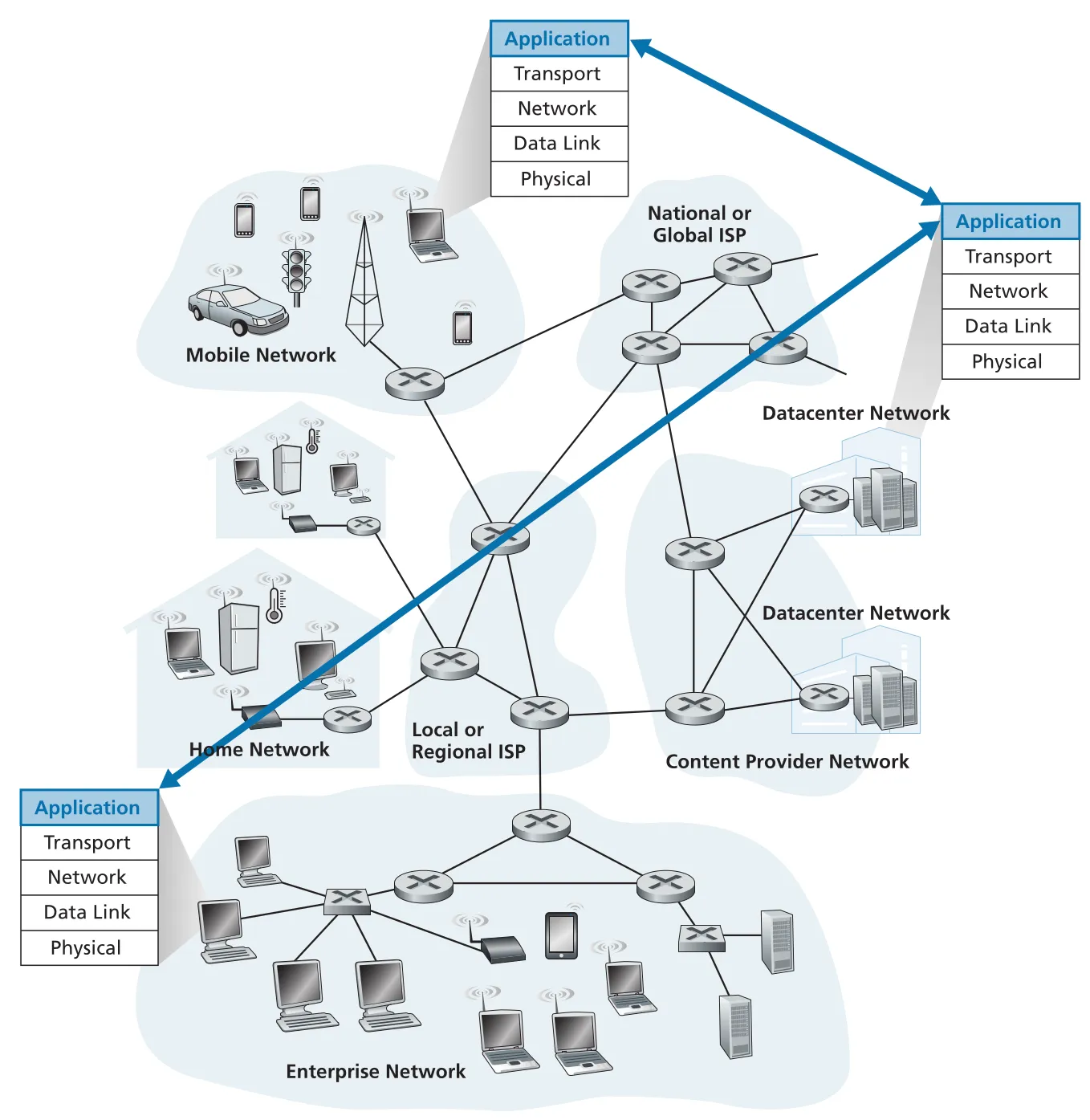 Figure 2.1 · PDF p. 94 · network application의 communication은 application layer의 end systems 사이에서 일어난다
이 설계는 application innovation을 빠르게 만든다. 개발자는 network core를 수정하지 않고 end systems에 새 client/server code를 배포해 새로운 application을 만들 수 있다. Chapter 1의 edge/core 분리와 이어지는 중요한 설계 감각이다.
network application architecture: client-server와 P2P
application architecture는 network architecture와 다르다. network architecture는 Internet의 고정된 protocol stack과 service model이고, application architecture는 application developer가 end systems 위에 application을 어떻게 배치할지 정하는 구조다. 대표 구조는 client-server architecture와 peer-to-peer(P2P) architecture다.
client-server architecture에서는 always-on host인 server가 많은 clients의 requests를 처리한다. server는 fixed, well-known IP address를 갖고, clients는 직접 서로 통신하지 않고 server와 통신한다. Web, FTP, Telnet, e-mail이 전형적인 예다. 인기 service는 단일 server로 감당하기 어렵기 때문에 data center의 많은 hosts를 묶어 virtual server처럼 동작시킨다. trade-off는 서버 인프라, 전력, 유지보수, interconnection, bandwidth 비용이다.
P2P architecture는 dedicated server 의존을 최소화하고 intermittently connected hosts인 peers 사이의 direct communication을 활용한다. BitTorrent가 대표 예다. P2P의 강점은 self-scalability다. 각 peer는 file을 요청하며 workload를 만들지만 동시에 다른 peer에게 file을 제공해 service capacity도 늘린다. 그러나 decentralized structure 때문에 security, performance, reliability 관리가 어렵다.
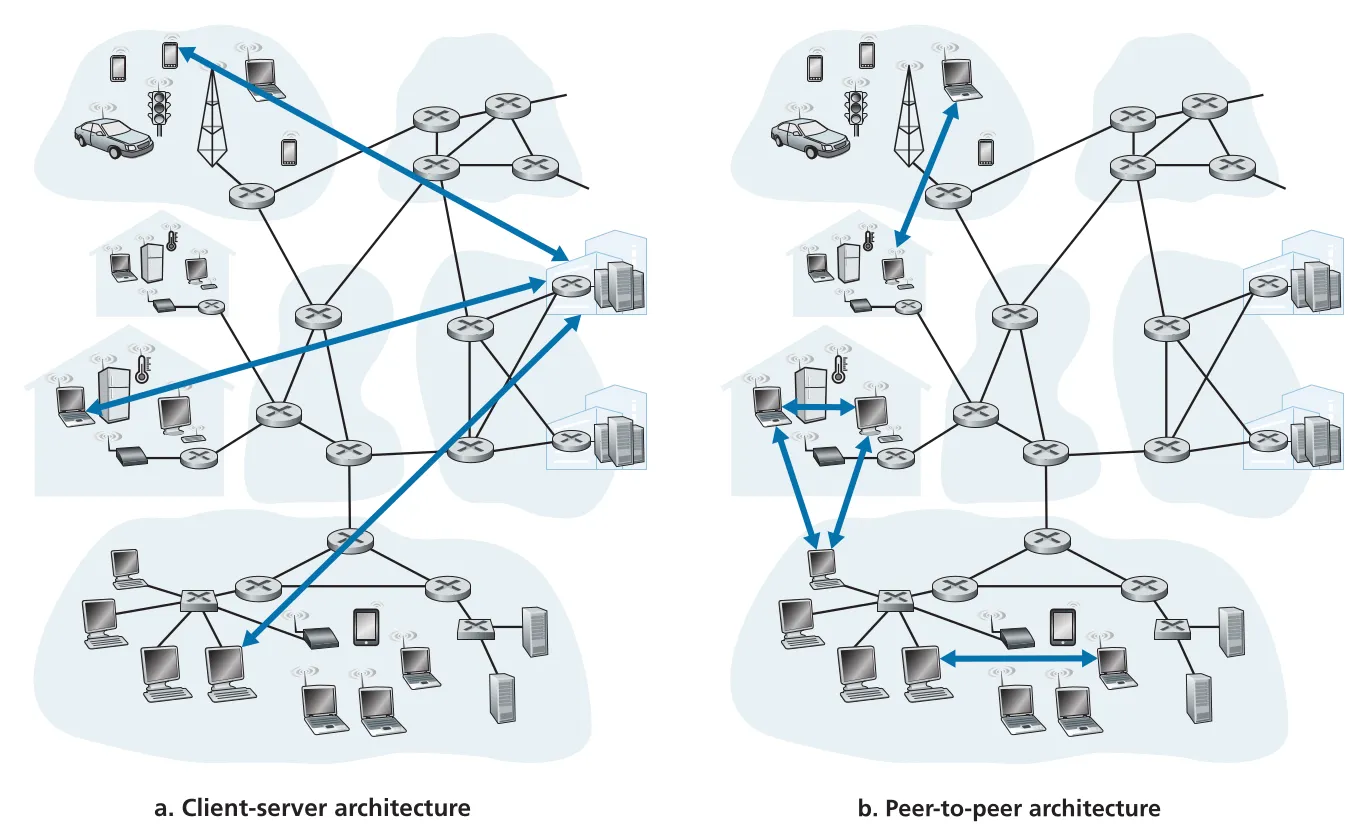 Figure 2.2 · PDF p. 96 · client-server architecture와 peer-to-peer(P2P) architecture의 구조 차이
processes, sockets, ports
network application에서 실제로 통신하는 주체는 program 그 자체라기보다 실행 중인 process다. 같은 host 안의 processes는 operating system이 제공하는 interprocess communication으로 통신할 수 있지만, 이 장의 관심은 다른 hosts에서 실행되는 processes가 network를 통해 messages를 교환하는 방식이다.
communication session에서 먼저 접촉을 시작하는 process를 client process, 접촉을 기다리는 process를 server process라고 부른다. P2P application에서는 한 process가 어떤 session에서는 client이고 다른 session에서는 server일 수 있다. 예를 들어 Peer A가 Peer B에게 file을 요청하는 순간 A는 client, B는 server지만, 다른 순간에는 반대가 될 수 있다.
process는 socket이라는 software interface를 통해 network로 message를 보내고 받는다. socket은 application layer와 transport layer 사이의 API이며, process 입장에서는 network로 나가는 “door”다. application developer는 socket 위쪽의 application logic을 통제하고, socket 아래쪽 transport layer에 대해서는 보통 transport protocol 선택(TCP 또는 UDP)과 일부 parameters 정도만 통제한다.
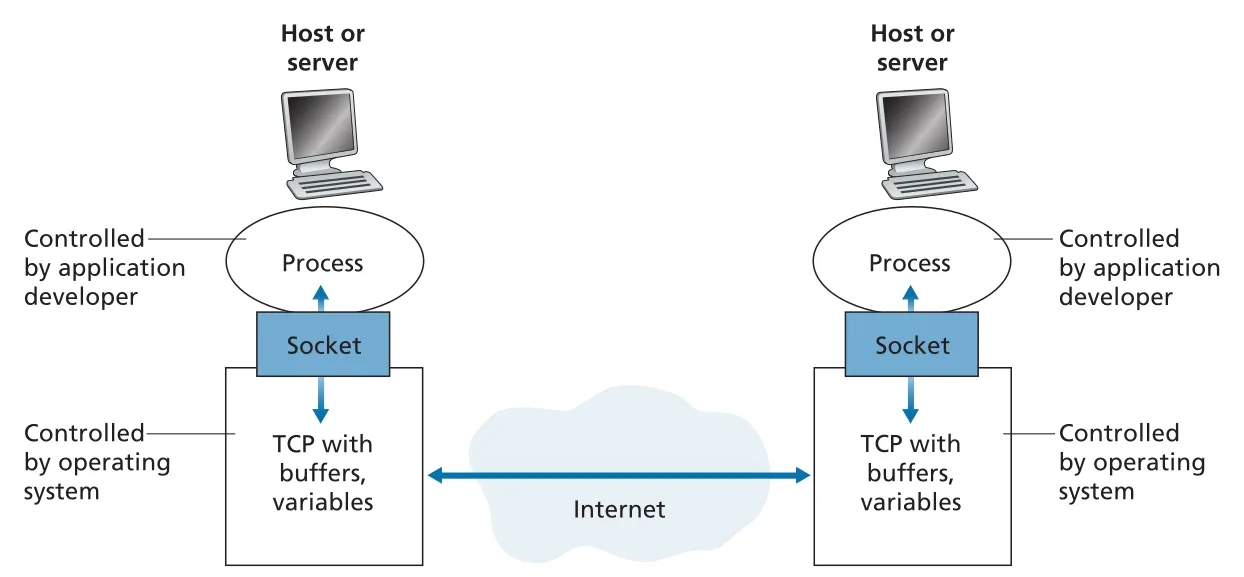 Figure 2.3 · PDF p. 98 · process가 socket API를 통해 TCP와 underlying network를 사용하는 구조
다른 host의 특정 process로 message를 보내려면 두 주소가 필요하다. 첫째는 host를 식별하는 IP address이고, 둘째는 destination host 안의 receiving process/socket을 식별하는 destination port number다. 예를 들어 Web server는 port 80, SMTP mail server는 port 25를 사용한다. port number와 multiplexing/demultiplexing은 Chapter 3 transport layer에서 더 자세히 다룬다.
application이 transport service에서 요구하는 것
application은 socket을 통해 transport-layer protocol에 messages를 맡긴다. transport protocol을 고를 때는 application이 어떤 service를 필요로 하는지 봐야 한다. 본문은 네 가지 축을 제시한다: reliable data transfer, throughput, timing, security.
reliable data transfer는 sender가 socket에 넣은 data가 error 없이, 빠짐없이 receiver process에 도착한다는 보장이다. e-mail, file transfer, Web document, financial application처럼 data loss가 치명적인 application은 reliability가 필요하다. 반대로 conversational audio/video처럼 일부 손실이 작은 glitch로 끝나는 application은 loss-tolerant할 수 있다.
throughput 요구는 bandwidth-sensitive applications와 elastic applications를 가른다. Internet telephony나 video는 일정 rate 이상을 받아야 의미가 있으므로 bandwidth-sensitive하다. e-mail, file transfer, Web transfer는 적은 throughput도 사용할 수 있지만 많을수록 좋은 elastic applications다.
timing guarantee는 bit가 socket에 들어간 뒤 일정 시간 안에 receiver socket에 도착해야 한다는 요구다. Internet telephony, teleconferencing, multiplayer games, virtual environments는 수백 ms 수준의 delay에도 사용자 경험이 깨질 수 있다. 반면 file transfer나 e-mail은 낮은 delay가 좋긴 하지만 tight timing constraint는 없다.
security service는 confidentiality, data integrity, end-point authentication 등을 포함한다. 중요한 주의점은 TCP와 UDP 자체가 encryption을 제공하지 않는다는 것이다. TCP를 사용하는 application이 process-to-process 보안을 원하면 Transport Layer Security(TLS)를 application layer에서 TCP 위에 얹는다. TLS는 TCP/UDP와 같은 별도 transport protocol이 아니라 TCP enhancement로 사용되는 library/API 성격이 강하다.
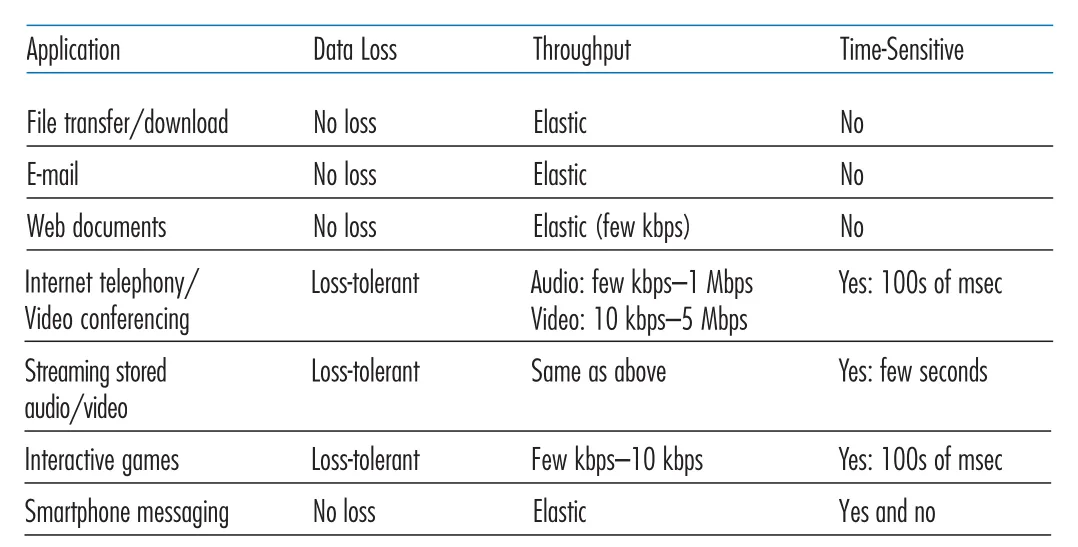 Figure 2.4 · PDF p. 102 · file transfer, Web, Internet telephony, streaming, games 등이 요구하는 data loss, throughput, timing 특성
TCP와 UDP의 application-facing service
Internet은 application에게 TCP와 UDP 두 transport protocols를 제공한다. TCP는 connection-oriented service와 reliable data transfer service를 제공한다. connection-oriented라는 말은 application data가 흐르기 전에 client/server가 transport-layer control information을 교환하는 handshaking을 수행한다는 뜻이다. handshaking 후 sockets 사이에 full-duplex TCP connection이 존재하고, 양쪽 process는 동시에 data를 보낼 수 있다. reliable data transfer는 byte stream이 missing/duplicate 없이, 순서대로 receiver socket에 도착하도록 해 준다. TCP에는 network congestion이 있을 때 sender를 throttling하는 congestion-control mechanism도 있다.
UDP는 no-frills, lightweight, connectionless transport protocol이다. handshaking이 없고, message가 도착한다는 보장도 없으며, 도착한 messages의 순서도 보장하지 않는다. 또한 congestion-control mechanism이 없어서 application이 원하는 rate로 network layer에 data를 밀어 넣을 수 있다. 다만 실제 end-to-end throughput은 path의 link capacity와 congestion에 의해 제한된다.
현재 Internet transport는 reliable data transfer(TCP)와 security(TLS를 얹은 TCP)는 제공할 수 있지만, throughput guarantee나 timing guarantee는 기본적으로 제공하지 않는다. 그래서 time-sensitive applications는 loss concealment, adaptive coding, buffering, fallback transport 같은 application-level 설계로 보장 부재를 견딘다.
| Application | Application-layer protocol | Underlying transport protocol | 선택 이유 |
|---|---|---|---|
| Electronic mail | SMTP | TCP | message loss 없이 전달 필요 |
| Web | HTTP | TCP | objects를 정확히 받아야 함 |
| File transfer | FTP | TCP | file bytes의 정확한 순서/완전성 필요 |
| Streaming multimedia | HTTP, DASH | TCP | CDN/HTTP infrastructure 활용, adaptive streaming |
| Internet telephony | SIP, RTP, proprietary | UDP 또는 TCP | loss-tolerant, timing-sensitive; UDP 차단 시 TCP fallback |
application-layer protocol과 application의 구분
application-layer protocol은 서로 다른 end systems의 application processes가 messages를 어떻게 주고받는지 정의한다. 구체적으로 message types, message syntax, field semantics, message 송수신 규칙을 정의한다. HTTP처럼 RFC로 공개된 protocol도 있고, proprietary protocol도 있다.
application-layer protocol은 network application의 일부일 뿐이다. Web application은 HTML, browser, Web server, HTTP 등으로 구성되고, HTTP는 browser와 server가 교환하는 message format과 sequence를 정의하는 protocol이다. Netflix 같은 video service도 client app, storage/transmission servers, billing/management servers, DASH protocol 등 여러 구성요소로 이루어지며, DASH는 그중 server-client video retrieval message를 정의하는 한 조각이다.
2.2 The Web and HTTP
Web과 HTTP의 기본 구조
World Wide Web은 Internet을 일반 대중의 도구로 바꾼 결정적 application이다. Web의 강점은 on demand 동작이다. 사용자는 broadcast처럼 정해진 시간에 맞춰 받는 것이 아니라, browser에서 원하는 object를 요청하고 그때 server가 object를 보낸다. Web은 HTML document, hyperlink, search engine, form, JavaScript, video 등 여러 요소를 품지만, application-layer protocol의 중심은 HyperText Transfer Protocol(HTTP)이다.
HTTP는 client program과 server program이 교환하는 HTTP messages의 structure와 exchange rule을 정의한다. browser는 HTTP client side를 구현하고, Web server는 HTTP server side를 구현한다. Web page(document)는 objects로 구성된다. object는 HTML file, JPEG image, JavaScript file, CSS style sheet, video clip처럼 하나의 URL로 addressable한 file이다. 일반적인 Web page는 base HTML file과 그 안에서 참조하는 여러 objects로 구성된다.
URL은 server의 hostname과 object의 path name을 포함한다. 예를 들어 http://www.someSchool.edu/someDepartment/picture.gif에서 www.someSchool.edu는 hostname이고 /someDepartment/picture.gif는 path name이다. browser가 Web page를 요청하면 base HTML file을 받은 뒤, 그 안에 포함된 referenced objects의 URL을 읽고 추가 HTTP requests를 보낸다.
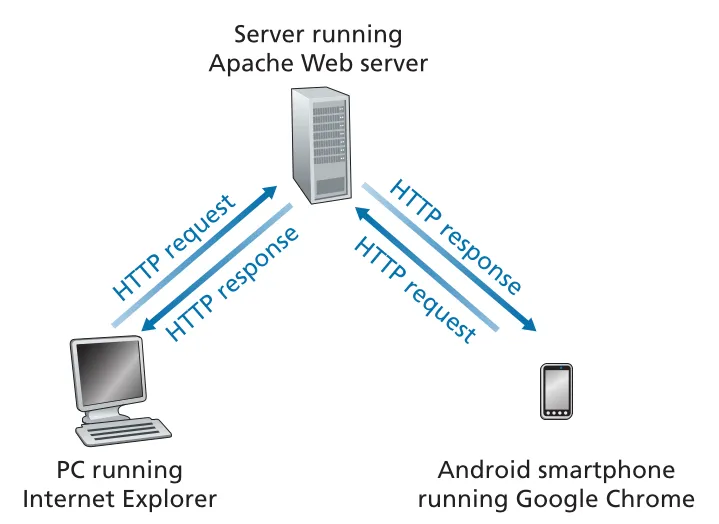 Figure 2.6 · PDF p. 108 · browser/client가 HTTP request를 보내고 server가 HTTP response로 object를 돌려주는 흐름
HTTP는 UDP가 아니라 TCP 위에서 동작한다. HTTP client는 먼저 server와 TCP connection을 만들고, connection이 만들어지면 browser와 server process는 socket interface를 통해 TCP를 사용한다. HTTP가 TCP를 사용하는 덕분에 HTTP 자체는 packet loss, reordering, retransmission 세부를 직접 처리하지 않아도 된다. 이는 layered architecture의 장점이다. application protocol은 message semantics에 집중하고, reliable data transfer는 TCP가 맡는다.
HTTP server는 client에 대한 state information을 저장하지 않는 stateless protocol이다. 같은 client가 몇 초 뒤 같은 object를 다시 요청해도 server는 “방금 보냈다”고 기억하지 않고 object를 다시 보낸다. stateless 설계는 server 구현과 scale-out을 단순하게 하지만, login state나 user preference 같은 기능은 cookies, session identifiers, application database 같은 별도 mechanism이 필요하다.
non-persistent connection과 persistent connection
HTTP가 TCP 위에서 동작할 때 application developer는 request/response pair마다 별도 TCP connection을 만들지, 아니면 여러 requests/responses를 같은 TCP connection에 실을지 선택할 수 있다. 전자를 non-persistent connections, 후자를 persistent connections라고 한다.
non-persistent HTTP에서는 한 TCP connection이 정확히 하나의 HTTP request와 하나의 HTTP response를 운반한다. 예를 들어 base HTML file과 10개의 JPEG images로 된 page를 받으려면 총 11개의 TCP connections가 필요하다. 흐름은 TCP connection setup → HTTP request → HTTP response/object 수신 → TCP close가 object마다 반복된다.
이때 response time의 기본 단위는 round-trip time(RTT)이다. RTT는 작은 packet이 client에서 server까지 갔다가 다시 client로 돌아오는 시간이며 propagation, queuing, processing delay를 포함한다. 사용자가 hyperlink를 클릭하면 TCP three-way handshake의 앞 두 단계가 약 1 RTT를 쓰고, HTTP request가 server에 도착해 response가 돌아오는 데 또 1 RTT가 필요하다. 따라서 base HTML file 하나를 받는 대략적 시간은 다음과 같다.
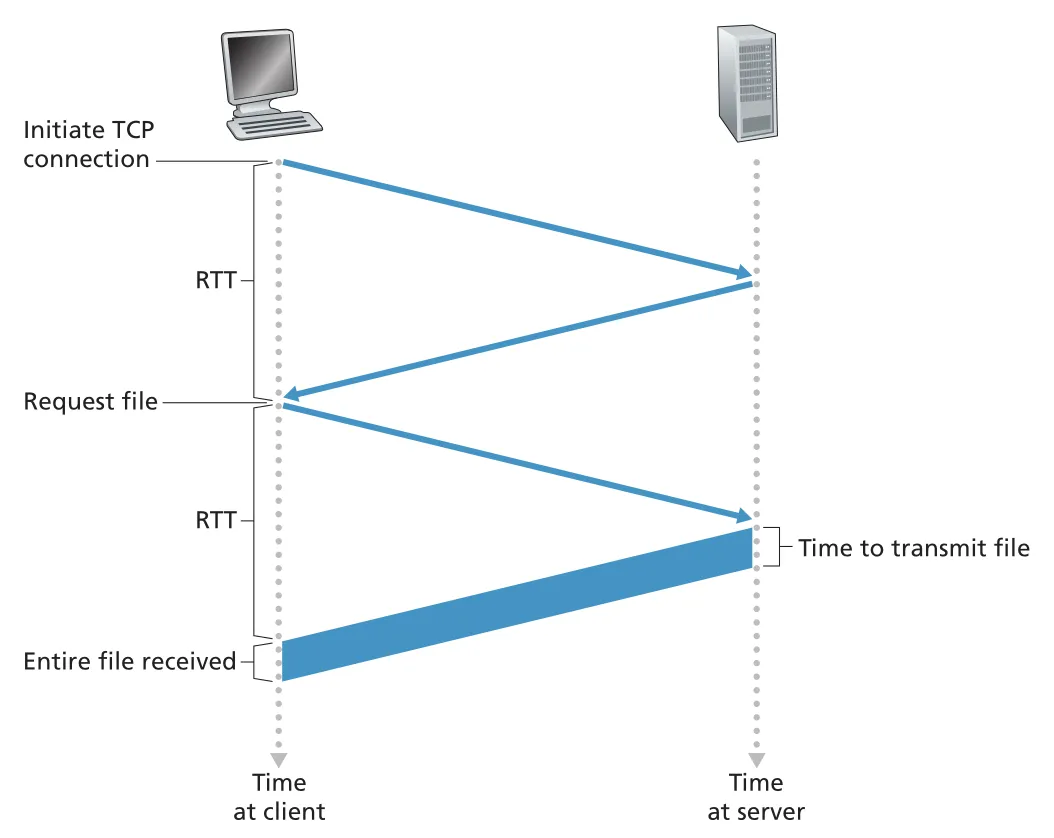 Figure 2.7 · PDF p. 111 · non-persistent HTTP에서 TCP setup과 request/response가 각각 RTT를 소비하는 시간 계산
non-persistent connections의 단점은 object마다 TCP buffers와 variables가 양쪽에 필요하고, server가 많은 clients를 처리할 때 부담이 커진다는 것이다. 또한 각 object가 TCP connection setup RTT를 반복해서 지불한다. browser가 parallel TCP connections를 열어 일부 지연을 줄일 수 있지만, connection 수와 server/network 부담이 늘어난다.
HTTP/1.1의 default는 persistent connections다. server는 response를 보낸 뒤 TCP connection을 닫지 않고 열어 둔다. 같은 client와 server 사이의 subsequent requests/responses가 같은 connection을 재사용할 수 있고, 여러 objects를 back-to-back으로 요청하는 pipelining도 가능하다. connection은 일정 시간 사용되지 않으면 server가 timeout으로 닫는다. persistent connection의 핵심 이점은 TCP setup overhead를 줄이고, 같은 server의 여러 Web pages/objects에 connection을 재사용한다는 점이다.
HTTP request message format
HTTP request message는 ASCII text로 구성되며, request line, header lines, blank line, optional entity body로 나뉜다. 대표 예시는 다음과 같다.
GET /somedir/page.html HTTP/1.1
Host: www.someschool.edu
Connection: close
User-agent: Mozilla/5.0
Accept-language: fr
request line은 method URL version 세 필드를 갖는다. GET은 object 요청에 가장 흔히 쓰이고, POST는 form 입력값을 entity body에 담아 server에 보낼 때 자주 쓰인다. HEAD는 response에서 requested object를 제외하고 headers만 받기 때문에 debugging에 유용하다. PUT은 object upload, DELETE는 server object 삭제에 쓰일 수 있다.
header lines의 의미도 중요하다. Host:는 object가 있는 host를 지정하며 Web proxy cache에도 필요하다. Connection: close는 persistent connection을 쓰지 않고 response 후 connection을 닫도록 요청한다. User-agent:는 browser type을 알려 server가 user agent별 object를 줄 수 있게 한다. Accept-language:는 language preference를 표현하는 content negotiation header다.
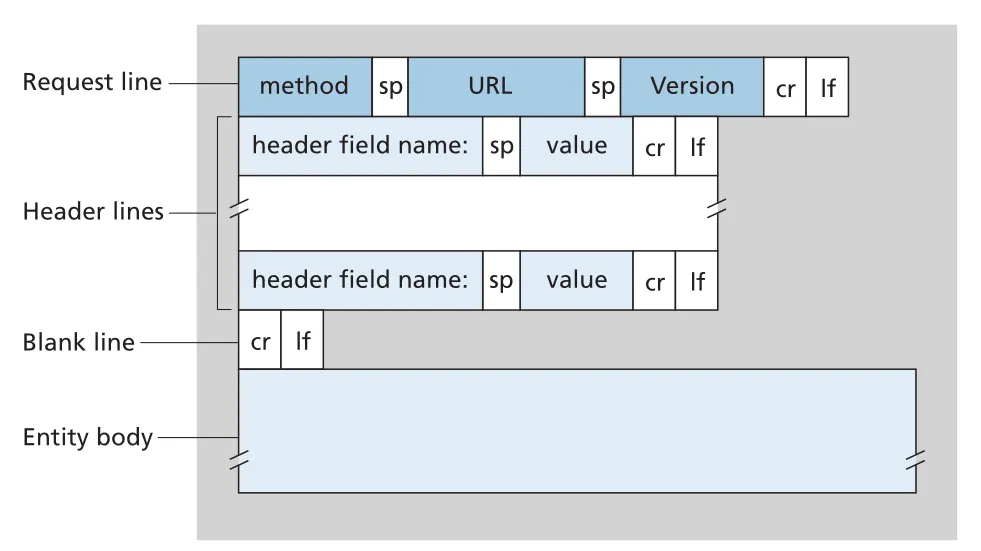 Figure 2.8 · PDF p. 113 · HTTP request message의 request line, header lines, blank line, entity body 구조
HTTP request의 일반 구조는 이렇게 기억하면 된다.
Request line:  method SP URL SP version CRLF
Header lines: header-field-name: SP value CRLF
              ...
Blank line:   CRLF
Entity body:  optional, 주로 POST에서 사용
HTTP response message format
HTTP response message는 status line, header lines, blank line, entity body로 구성된다. entity body에는 requested object 자체가 들어간다. 대표 구조는 다음과 같다.
HTTP/1.1 200 OK
Connection: close
Date: Tue, 18 Aug 2015 15:44:04 GMT
Server: Apache/2.2.3 (CentOS)
Last-Modified: Tue, 18 Aug 2015 15:11:03 GMT
Content-Length: 6821
Content-Type: text/html

(data data data ...)
status line은 version status-code phrase 형식이다. 200 OK는 성공, 301 Moved Permanently는 object가 이동했으며 새 URL이 Location: header에 있음을 뜻한다. 400 Bad Request는 server가 request를 이해하지 못했다는 일반 오류, 404 Not Found는 requested document가 없음을 뜻한다. 505 HTTP Version Not Supported는 server가 request의 HTTP version을 지원하지 않는다는 뜻이다.
response headers도 caching과 object 해석에 중요하다. Date:는 response가 server에서 생성/전송된 시간이고 object의 생성 시간이 아니다. Last-Modified:는 object가 마지막으로 수정된 시간이며 Web cache의 freshness validation에 중요하다. Content-Length:는 object byte 수, Content-Type:은 entity body의 media type을 지정한다. object type은 file extension이 아니라 Content-Type header로 공식 표시된다.
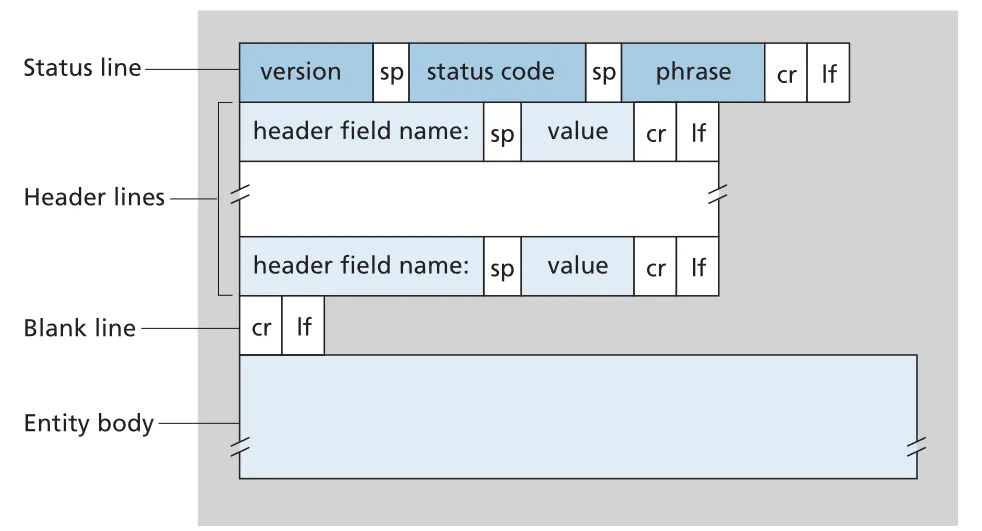 Figure 2.9 · PDF p. 115 · HTTP response message의 status line, header lines, blank line, entity body 구조
cookies: stateless HTTP 위의 user session
HTTP server는 stateless지만, 실제 Web sites는 user를 식별해야 할 때가 많다. access restriction, shopping cart, personalization, one-click shopping, Web-based e-mail session 유지가 모두 user identity를 필요로 한다. cookies는 stateless HTTP 위에 user session layer를 만드는 mechanism이다.
cookie technology는 네 구성요소로 이루어진다. 첫째, HTTP response message의 Set-cookie: header line. 둘째, 이후 HTTP request message의 Cookie: header line. 셋째, browser가 user end system에 관리하는 cookie file. 넷째, Web site의 back-end database다. 사용자가 site에 처음 방문하면 server는 unique identification number를 만들고 database entry를 생성한 뒤 response에 Set-cookie: 1678 같은 header를 보낸다. browser는 hostname과 ID를 cookie file에 저장한다. 이후 같은 site로 가는 request마다 Cookie: 1678을 붙여 server가 같은 user의 activity를 이어서 볼 수 있게 한다.
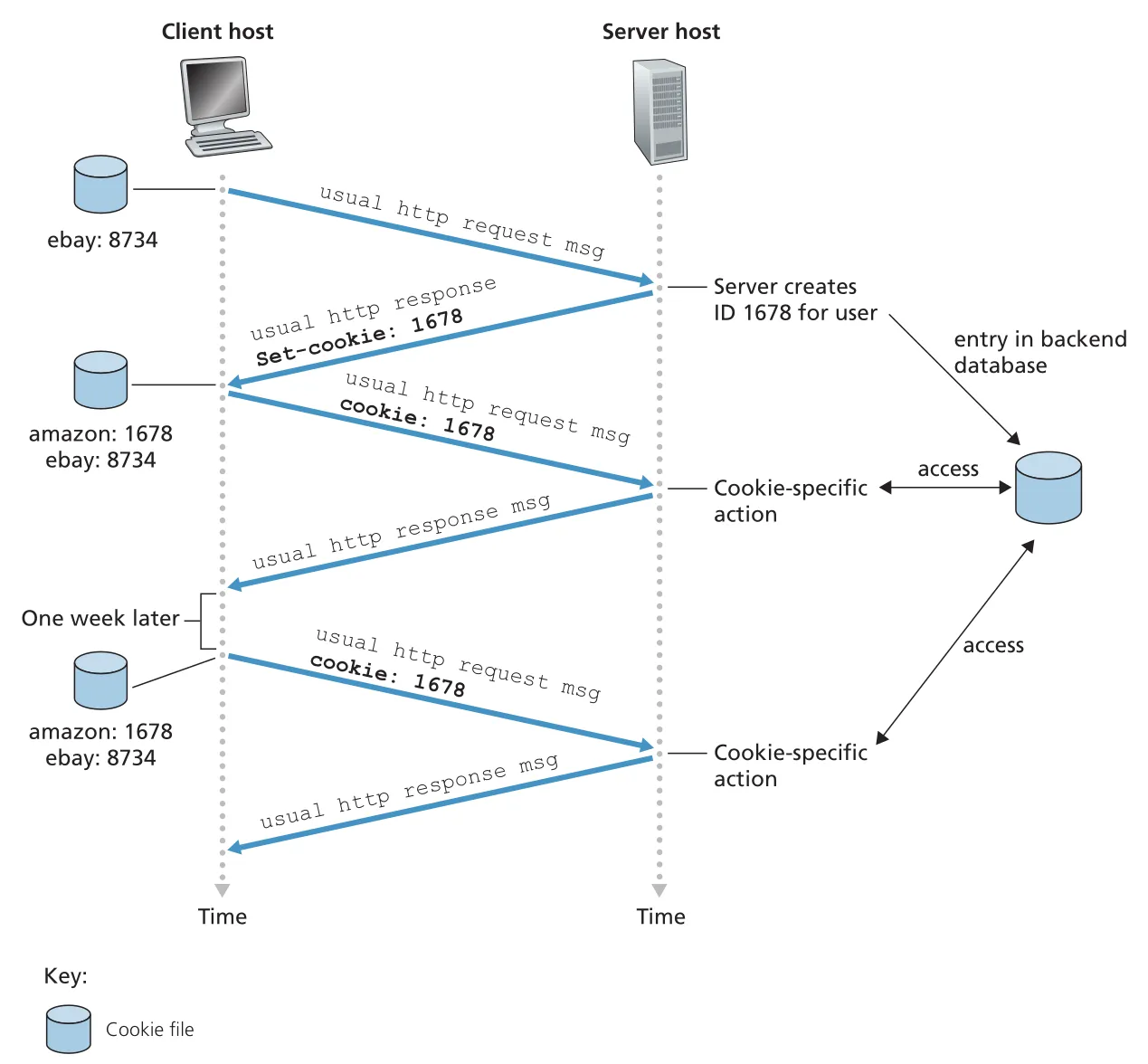 Figure 2.10 · PDF p. 117 · Set-cookie, Cookie header, browser cookie file, server database가 함께 user state를 유지하는 흐름
cookies의 설계 trade-off는 분명하다. server는 HTTP 자체를 stateless로 유지하면서도 user-specific behavior를 구현할 수 있다. 하지만 Web site가 pages visited, order, time, account information을 연결해 user profile을 만들 수 있으므로 privacy risk가 생긴다. 즉 cookies는 convenience와 tracking capability를 동시에 제공한다.
Web caching과 proxy server
Web cache 또는 proxy server는 origin Web server를 대신해 HTTP requests를 만족시키는 network entity다. cache는 자체 disk storage에 recently requested objects의 copies를 저장한다. browser가 cache를 사용하도록 설정되면, browser의 HTTP requests는 먼저 Web cache로 간다.
cache hit이면 cache가 local copy를 HTTP response로 바로 돌려준다. cache miss이면 cache가 origin server로 TCP connection을 열고 object를 요청한 뒤, 받은 object를 local storage에 저장하면서 client browser에도 전달한다. 따라서 cache는 browser에게는 server이고, origin server에게는 client다.
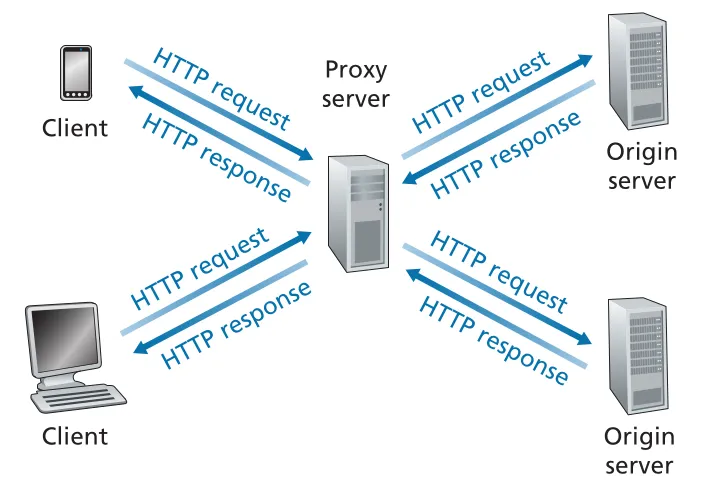 Figure 2.11 · PDF p. 119 · browser requests가 먼저 Web cache로 가고, miss일 때 cache가 origin server에 요청하는 구조
Web caching의 이점은 두 가지다. 첫째, client와 cache 사이 bottleneck bandwidth가 client-origin server 사이보다 크고 cache hit이면 response time이 크게 줄어든다. 둘째, institution access link를 지나는 traffic을 줄여 link upgrade 비용을 늦출 수 있고, Internet 전체 Web traffic도 줄인다.
본문의 계산 예시는 Chapter 1의 traffic intensity가 실제 Web caching 성능에 어떻게 쓰이는지 보여준다. average object size가 1 Mbits, request rate가 15 requests/sec이면 100 Mbps LAN의 traffic intensity는 라 delay가 작다. 하지만 15 Mbps access link의 traffic intensity는 이 되어 queuing delay가 폭발한다.
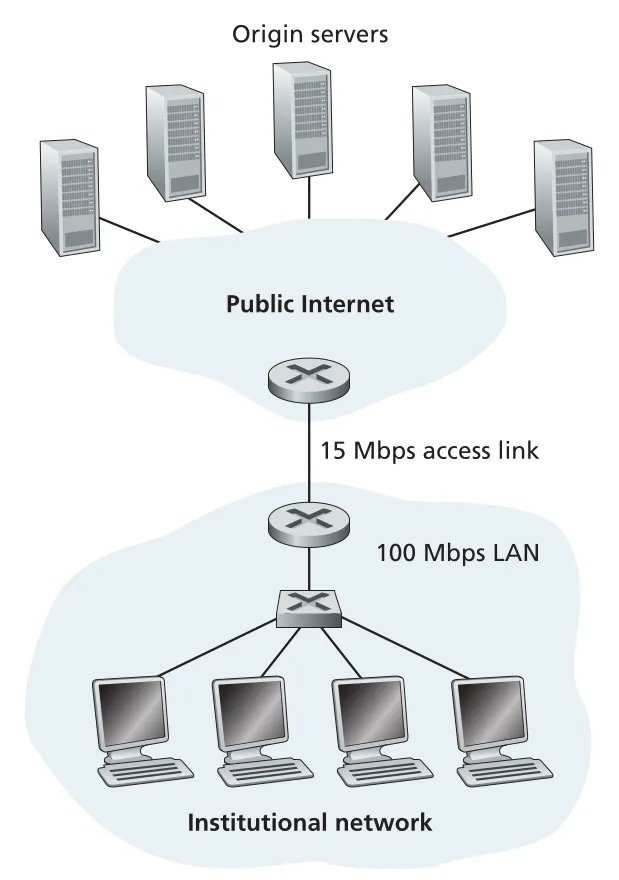 Figure 2.12 · PDF p. 121 · institutional network와 Internet 사이 15 Mbps access link가 bottleneck이 되는 상황
해결책 하나는 access link를 100 Mbps로 upgrade하는 것이지만 비용이 크다. 다른 해결책은 institutional network 안에 Web cache를 설치하는 것이다. hit rate가 0.4라면 40% requests는 LAN 내부 cache에서 약 10 ms에 만족되고, 나머지 60%만 origin server로 나가므로 access link traffic intensity는 1.0에서 0.6으로 내려간다. 평균 response time은 대략 다음처럼 줄어든다.
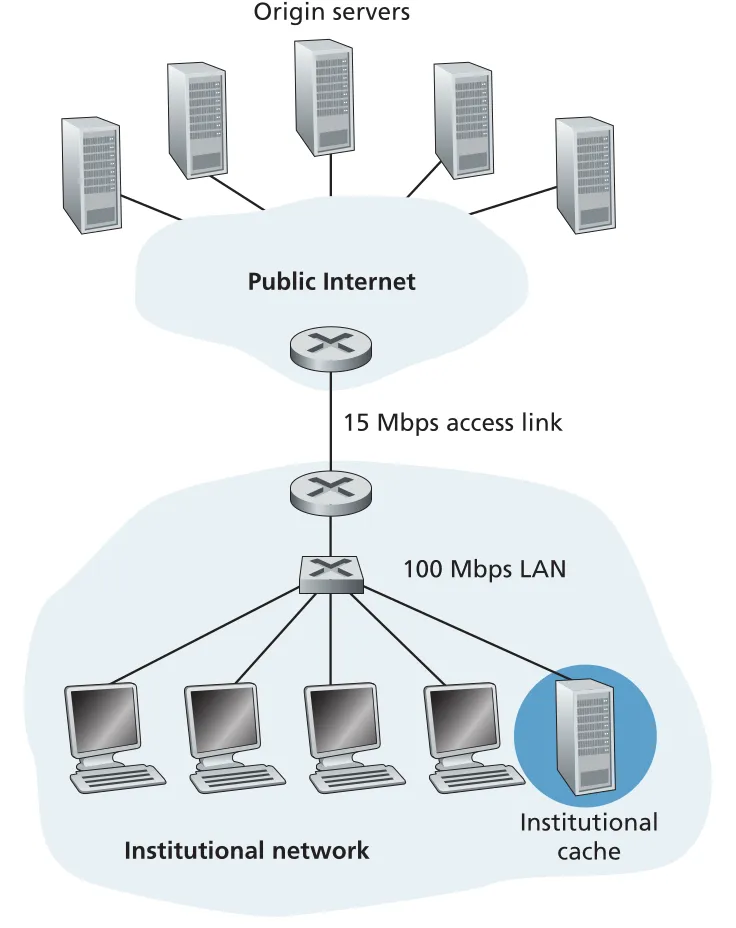 Figure 2.13 · PDF p. 122 · institutional cache가 hit traffic을 LAN 안에서 처리해 access link load를 줄이는 구조
Content Distribution Networks(CDNs)는 Web caches를 Internet 전역에 분산 배치한 확장 형태로 볼 수 있다. Akamai나 Limelight 같은 shared CDN, Google이나 Netflix 같은 dedicated CDN은 traffic을 user 가까이 localize하여 delay와 backbone/access traffic을 줄인다. 이 주제는 Section 2.6에서 video streaming과 함께 다시 등장한다.
conditional GET
caching은 stale object 문제를 만든다. cache가 가진 object copy가 origin server의 최신 object와 다를 수 있기 때문이다. HTTP의 conditional GET은 cache가 cached object의 freshness를 확인하면서 bandwidth 낭비를 줄이는 mechanism이다. conditional GET이 되려면 request가 GET method를 사용하고 If-Modified-Since: header를 포함해야 한다.
흐름은 이렇다. cache가 처음 object를 origin server에서 가져올 때 response의 Last-Modified: 값을 object와 함께 저장한다. 나중에 같은 object 요청이 오면 cache는 origin server에 다음처럼 확인한다.
GET /fruit/kiwi.gif HTTP/1.1
Host: www.exotiquecuisine.com
If-Modified-Since: Wed, 9 Sep 2015 09:23:24
object가 그 이후 수정되지 않았다면 origin server는 object body를 보내지 않고 다음처럼 응답한다.
HTTP/1.1 304 Not Modified
Date: Sat, 10 Oct 2015 15:39:29
Server: Apache/1.3.0 (Unix)
304 Not Modified는 cache가 자기 cached copy를 browser에게 보내도 된다는 뜻이다. object가 큰 경우 conditional GET은 bandwidth와 user-perceived response time을 크게 줄인다.
HTTP/2: multiplexing, framing, prioritization, server push
HTTP/2의 목표는 HTTP semantics를 바꾸는 것이 아니라 perceived latency를 줄이는 것이다. methods, status codes, URLs, header fields는 유지하고, data formatting과 transport 방식을 바꾼다. 핵심 기능은 single TCP connection 위의 request/response multiplexing, request prioritization, server push, HTTP header compression이다.
HTTP/1.1 persistent connection은 server socket 수와 setup overhead를 줄이지만, single TCP connection 위에서 Web page objects를 순서대로 보내면 Head-of-Line(HOL) blocking이 생긴다. 예를 들어 base HTML, 큰 video clip, 여러 small objects가 있을 때 video frames가 bottleneck link를 오래 차지하면 뒤의 small objects가 기다린다. browser들은 이를 피하려고 여러 parallel TCP connections를 열었고, 이는 server socket 부담을 늘리고 TCP congestion control의 fair share 의도를 우회하는 효과를 냈다.
HTTP/2는 HTTP message를 작은 frames로 쪼개고, 같은 TCP connection 위에서 여러 request/response의 frames를 interleave한다. 큰 video response의 frame 하나를 보낸 뒤 small object responses의 frames를 끼워 넣으면 small objects가 video 전체 뒤에 갇히지 않는다. HTTP/2 framing sub-layer는 response header와 body를 frames로 나누고, 수신 측에서 다시 original response message로 reassemble한다. frames는 binary encoded되어 parsing efficiency도 높다.
prioritization은 client가 concurrent requests의 responses에 weight와 dependency를 지정해 server가 더 중요한 response frames를 먼저 보내게 한다. server push는 server가 base HTML을 보고 필요한 additional objects를 예측해 client의 explicit request를 기다리지 않고 함께 보내는 기능이다. 다만 HTTP/3에서는 QUIC이 UDP 위 application layer에서 multiplexing, per-stream flow control, low-latency connection establishment를 제공하면서 HTTP/2의 일부 기능을 transport-like layer가 흡수한다.
2.3 Electronic Mail in the Internet
e-mail system의 구성요소
e-mail은 asynchronous communication medium이다. sender와 recipient가 동시에 online일 필요 없이, 각자 편한 시간에 message를 보내고 읽는다. Internet e-mail system의 핵심 구성요소는 user agents, mail servers, Simple Mail Transfer Protocol(SMTP)다.
user agent는 사용자가 messages를 compose, read, reply, forward, save하게 해 주는 client-side application이다. mail server는 e-mail infrastructure의 중심이며, 각 recipient의 mailbox와 outgoing message queue를 관리한다. Alice가 message를 작성하면 Alice의 user agent는 message를 Alice의 mail server로 보내고, 그 message는 outgoing message queue에 들어간다. Bob이 message를 읽을 때 Bob의 user agent는 Bob의 mail server에 있는 mailbox에서 message를 가져온다.
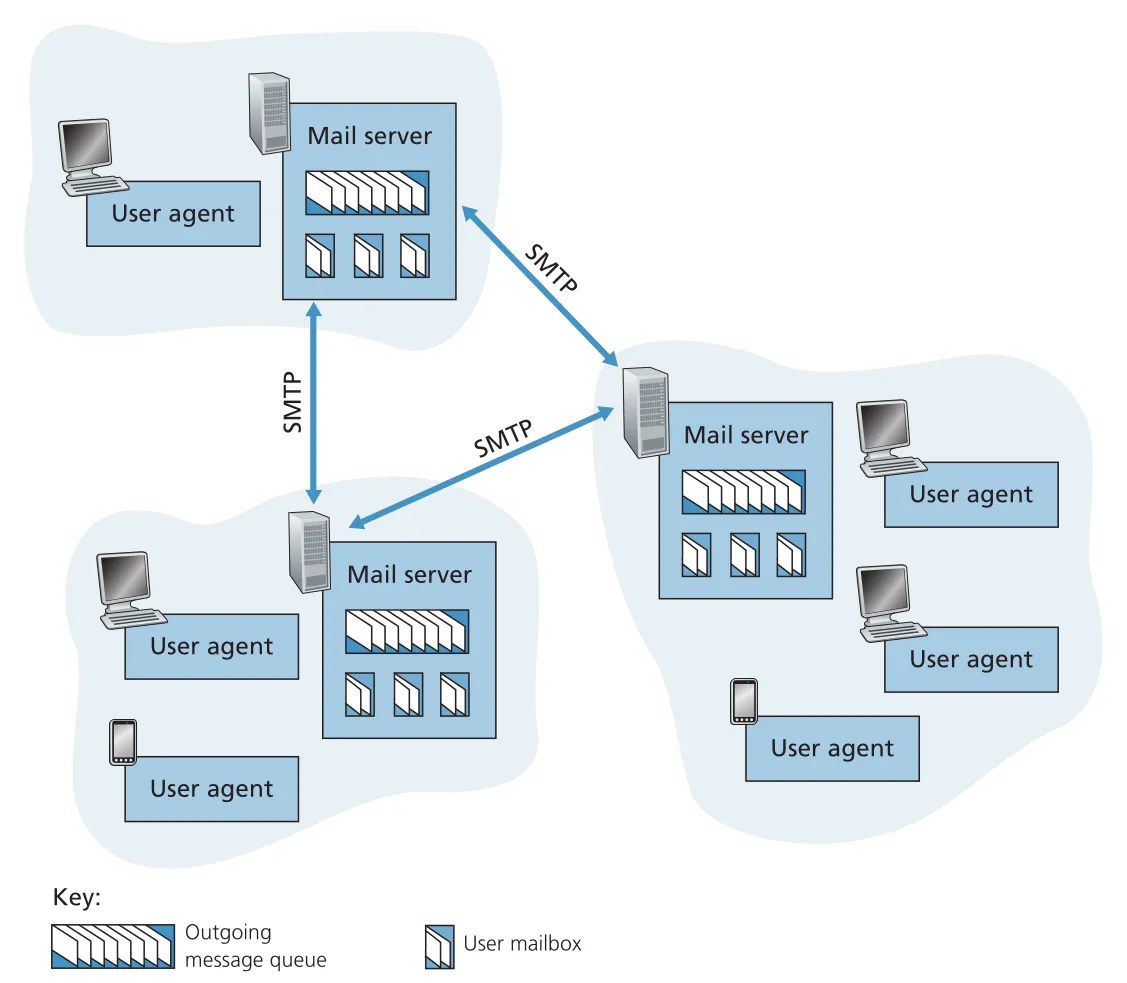 Figure 2.14 · PDF p. 128 · user agent, mail server, message queue, mailbox, SMTP로 이루어진 Internet e-mail system
mail server는 failure handling도 맡는다. Alice의 mail server가 Bob의 mail server에 message를 전달하지 못하면, message를 queue에 보관하고 later retry한다. 여러 날 실패하면 message를 제거하고 sender에게 failure notification을 보낸다. 이 구조 덕분에 Bob의 PC나 smartphone이 항상 켜져 있지 않아도 e-mail을 받을 수 있다.
SMTP의 동작 방식
SMTP는 Internet e-mail의 principal application-layer protocol이며 TCP의 reliable data transfer service를 사용해 sender의 mail server에서 recipient의 mail server로 mail을 보낸다. 모든 mail server는 SMTP client side와 SMTP server side를 모두 실행한다. 다른 mail server로 보낼 때는 SMTP client가 되고, 다른 mail server에서 받을 때는 SMTP server가 된다.
SMTP의 전송 흐름은 다음과 같다. Alice의 user agent가 message를 Alice mail server에 넣는다. Alice mail server의 SMTP client가 Bob mail server의 SMTP server, port 25로 TCP connection을 연다. application-layer handshaking 동안 sender address와 recipient address를 알리고, 이후 message body를 TCP connection에 보낸다. Bob mail server의 SMTP server는 message를 Bob의 mailbox에 넣는다.
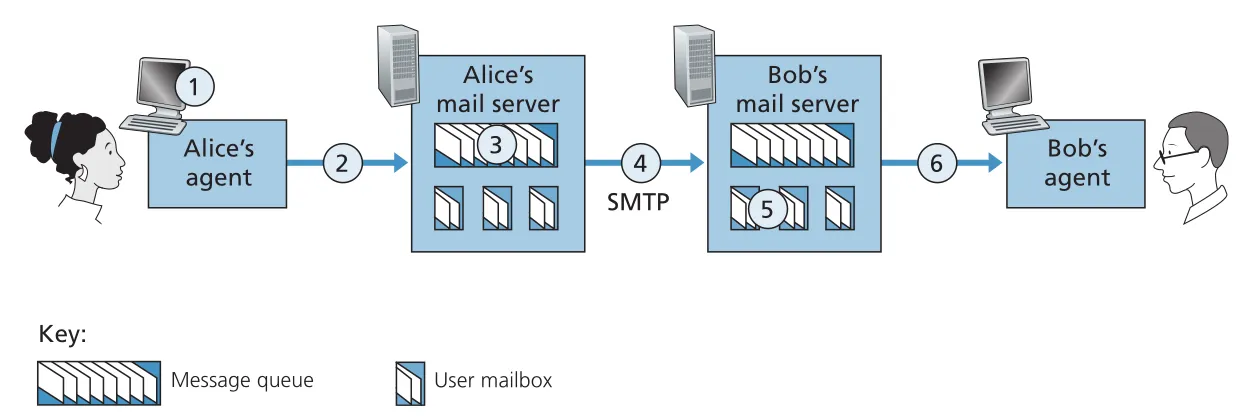 Figure 2.15 · PDF p. 130 · Alice user agent에서 Alice mail server, Bob mail server, Bob user agent로 이어지는 e-mail delivery path
SMTP는 보통 intermediate mail servers를 사용하지 않고 sending mail server와 receiving mail server 사이에 direct TCP connection을 만든다. Bob의 mail server가 down이면 message가 중간 server에 맡겨지는 것이 아니라 Alice의 mail server queue에 남아 재시도된다.
SMTP dialogue는 ASCII command/reply로 이루어진다. 대표 commands는 HELO, MAIL FROM, RCPT TO, DATA, QUIT이다. server replies는 status code와 설명을 포함한다. message 끝은 한 줄에 period만 있는 CRLF.CRLF로 표시한다. SMTP는 persistent connections를 사용하므로 같은 receiving mail server로 여러 messages를 보낼 때 같은 TCP connection에서 MAIL FROM, RCPT TO, DATA sequence를 반복하고 마지막에 QUIT한다.
S: 220 hamburger.edu
C: HELO crepes.fr
C: MAIL FROM:<alice@crepes.fr>
C: RCPT TO:<bob@hamburger.edu>
C: DATA
C: ... message body ...
C: .
C: QUIT
SMTP의 오래된 설계 흔적도 중요하다. SMTP는 message body까지 simple 7-bit ASCII로 제한한다. 현대 multimedia attachments는 binary data를 ASCII로 encoding한 뒤 SMTP로 보내고, 수신 후 다시 binary로 decoding해야 한다. HTTP가 multimedia data를 ASCII로 강제하지 않는 것과 대비된다.
mail message format과 SMTP commands의 구분
mail message 자체는 RFC 5322가 정의하는 header lines와 body로 구성된다. header lines와 body는 blank line으로 구분된다. 필수 header에는 From:과 To:가 있고, Subject: 같은 optional header도 있다.
From: alice@crepes.fr
To: bob@hamburger.edu
Subject: Searching for the meaning of life.

message body...
여기서 From:과 To: header lines는 message 내용의 일부이고, SMTP handshaking commands인 MAIL FROM과 RCPT TO와는 다르다. 전자는 recipient에게 전달되는 mail object의 header이고, 후자는 mail servers 사이에서 delivery envelope를 지정하는 protocol command다. 이 구분은 실제 e-mail debugging과 security 분석에서 중요하다.
mail access protocols: HTTP와 IMAP
SMTP는 push protocol이다. sending mail server가 receiving mail server로 message를 밀어 넣는 데 쓰인다. 하지만 Bob이 자기 mailbox에서 messages를 가져오는 것은 pull operation이다. 그래서 Bob의 user agent는 SMTP가 아니라 mail access protocol을 사용한다.
오늘날 흔한 방식은 두 가지다. Web-based e-mail이나 smartphone app은 HTTP interface를 통해 Bob의 mail server에서 messages를 가져온다. Outlook 같은 전통 mail client는 Internet Mail Access Protocol(IMAP)을 사용한다. 둘 다 Bob의 mail server에 있는 folders를 관리하고, messages를 move/delete/mark할 수 있게 한다.
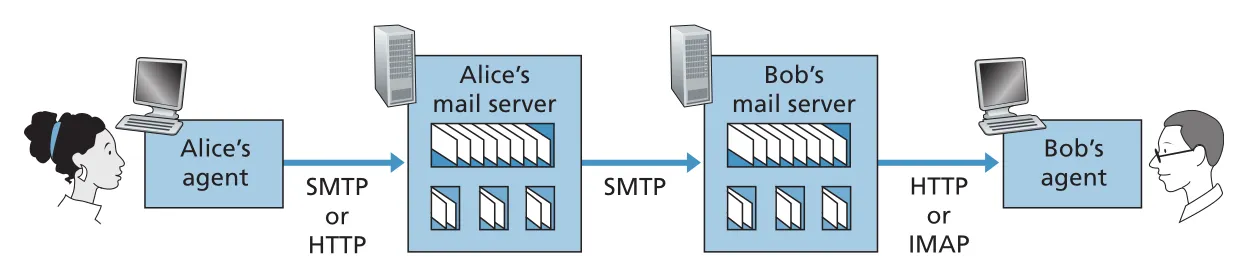 Figure 2.16 · PDF p. 133 · user agent와 mail server 사이 HTTP/IMAP, mail servers 사이 SMTP가 쓰이는 위치
e-mail의 큰 구조는 “작성/제출 → server-to-server push → mailbox에서 pull”이다. Alice user agent는 SMTP 또는 HTTP로 Alice mail server에 제출하고, Alice mail server는 SMTP로 Bob mail server에 relay하며, Bob user agent는 HTTP 또는 IMAP으로 Bob mailbox에서 읽는다.
2.4 DNS: The Internet’s Directory Service
DNS(Domain Name System)는 사람이 쓰기 쉬운 hostname과 router가 다루기 쉬운 IP address 사이의 간극을 메우는 Internet directory service다. www.google.com, gaia.cs.umass.edu 같은 hostname은 mnemonic하지만 위치 정보가 약하고 길이가 가변적이다. 반대로 IP address는 fixed-length이고 계층적 구조를 가져 forwarding과 routing에 유리하다. DNS의 핵심 역할은 hostname-to-IP-address translation이다.
DNS는 두 가지 얼굴을 가진다. 첫째, 전 세계 DNS servers에 분산 저장된 distributed hierarchical database다. 둘째, hosts와 DNS servers가 query/reply를 주고받는 application-layer protocol이다. DNS protocol은 UDP 위에서 동작하고 well-known port 53을 사용한다. HTTP, SMTP 같은 application-layer protocol은 사용자가 입력한 hostname을 실제 server IP address로 바꾸기 위해 DNS를 먼저 호출한다.
DNS lookup이 application에 끼는 영향
browser가 www.someschool.edu/index.html을 요청할 때 바로 HTTP request를 보내는 것이 아니다. browser는 URL에서 hostname을 추출하고, host의 DNS client가 DNS query를 보내 IP address를 얻은 뒤, 그 IP address의 HTTP server process port 80으로 TCP connection을 연다.
이 단계는 application response time에 추가 delay를 만든다. 다만 DNS caching 때문에 대부분의 lookup은 “가까운” local DNS server에서 해결되어 average DNS delay와 DNS traffic이 줄어든다. DNS는 end-system edge에서 핵심 Internet 기능을 수행한다는 점에서, Internet complexity를 edge에 둔다는 Chapter 1의 설계 철학과 연결된다.
DNS가 제공하는 추가 services
DNS는 단순 hostname translation만 하지 않는다.
| DNS service | 핵심 의미 | 예시/효과 |
|---|---|---|
host aliasing | alias hostname을 canonical hostname과 IP address로 해석 | www.enterprise.com → relay1.west-coast.enterprise.com |
mail server aliasing | e-mail address domain을 실제 mail server canonical hostname으로 해석 | MX record가 Web server와 mail server의 alias 충돌을 피하게 함 |
load distribution | 하나의 alias hostname에 여러 IP addresses를 연결하고 reply 순서를 rotate | replicated Web servers 사이에 client requests 분산 |
load distribution에서 DNS server는 같은 hostname에 대한 IP address set을 반환하되 순서를 바꿔 보낸다. client는 보통 첫 번째 IP address로 접속하므로 traffic이 여러 replicated servers로 나뉜다. 이 아이디어는 뒤의 CDN(content distribution network)에서도 더 정교하게 사용된다.
왜 centralized DNS server는 안 되는가
모든 hostname-to-IP mappings를 하나의 DNS server에 넣는 설계는 단순하지만 Internet 규모에서는 실패한다.
| 문제 | 이유 |
|---|---|
single point of failure | server 하나가 죽으면 name resolution 전체가 멈춤 |
traffic volume | 전 세계 HTTP, e-mail 등 모든 DNS queries가 한 곳으로 몰림 |
distant centralized database | 모든 client와 가까울 수 없어 long RTT와 congestion을 유발 |
maintenance | 모든 hosts의 records를 한 곳에서 자주 갱신해야 함 |
따라서 DNS는 scale을 위해 처음부터 distributed hierarchical database로 설계되었다.
DNS server hierarchy
DNS hierarchy의 기본 축은 root DNS servers, top-level domain (TLD) DNS servers, authoritative DNS servers다. 예를 들어 client가 www.amazon.com을 찾는다면 root는 .com TLD servers를 알려 주고, .com TLD server는 amazon.com authoritative DNS server를 알려 주며, authoritative server가 최종 host IP address를 준다.
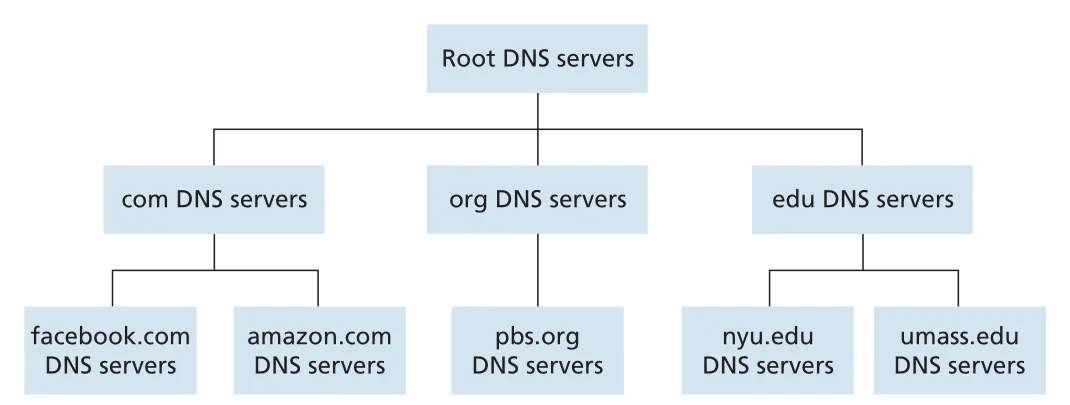 Figure 2.17 · PDF p. 138 · root, TLD, authoritative DNS servers로 이어지는 DNS hierarchy
각 server class의 역할은 다르다.
| DNS server class | 역할 |
|---|---|
root DNS servers | TLD servers의 IP addresses를 제공 |
TLD DNS servers | .com, .org, .edu, country-code TLD 등에서 authoritative DNS servers의 IP addresses를 제공 |
authoritative DNS servers | 조직의 public hosts에 대한 DNS records를 보유하고 최종 mapping을 제공 |
여기에 local DNS server(default name server)가 추가된다. local DNS server는 hierarchy의 엄격한 구성원은 아니지만 DNS architecture의 중심이다. 각 ISP나 기관은 local DNS server를 제공하고, host는 보통 DHCP를 통해 그 주소를 받는다. host의 DNS query는 먼저 local DNS server로 가며, local DNS server가 proxy처럼 root/TLD/authoritative hierarchy를 따라 query를 진행한다.
iterative query와 recursive query
cse.nyu.edu가 gaia.cs.umass.edu의 IP address를 찾는 예를 보면 DNS lookup의 message flow가 선명하다. host는 local DNS server dns.nyu.edu에 query를 보낸다. local DNS server는 root DNS server, edu TLD server, UMass authoritative DNS server를 차례로 묻고, 최종 IP address를 host에게 돌려준다. 기본 예에서는 4 queries와 4 replies, 총 8 DNS messages가 발생한다.
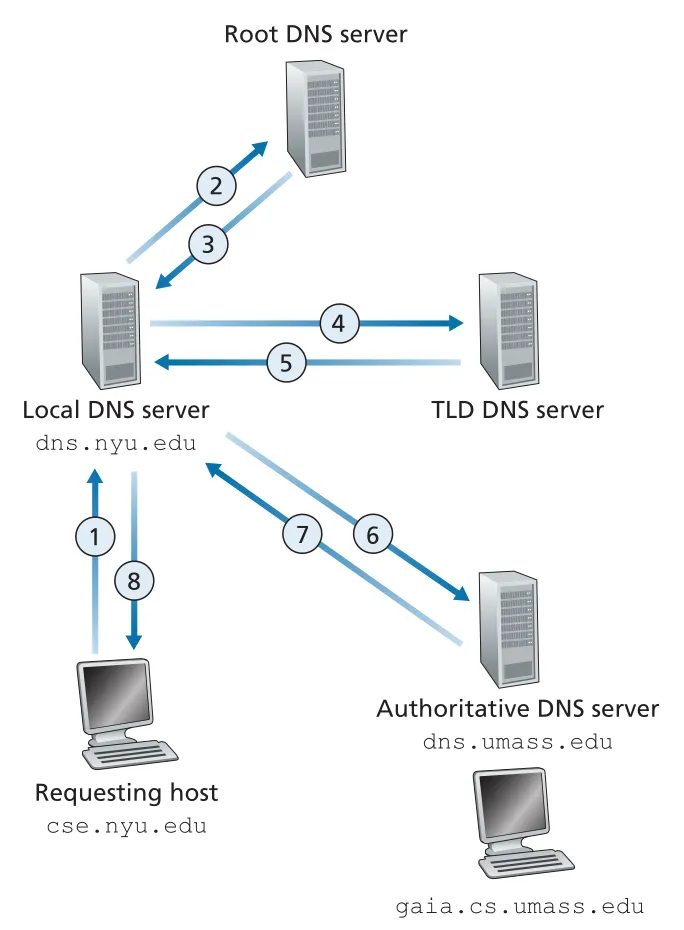 Figure 2.19 · PDF p. 140 · local DNS server가 hierarchy를 따라 iterative queries를 수행하는 흐름
Figure 2.19의 첫 query, 즉 requesting host에서 local DNS server로 가는 query는 recursive query다. host는 “나 대신 mapping을 구해 달라”고 요청한다. 반면 local DNS server가 root, TLD, authoritative server에 보내는 query들은 iterative query다. 각 server는 최종 답을 대신 구해 주는 것이 아니라 다음에 물어볼 위치나 알고 있는 답을 local DNS server에 직접 돌려준다.
책은 모든 단계가 recursive인 경우도 보여 준다. 이 경우 각 DNS server가 다음 server에 query를 넘기고, reply도 거슬러 올라오므로 각 intermediate server가 더 많은 state와 forwarding 책임을 진다. 실제 Internet에서는 보통 host → local DNS server는 recursive, local DNS server → hierarchy는 iterative 패턴이 일반적이다.
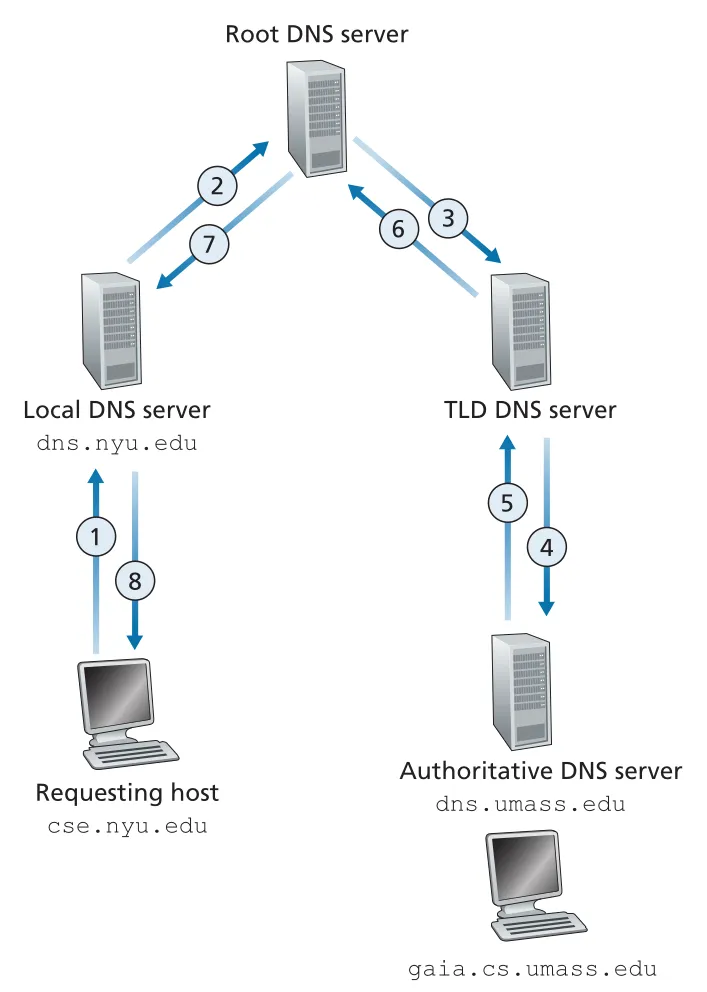 Figure 2.20 · PDF p. 142 · 모든 단계가 recursive query로 이어질 때의 DNS message 흐름
DNS caching
DNS caching은 delay를 줄이고 Internet 전체 DNS message traffic을 줄이는 핵심 최적화다. DNS server가 reply를 받으면 그 안의 hostname/IP mapping이나 TLD server address 같은 정보를 local memory에 저장할 수 있다. 이후 같은 query가 오면 해당 server가 authoritative server가 아니어도 cached answer를 반환할 수 있다.
cache entry는 영구적이지 않다. host와 mapping은 바뀔 수 있으므로 DNS servers는 일정 시간이 지나면 cached information을 버린다. 이 시간은 resource record의 TTL(time to live)로 제어된다. local DNS server가 TLD server IP addresses를 cache하면 root DNS servers를 우회할 수 있고, 실제로 caching 덕분에 root servers는 극히 일부 DNS queries에만 관여한다.
DNS resource records (RRs)
DNS distributed database의 저장 단위는 resource record(RR)다. 각 RR은 다음 4-tuple이다.
(Name, Value, Type, TTL)TTL은 cache에서 record를 언제 제거할지 결정한다. Name과 Value의 의미는 Type에 따라 달라진다.
| Type | Name | Value | 의미 |
|---|---|---|---|
A | hostname | IP address | 표준 hostname-to-IP-address mapping |
NS | domain | authoritative DNS server hostname | query를 다음 authoritative 영역으로 안내 |
CNAME | alias hostname | canonical hostname | alias를 실제 canonical name으로 변환 |
MX | mail alias domain/name | canonical mail server hostname | mail server aliasing에 사용 |
authoritative DNS server는 자신이 책임지는 hostname의 Type A record를 가진다. TLD server처럼 최종 authoritative가 아닌 server는 대상 domain에 대한 NS record와, 그 NS server hostname을 IP address로 바꾸는 A record를 함께 가질 수 있다. 이 추가 A record는 다음 DNS server에 접속하기 위해 필요한 “glue” 정보처럼 동작한다.
DNS message format
DNS query와 reply는 같은 message format을 쓴다. header는 12 bytes이고 query identifier, flags, section별 count를 포함한다. identifier는 reply에도 복사되어 client가 sent query와 received reply를 match할 수 있게 한다.
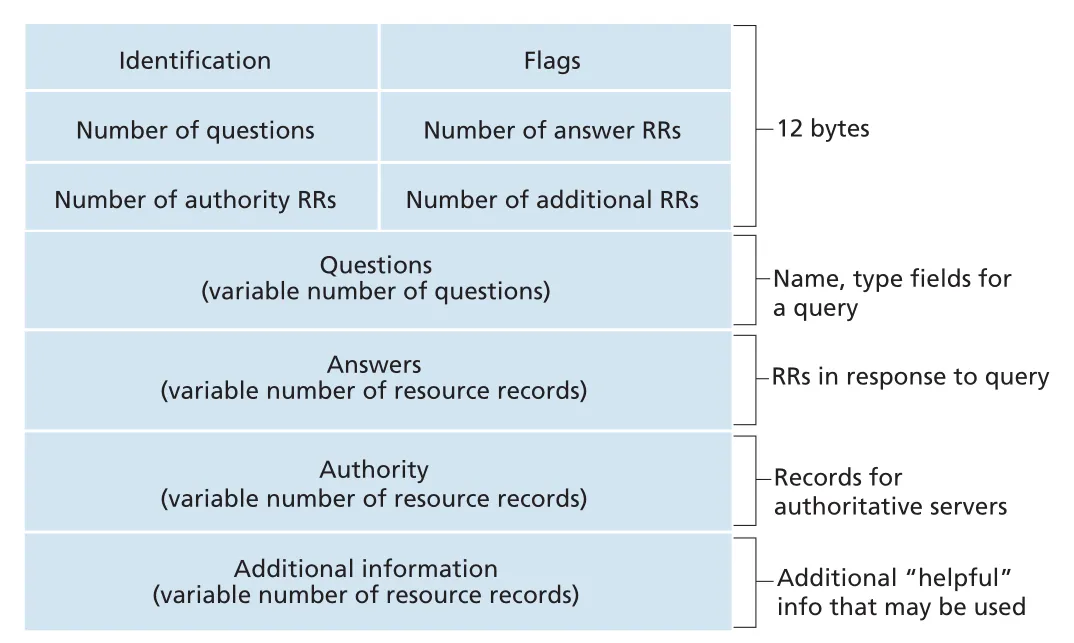 Figure 2.21 · PDF p. 144 · DNS query/reply 공통 message format과 네 가지 data section
DNS message의 주요 sections는 다음과 같다.
| section | 내용 |
|---|---|
header | 16-bit identification, query/reply flag, authoritative flag, recursion-desired, recursion-available, section counts |
question | queried name과 query type, 예: Type A, Type MX |
answer | query name에 대한 resource records |
authority | 다른 authoritative servers에 대한 records |
additional information | 추가로 유용한 records, 예: MX reply에서 mail server canonical hostname의 Type A record |
reply의 answer section에는 여러 RRs가 들어갈 수 있다. replicated Web servers처럼 하나의 hostname이 여러 IP addresses에 대응할 수 있기 때문이다. authority section은 다음 권한 server를 알려 주고, additional section은 그 server나 mail server의 IP address처럼 이어지는 lookup에 필요한 보조 정보를 제공한다.
DNS database에 records가 들어가는 방식
새 domain networkutopia.com을 만든다면 registrar에 domain을 등록하고 primary/secondary authoritative DNS server 이름과 IP addresses를 제공해야 한다. registrar는 .com TLD servers에 다음과 같은 records가 들어가도록 한다.
(networkutopia.com, dns1.networkutopia.com, NS)
(dns1.networkutopia.com, 212.212.212.1, A)
그리고 해당 domain의 authoritative DNS servers에는 Web server에 대한 A record, mail server에 대한 MX record가 들어가야 한다. 이렇게 해야 외부 host가 TLD server를 통해 authoritative server를 찾고, 다시 www.networkutopia.com의 최종 IP address를 얻어 HTTP TCP connection을 시작할 수 있다.
DNS vulnerabilities와 DNSSEC
DNS는 Web과 e-mail이 의존하는 critical infrastructure라 공격 표면도 크다. 대표 공격은 root/TLD DNS servers에 대한 DDoS bandwidth-flooding, man-in-the-middle attack, DNS poisoning attack이다. DNS poisoning은 DNS server cache에 bogus records를 받아들이게 하여 사용자를 공격자의 Web site로 redirect할 수 있다.
root servers에 대한 공격은 packet filtering과 caching 때문에 영향이 제한될 수 있다. 반면 TLD servers에 대한 대규모 DNS query flood는 우회가 더 어렵다. 이런 위협에 대응하기 위해 DNS Security Extensions(DNSSEC)가 설계·배포되었다. DNSSEC는 DNS data의 위조와 cache poisoning 같은 공격을 줄이기 위한 secured DNS 확장이다.
2.5 Peer-to-Peer File Distribution
지금까지의 Web, e-mail, DNS는 항상 켜져 있는 infrastructure servers에 크게 의존하는 client-server architecture였다. P2P(peer-to-peer) architecture는 always-on infrastructure server 의존을 최소화하고, intermittent하게 연결되는 peers가 직접 서로 통신한다. 여기서 peers는 service provider가 소유한 장비가 아니라 사용자의 PC, laptop, smartphone 같은 end systems다.
P2P file distribution의 대표 문제는 하나의 큰 file을 개 peers에게 배포하는 것이다. client-server 방식에서는 server가 file copy를 각 peer에게 직접 보내야 하므로 server upload bandwidth가 병목이 된다. P2P 방식에서는 peer가 받은 file portion을 다른 peers에게 다시 upload할 수 있어, 소비자인 동시에 redistributor가 된다.
file distribution model
책의 모델은 server와 peers가 Internet에 access links로 연결되어 있고, 병목은 Internet core가 아니라 access network에 있다고 가정한다.
| 기호 | 의미 |
|---|---|
| 배포할 file size, bits | |
| file copy를 원하는 peers 수 | |
| server upload rate | |
peer i의 upload rate | |
peer i의 download rate | |
| 가장 느린 peer download rate, | |
distribution time | 모든 peers가 file copy를 얻는 데 걸리는 시간 |
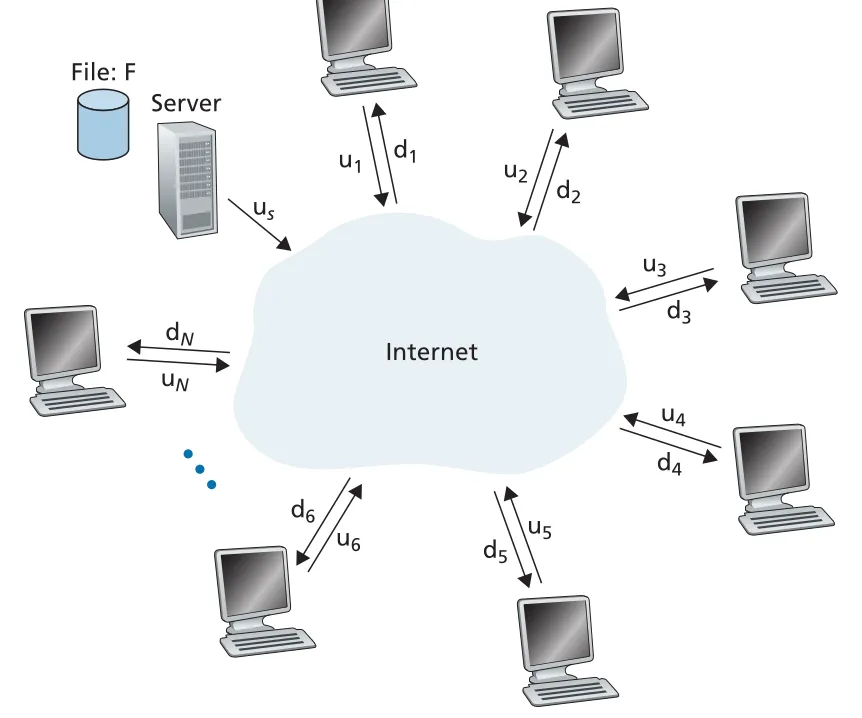 Figure 2.22 · PDF p. 148 · server upload rate와 peer upload/download rates로 본 file distribution 모델
client-server distribution time
client-server architecture에서는 peers가 distribution을 돕지 않는다. server는 개 peers에게 file을 하나씩 보내야 하므로 총 bits를 upload해야 한다. 따라서 server upload만 봐도 최소 시간은 이상이다. 또한 가장 느린 peer는 보다 빨리 file 전체를 받을 수 없다.
이 커지면 가 지배적이므로 distribution time은 peers 수에 선형으로 증가한다. 사용자가 천 배 늘면, 같은 server capacity에서는 배포 시간도 거의 천 배 늘 수 있다.
P2P distribution time과 self-scalability
P2P architecture에서는 server가 file의 각 bit를 적어도 한 번은 peer community로 넣어야 하므로 가 하한이다. 가장 느린 peer download 제약은 여전히 이다. 여기에 system 전체 upload capacity가 중요해진다.
P2P의 핵심은 peers가 늘수록 demand도 늘지만 upload capacity도 함께 늘어난다는 점이다. 이것이 self-scalability다. peers는 file을 받는 소비자이면서 동시에 다른 peers에게 chunks를 공급하는 upload resources가 된다.
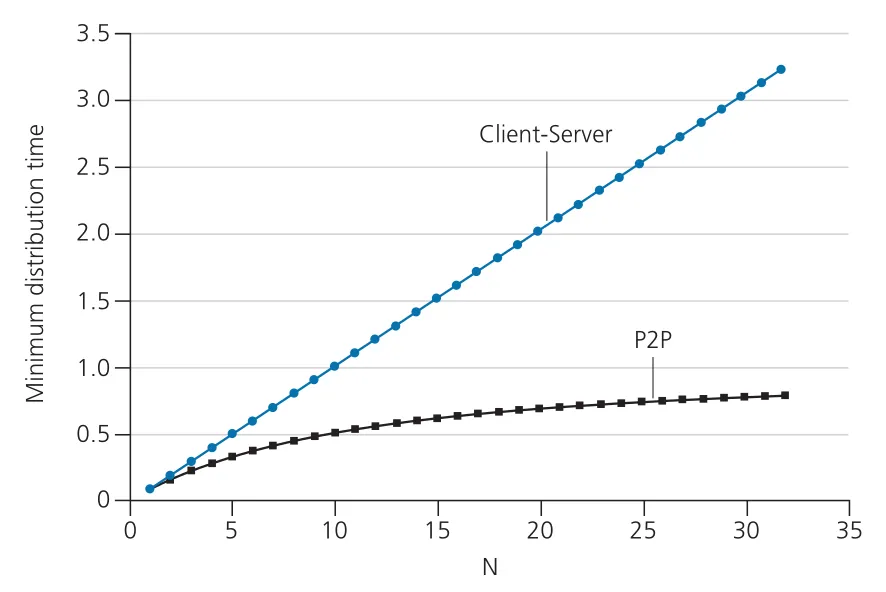 Figure 2.23 · PDF p. 151 · peers 수가 증가할 때 client-server와 P2P distribution time의 차이
Figure 2.23의 설정에서는 client-server distribution time이 N에 따라 계속 증가하지만, P2P distribution time은 훨씬 낮고 bounded에 가깝게 유지된다. P2P scalability는 “중앙 server가 모든 bits를 반복해서 보내지 않는다”는 점에서 나온다.
BitTorrent: torrent, tracker, chunks
BitTorrent는 P2P file distribution protocol이다. 특정 file distribution에 참여하는 peers 전체를 torrent라고 부른다. file은 equal-size chunks로 나뉘며, typical chunk size는 256 KBytes다. peer는 처음 torrent에 들어오면 chunks가 없고, 시간이 지나며 chunks를 모은다. 동시에 자신이 가진 chunks를 다른 peers에게 upload한다.
각 torrent에는 tracker라는 infrastructure node가 있다. peer가 torrent에 join하면 tracker에 자신을 등록하고, 주기적으로 아직 torrent 안에 있음을 알린다. tracker는 참여 peers 목록을 유지한다.
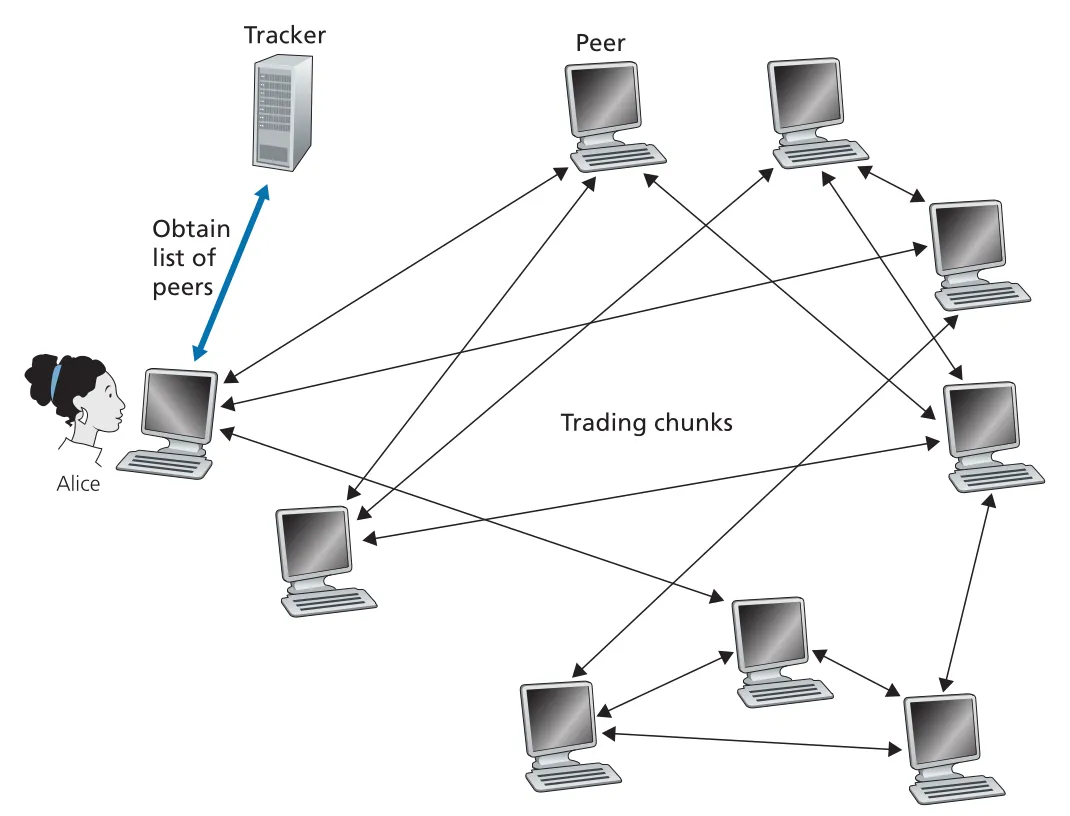 Figure 2.24 · PDF p. 152 · tracker가 peer 목록을 제공하고 peers가 chunks를 교환하는 BitTorrent 구조
새 peer Alice가 join하면 tracker는 참여 peers 중 일부, 예를 들어 50개의 IP addresses를 Alice에게 보낸다. Alice는 이 peers와 concurrent TCP connections를 시도한다. 연결에 성공한 peers는 Alice의 neighboring peers가 된다. neighboring peers는 시간이 지나며 떠나거나 새로 들어오므로 계속 변한다.
rarest first와 tit-for-tat
Alice는 주기적으로 neighboring peers에게 그들이 가진 chunks list를 묻는다. 그 후 자신이 아직 갖지 않은 chunks 중 어떤 것을 먼저 요청할지 결정한다. BitTorrent의 chunk selection 핵심은 rarest first다. Alice는 neighbors 사이에서 가장 복사본이 적은 chunks를 먼저 요청한다. 이렇게 하면 rare chunks가 빠르게 재배포되어 torrent 안에서 chunk availability가 균형을 이룬다.
두 번째 결정은 “누구에게 upload할 것인가”다. BitTorrent는 trading incentive algorithm을 사용한다. Alice는 각 neighbor가 자신에게 보내는 bit rate를 계속 측정하고, 가장 높은 rate로 데이터를 제공하는 4 peers에게 우선 upload한다. 이 peers를 unchoked peers라고 한다. Alice는 10초마다 top four를 다시 계산한다.
또한 30초마다 Alice는 neighbor 하나를 random하게 골라 chunks를 보낸다. 이 peer는 optimistically unchoked된다. 이 random probing 덕분에 새 peers도 chunks를 얻어 거래를 시작할 수 있고, upload rate가 잘 맞는 peer pairs가 서로를 발견할 수 있다. 나머지 peers는 choked되어 Alice로부터 chunks를 받지 못한다.
이 incentive mechanism은 흔히 tit-for-tat이라고 부른다. 핵심은 “나에게 좋은 rate로 보내는 peer에게 나도 보내고, 가끔 새 partner를 탐색한다”는 것이다. 완벽하게 우회 불가능한 scheme은 아니지만, freeriders가 다수를 차지해 system이 붕괴하는 일을 막는 데 결정적이다.
Distributed Hash Table (DHT)
P2P의 다른 중요한 응용은 Distributed Hash Table(DHT)이다. DHT는 database records를 P2P system의 peers에 분산 저장하는 simple database abstraction이다. BitTorrent에서도 구현되어 왔고, P2P lookup과 decentralized indexing을 이해할 때 뒤에서 자주 만나는 구조다.
2.6 Video Streaming and Content Distribution Networks
streaming video는 Internet traffic의 대부분을 차지하는 대표 application이다. stored video streaming에서는 prerecorded video가 servers에 저장되어 있고, 사용자는 on demand로 request를 보내 재생한다. Netflix, YouTube, Amazon Prime 같은 service는 application-level protocols와 server infrastructure를 조합해 대규모 video delivery를 구현한다.
Internet video의 networking 특성
video는 일정 rate로 표시되는 images sequence다. digital image는 pixels와 bits로 표현되며, video compression은 quality와 bit rate 사이의 trade-off를 만든다. higher bit rate는 보통 더 좋은 image quality와 viewing experience를 의미하지만, network traffic과 storage 요구량도 커진다.
networking 관점에서 가장 중요한 성능 지표는 average end-to-end throughput이다. continuous playout을 위해 network가 streaming application에 제공하는 average throughput은 compressed video bit rate 이상이어야 한다.
같은 video를 여러 bit rates로 encoding해 둘 수 있다. 예를 들어 300 kbps, 1 Mbps, 3 Mbps versions를 만들면, low-speed mobile user는 낮은 rate version을, fiber user는 높은 rate version을 받을 수 있다. 이것이 뒤의 DASH adaptive streaming의 기반이다.
HTTP streaming
가장 단순한 HTTP streaming에서는 video가 HTTP server의 ordinary file로 저장되고, client는 해당 URL에 대해 HTTP GET을 보낸다. server는 HTTP response로 video file을 가능한 빠르게 전송하고, client는 bytes를 application buffer에 모은다. buffer가 threshold를 넘으면 playback을 시작하고, 이후 streaming application은 buffer에서 frames를 꺼내 decompress/display한다.
이 방식의 약점은 모든 clients가 같은 encoding을 받는다는 점이다. client마다 access bandwidth가 다르고, 같은 client도 session 중 available bandwidth가 변할 수 있다. 특히 mobile users는 이동하면서 bandwidth fluctuation이 크다.
DASH: Dynamic Adaptive Streaming over HTTP
DASH(Dynamic Adaptive Streaming over HTTP)는 video를 여러 versions로 encoding하고, client가 몇 초 길이의 video chunks를 동적으로 선택해 HTTP GET으로 요청하는 방식이다. available bandwidth가 높으면 high-rate version의 chunk를, 낮으면 low-rate version의 chunk를 요청한다.
DASH에서 server는 각 version을 다른 URL로 저장하고, manifest file을 제공한다. manifest file은 각 version의 URL과 bit rate 정보를 담는다. client는 먼저 manifest file을 받은 뒤, chunk마다 URL과 byte range를 지정해 HTTP GET을 보낸다. download 중 client는 measured received bandwidth와 buffer occupancy를 보고 다음 chunk의 quality를 선택한다.
| DASH 요소 | 역할 |
|---|---|
| multiple encodings | 같은 video를 여러 bit rate/quality level로 저장 |
| manifest file | versions의 URL과 bit rate 정보를 client에게 제공 |
| byte-range HTTP GET | 특정 chunk 또는 segment 범위를 요청 |
| rate determination algorithm | bandwidth와 buffer 상태를 보고 다음 chunk quality 결정 |
DASH의 중요한 설계 포인트는 adaptation decision이 client 쪽에 있다는 것이다. server는 versions와 manifest를 제공하고, client가 자기 network condition을 측정해 quality를 바꾼다.
왜 CDN이 필요한가
single massive data center에서 전 세계 users에게 video를 직접 보내는 설계는 세 가지 이유로 부적합하다.
| 문제 | 설명 |
|---|---|
| long path와 bottleneck | client가 멀수록 많은 links/ISPs를 지나며, path 중 하나라도 throughput이 video bit rate보다 낮으면 freezing delay 발생 |
| duplicate traffic | popular video bytes가 같은 links를 반복 통과해 bandwidth와 provider ISP cost 낭비 |
| single point of failure | data center나 uplink 장애가 전체 service outage로 이어짐 |
CDN(Content Distribution Network)은 geographically distributed locations에 servers를 배치하고, videos와 Web content copies를 저장한 뒤, 각 user request를 좋은 experience를 줄 수 있는 CDN location으로 보낸다. CDN은 content provider가 직접 운영하는 private CDN일 수도 있고, 여러 providers를 대신하는 third-party CDN일 수도 있다.
CDN server placement: Enter Deep vs Bring Home
CDN deployment에는 대표적으로 두 철학이 있다.
| placement philosophy | 방식 | 장점 | trade-off |
|---|---|---|---|
Enter Deep | access ISPs 내부 깊숙이 많은 small clusters 배치 | end users와 가까워 delay/throughput 개선 | clusters 수가 많아 maintenance/management가 어려움 |
Bring Home | IXPs 같은 적은 수의 큰 sites에 large clusters 배치 | 운영이 단순하고 관리 비용이 낮음 | users와 path가 더 길어질 수 있음 |
content replication도 모든 clusters에 모든 videos를 넣는 방식만 있는 것은 아니다. 많은 CDNs는 pull strategy를 사용한다. client가 cluster에 없는 video를 요청하면, cluster가 central repository나 다른 cluster에서 video를 가져오면서 동시에 client에게 stream하고 local copy를 저장한다. storage가 가득 차면 Web cache처럼 덜 자주 요청되는 videos를 제거한다.
CDN operation: DNS redirect
CDN은 user request를 가로채 적절한 CDN server cluster로 redirect해야 한다. 많은 CDNs는 DNS를 이용한다. content provider의 authoritative DNS server가 video hostname query를 CDN domain으로 넘기고, CDN의 DNS infrastructure가 client의 LDNS(local DNS server) 정보를 바탕으로 content server IP address를 반환한다.
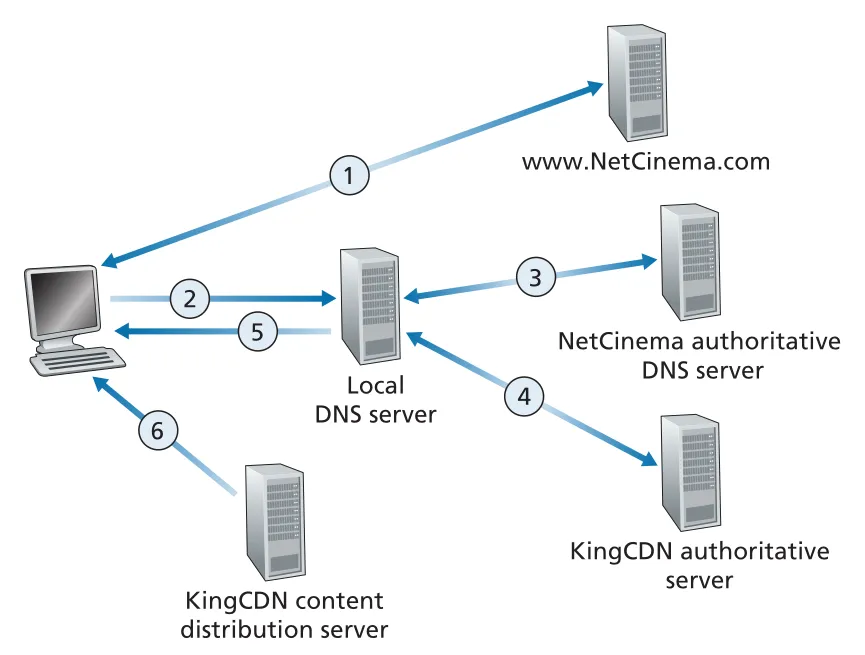 Figure 2.25 · PDF p. 159 · DNS를 이용해 content provider URL 요청을 CDN server로 redirect하는 과정
전형적 흐름은 다음과 같다.
- user가 content provider Web page에서 video link를 클릭한다.
- host가
video.netcinema.com같은 hostname에 대해 DNS query를 보낸다. - content provider authoritative DNS server는 IP address 대신 CDN domain hostname, 예:
a1105.kingcdn.com을 반환한다. - LDNS가 CDN DNS system에 다시 query한다.
- CDN DNS system이 선택한 CDN content server IP address를 LDNS에 반환한다.
- client는 해당 CDN server와 TCP connection을 열고 HTTP GET을 보낸다. DASH라면 먼저 manifest file을 받고 chunks를 선택한다.
cluster selection strategies
CDN의 핵심은 cluster selection strategy다. DNS-based CDN은 query를 보낸 LDNS IP address를 보고 client 위치를 추정한다. 가장 단순한 방법은 geo-location database로 LDNS를 위치에 mapping하고 geographically closest cluster를 고르는 것이다.
하지만 geography가 network distance와 같지는 않다. 가까운 cluster가 hop count나 RTT 측면에서 더 나쁠 수 있고, user가 remote LDNS를 사용하면 LDNS 위치가 실제 client 위치와 다를 수 있다. 또한 simple geo strategy는 path delay와 available bandwidth의 time variation을 반영하지 못한다. 그래서 CDNs는 clusters와 LDNS/clients 사이의 delay, loss 같은 real-time measurements를 주기적으로 수행하기도 한다. 단, 많은 LDNS가 probes에 응답하지 않는다는 한계가 있다.
Netflix architecture
Netflix video distribution은 Amazon cloud와 Netflix private CDN으로 나뉜다.
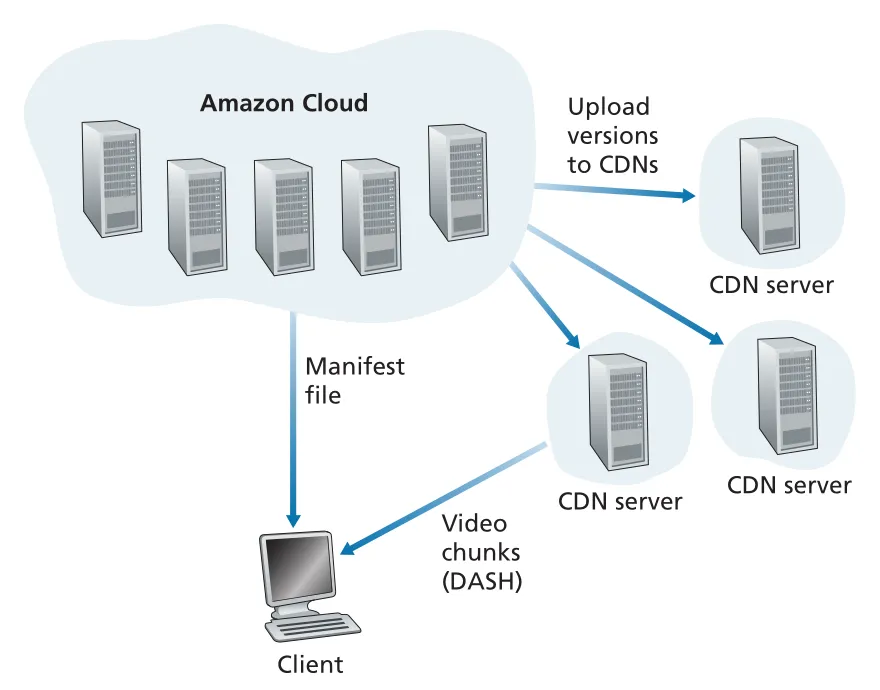 Figure 2.26 · PDF p. 161 · Amazon cloud가 control/processing을 맡고 Netflix CDN이 DASH chunks를 전달하는 구조
Amazon cloud는 user registration/login, billing, catalogue browsing/search, recommendation 같은 Web service와 backend databases를 담당한다. 또한 content ingestion, content processing, 여러 device/bit rate용 versions 생성, CDN으로 versions upload를 수행한다.
Netflix CDN은 IXPs와 residential ISPs 내부의 server racks로 구성된다. Netflix는 pull caching 대신 push caching을 사용한다. videos를 off-peak hours에 CDN servers로 미리 밀어 넣고, 전체 library를 담을 수 없는 locations에는 daily popularity를 바탕으로 popular videos만 push한다.
user가 movie를 선택하면 Amazon cloud의 Netflix software가 어떤 CDN servers가 해당 movie를 갖고 있는지 확인하고, client에게 가장 적합한 server를 정한다. residential ISP 내부 Netflix rack에 movie copy가 있으면 그 rack이 보통 선택되고, 없으면 가까운 IXP server가 선택된다. Netflix는 일반 CDN처럼 DNS redirect에만 의존하지 않고, control software가 client에게 specific CDN server IP address와 manifest file을 직접 준다. 이후 client는 proprietary DASH variant로 약 4초 chunks를 HTTP byte-range GET으로 요청한다.
YouTube architecture
YouTube도 private CDN을 사용하지만 Netflix와 다른 선택을 한다. Google은 많은 IXP/ISP locations와 대형 data centers에서 YouTube videos를 배포한다. Netflix와 달리 YouTube는 pull caching과 DNS redirect를 사용한다. cluster selection은 보통 client와 cluster 사이 RTT가 낮은 쪽을 고르지만, load balancing을 위해 더 먼 cluster로 보낼 때도 있다.
YouTube는 HTTP streaming을 사용하며, video마다 bit rate/quality가 다른 몇 가지 versions를 제공한다. 책의 설명 범위에서는 DASH 같은 adaptive streaming 대신 user가 version을 manually select하는 방식으로 설명된다. 또한 bandwidth와 server resources 낭비를 줄이기 위해 HTTP byte range request로 prefetch되는 video amount를 제한한다. uploads도 HTTP로 client에서 server로 올라가며, Google data centers에서 YouTube format과 multiple bit rate versions로 processing된다.
2.7 Socket Programming: Creating Network Applications
network application은 보통 서로 다른 end systems에 있는 client program과 server program 쌍으로 구성된다. 실행되면 client process와 server process가 만들어지고, 두 processes는 sockets에서 read/write하며 통신한다. application developer의 핵심 작업은 양쪽 program을 작성하고, TCP 또는 UDP transport service 위에서 어떤 messages를 주고받을지 정하는 것이다.
open protocol application과 proprietary application
network application은 크게 두 종류다.
| 종류 | 의미 | 예시/주의점 |
|---|---|---|
open protocol implementation | RFC나 standards document에 operation rules가 공개된 protocol 구현 | HTTP client/server처럼 서로 다른 개발자가 만들어도 interoperability 가능 |
proprietary network application | protocol이 공개 표준으로 정의되지 않고 개발 팀이 client/server를 모두 통제 | 외부 개발자가 호환 구현을 만들기 어려움 |
open protocol을 구현할 때는 RFC가 지정한 message format, sequence, well-known port number를 따라야 한다. proprietary application을 만들 때는 well-known port numbers와 충돌하지 않도록 port 선택에 주의해야 한다.
socket과 address의 의미
socket은 application process와 transport layer 사이의 door다. application developer는 socket의 application side를 제어하지만, transport-layer protocol이 실제 packet delivery를 처리한다. destination은 host만으로 충분하지 않다. 한 host에는 여러 application processes와 sockets가 있으므로, destination address는 IP address + port number로 식별된다.
UDP에서는 application이 datagram을 보낼 때 destination address를 명시적으로 붙인다. source address, 즉 source IP address와 source port number는 보통 OS가 자동으로 붙인다. TCP에서는 connection setup 이후 connected pipe처럼 bytes를 넣고 빼므로, 매 send마다 destination address를 붙이지 않는다.
UDP socket programming
UDP는 connectionless service다. client와 server가 handshake로 connection을 만들지 않고, 각 datagram이 독립적으로 destination address를 가진다. 책의 예제 application은 client가 lowercase sentence를 보내고, server가 uppercase로 바꿔 reply하는 구조다.
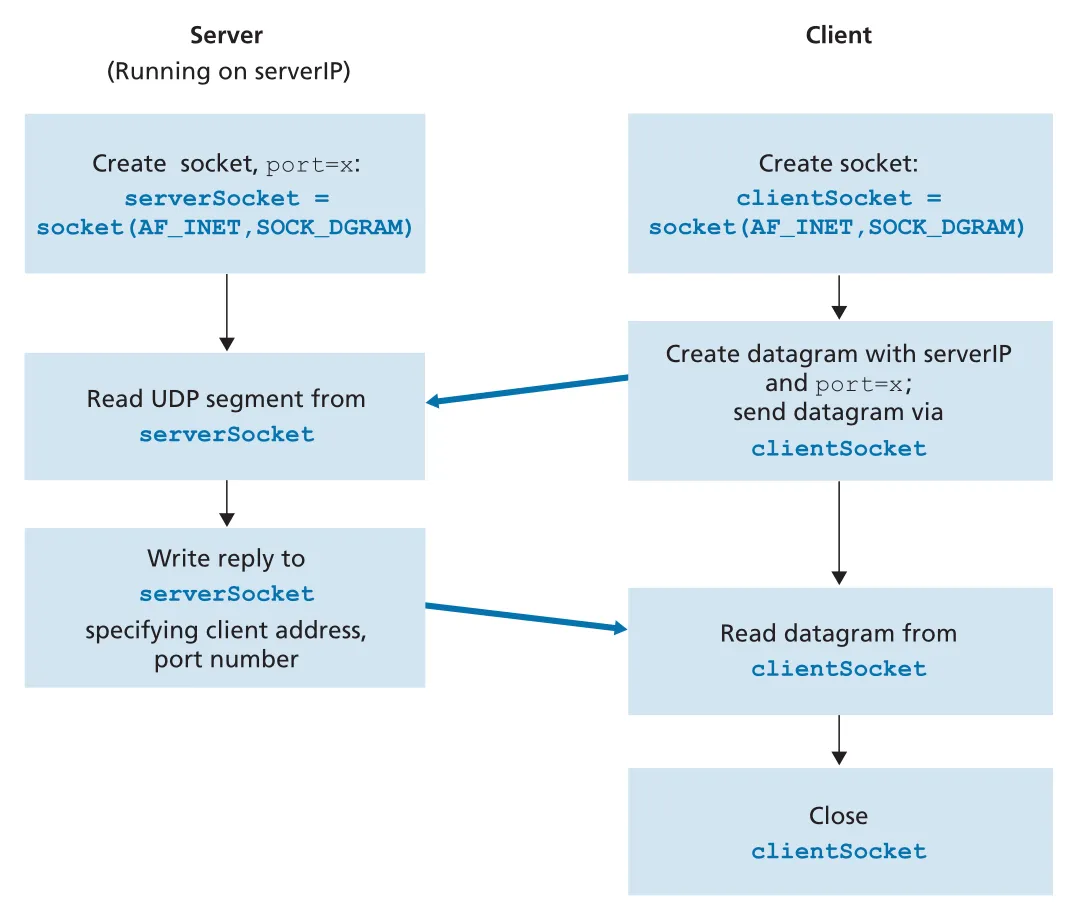 Figure 2.27 · PDF p. 166 · UDP client/server socket 생성, datagram 송수신, client socket close 흐름
UDP client의 핵심 흐름은 다음과 같다.
clientSocket = socket(AF_INET, SOCK_DGRAM)
message = input(...)
clientSocket.sendto(message.encode(), (serverName, serverPort))
modifiedMessage, serverAddress = clientSocket.recvfrom(2048)
clientSocket.close()AF_INET은 IPv4 address family를 뜻하고, SOCK_DGRAM은 UDP socket을 뜻한다. client socket은 port number를 직접 지정하지 않아도 OS가 ephemeral port를 할당한다. sendto()는 bytes로 encoding된 message와 destination (serverName, serverPort)를 함께 socket에 넣는다. recvfrom(2048)은 도착한 datagram payload와 source address를 함께 반환한다.
UDP server의 핵심 흐름은 다음과 같다.
serverSocket = socket(AF_INET, SOCK_DGRAM)
serverSocket.bind(('', serverPort))
while True:
    message, clientAddress = serverSocket.recvfrom(2048)
    modifiedMessage = message.decode().upper()
    serverSocket.sendto(modifiedMessage.encode(), clientAddress)
server는 bind(('', serverPort))로 well-known 또는 chosen server port를 socket에 연결한다. 그러면 해당 host IP address의 serverPort로 들어오는 UDP datagrams가 이 socket으로 전달된다. server는 datagram에서 얻은 clientAddress를 reply destination으로 사용한다. UDP server는 하나의 socket으로 여러 clients의 datagrams를 받을 수 있다.
UDP programming의 중요한 감각은 다음과 같다.
| 포인트 | 의미 |
|---|---|
| no connection setup | client는 server가 준비되어 있다고 가정하고 datagram을 보냄 |
| per-message destination | sendto()마다 destination address를 제공 |
| message boundary preserved | recvfrom()은 datagram 단위로 받음 |
| no delivery guarantee | loss, reordering, duplication 가능성은 application이 필요하면 직접 처리 |
TCP socket programming
TCP는 connection-oriented protocol이다. client와 server가 데이터를 보내기 전에 TCP connection을 establish해야 한다. 이 three-way handshake는 transport layer 내부에서 수행되며 application code에는 보이지 않는다. connection이 만들어지면 application은 socket에 bytes를 넣고 빼면 되고, TCP가 reliable, in-order byte-stream delivery를 제공한다.
TCP server에는 두 종류의 socket이 나온다. serverSocket은 모든 clients의 initial contact를 받는 welcoming socket이다. 어떤 client가 connect하면 accept()가 그 client 전용 connectionSocket을 새로 만든다. 이 구분은 TCP socket programming에서 가장 자주 헷갈리는 부분이다.
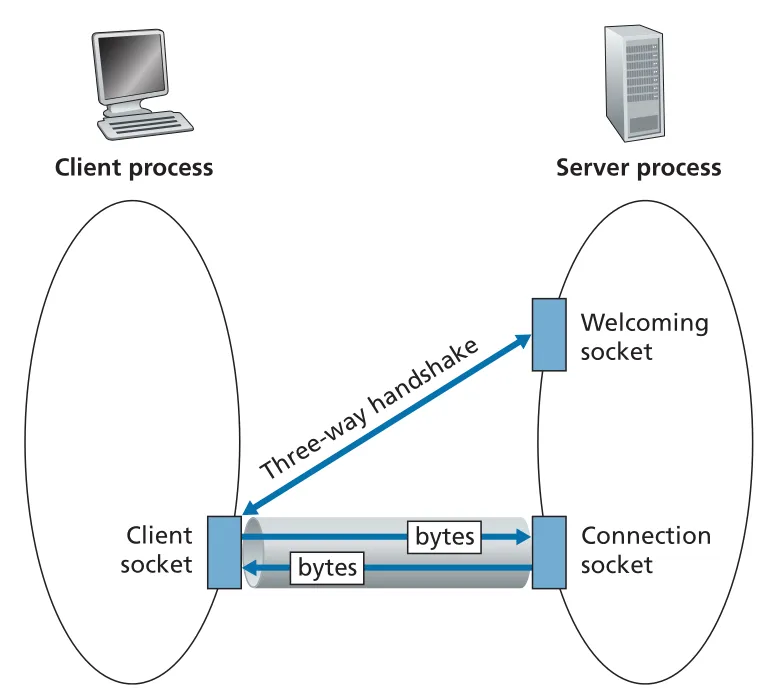 Figure 2.28 · PDF p. 172 · TCP server의 welcoming socket과 client별 connection socket 구분
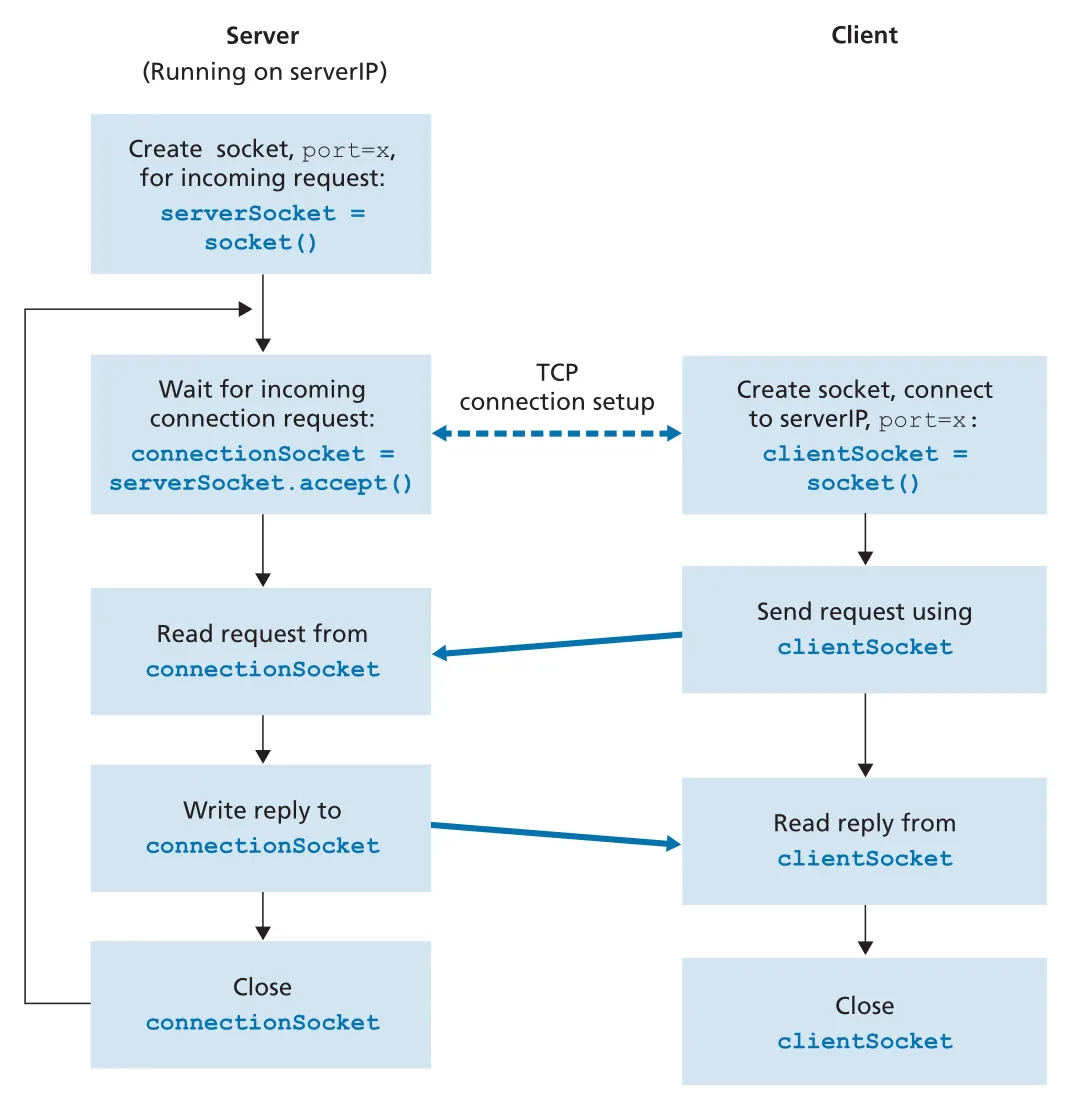 Figure 2.29 · PDF p. 173 · TCP connection setup 후 clientSocket과 connectionSocket이 bytes를 주고받는 흐름
TCP client의 핵심 흐름은 다음과 같다.
clientSocket = socket(AF_INET, SOCK_STREAM)
clientSocket.connect((serverName, serverPort))
clientSocket.send(sentence.encode())
modifiedSentence = clientSocket.recv(1024)
clientSocket.close()SOCK_STREAM은 TCP socket을 뜻한다. connect()가 server의 welcoming socket address에 접속을 시도하고 TCP connection setup을 시작한다. connection 이후 send()에는 destination address를 넘기지 않는다. 이미 connection이 client socket address와 server socket address를 묶고 있기 때문이다.
TCP server의 핵심 흐름은 다음과 같다.
serverSocket = socket(AF_INET, SOCK_STREAM)
serverSocket.bind(('', serverPort))
serverSocket.listen(1)
while True:
    connectionSocket, addr = serverSocket.accept()
    sentence = connectionSocket.recv(1024).decode()
    capitalizedSentence = sentence.upper()
    connectionSocket.send(capitalizedSentence.encode())
connectionSocket.close()listen(1)은 server가 incoming TCP connection requests를 받을 준비를 하게 한다. accept()는 client가 연결을 시도할 때까지 기다렸다가, 해당 client와 통신할 dedicated connection socket을 반환한다. 예제에서는 한 문장을 처리한 뒤 connectionSocket.close()로 해당 TCP connection을 닫지만, serverSocket은 계속 열려 있어 다음 client를 받을 수 있다.
UDP와 TCP socket code의 구조적 차이
| 비교 | UDP | TCP |
|---|---|---|
| socket type | SOCK_DGRAM | SOCK_STREAM |
| setup | connection 없음 | connect()와 three-way handshake |
| server socket | 하나의 UDP socket으로 datagrams 수신/응답 | welcoming serverSocket + client별 connectionSocket |
| send API | sendto(data, address) | send(data) |
| receive API | recvfrom(buffer)가 data와 source address 반환 | recv(buffer)가 byte stream 일부 반환 |
| delivery model | best effort datagrams | reliable, in-order byte stream |
| address handling | datagram마다 destination/source address 의미가 드러남 | connection setup 후 address는 connection state에 묶임 |
application protocol이 RFC로 정의되어 있다면 socket code는 반드시 해당 protocol의 transport choice와 port conventions를 따라야 한다. 예를 들어 HTTP client/server 구현은 TCP와 HTTP well-known port convention을 전제로 상호 운용된다. 반대로 proprietary application에서는 developer가 TCP/UDP 중 무엇이 application requirements에 맞는지 직접 선택한다.
2.8 Summary and Practice Targets
Chapter 2는 network application을 두 층에서 다뤘다. 첫째는 conceptual level이다. client-server architecture, P2P architecture, process/socket model, transport service requirements를 통해 application이 Internet edge에서 어떻게 구성되는지 보았다. 둘째는 implementation level이다. HTTP, SMTP, DNS, BitTorrent, DASH/CDN, UDP/TCP socket programming을 통해 실제 application-layer protocol이 어떤 message format과 message ordering을 갖는지 확인했다.
이 장을 지나면 protocol이라는 말이 훨씬 구체적이어야 한다. protocol은 단순히 “약속”이 아니라, communicating entities 사이에서 교환되는 messages의 format, order, 그리고 message/event를 받았을 때 수행하는 actions를 포함한다. HTTP request/response, SMTP command/reply, DNS query/reply, BitTorrent chunk trading, TCP/UDP socket API가 모두 이 정의를 다른 방식으로 보여 준다.
Chapter 3로 이어지는 연결점
Section 2.1과 2.7에서는 TCP와 UDP가 application에게 무엇을 제공하는지 보았다.
| transport service | Chapter 2에서 본 모습 | Chapter 3에서 이어질 질문 |
|---|---|---|
TCP reliable data transfer | HTTP/SMTP/IMAP, TCP socket byte stream | TCP는 loss, reordering, congestion 속에서 어떻게 reliability를 제공하는가 |
TCP connection-oriented service | connect(), three-way handshake, persistent HTTP | connection setup/teardown과 state는 transport layer에서 어떻게 관리되는가 |
UDP connectionless service | DNS, UDP socket datagrams, UDP Pinger | checksum, multiplexing/demultiplexing 외에 왜 reliability를 제공하지 않는가 |
TLS over TCP | application이 TLS library를 사용해 encrypted process-to-process channel 생성 | security가 transport service와 application code 사이에서 어떻게 결합되는가 |
즉 Chapter 2는 “application이 transport services를 어떻게 사용하나”를 다루고, Chapter 3는 “transport layer가 그 services를 어떻게 구현하나”로 내려간다.
Review Questions가 확인하는 핵심 축
end-of-chapter review는 암기보다 구분 능력을 묻는다.
| 범위 | 꼭 구분해야 할 것 |
|---|---|
| Section 2.1 | network architecture vs application architecture, client process vs server process, IP address + port number로 process 식별 |
| Section 2.2 | non-persistent HTTP vs persistent HTTP, HTTP request/response format, cookies, Web cache, conditional GET, HTTP/2 HOL blocking 완화 |
| Section 2.3 | SMTP server-to-server push, HTTP/IMAP mailbox access pull, MAIL FROM vs message From: header |
| Section 2.4 | DNS hierarchy, recursive query vs iterative query, A/NS/CNAME/MX resource records, DNS caching과 TTL |
| Section 2.5 | client-server distribution time vs P2P distribution time, BitTorrent rarest first, tit-for-tat, optimistic unchoking |
| Section 2.6 | DASH client-side adaptation, CDN Enter Deep vs Bring Home, DNS redirect와 cluster selection |
| Section 2.7 | UDP one-socket server vs TCP welcoming socket + connection socket, sendto/recvfrom vs send/recv |
Problems가 요구하는 계산/분석 패턴
Problems는 실제 protocol traces와 performance 계산을 섞는다. HTTP 문제들은 GET/response raw message에서 URL, HTTP version, connection persistence, Last-Modified, Content-Length, status code를 찾아내게 한다. timing 문제들은 DNS lookup RTT와 HTTP connection RTT를 합산하고, non-persistent/persistent/parallel connections의 차이를 계산하게 한다.
Web caching 문제는 average object size, request rate, access link rate, miss rate를 이용해 access delay와 total response time을 비교한다. P2P 문제는 와 를 실제 , , upload/download rates에 적용하게 한다. DASH 문제는 audio/video versions를 하나로 muxing할 때와 separate streams로 둘 때 필요한 files/URLs 수를 비교한다.
Socket Programming Assignments의 학습 목표
socket assignments는 Section 2.7의 API를 실제 protocol 구현으로 확장한다.
| assignment | 핵심 목표 |
|---|---|
Web Server | TCP accept() 후 HTTP request parsing, file lookup, HTTP response header/body, 404 Not Found |
UDP Pinger | UDP loss 가능성을 timeout으로 처리하고 RTT(Round Trip Time)를 측정 |
Mail Client | TCP connection 위에서 SMTP dialogue(HELO, MAIL FROM, RCPT TO, DATA, QUIT) 직접 수행 |
Web Proxy | browser request를 받아 origin server로 새 HTTP request를 보내고 response를 relay/cache하는 proxy 구조 이해 |
이 assignments는 “application-layer protocol은 결국 socket 위에서 bytes/messages를 정해진 순서대로 주고받는 code”라는 점을 손에 익히게 한다.
Wireshark Labs: HTTP와 DNS
Wireshark Lab: HTTP는 packet trace에서 basic GET/reply interaction, HTTP message format, large HTML file retrieval, embedded URLs, persistent/non-persistent connections, authentication/security 관련 headers를 직접 관찰하게 한다. 이 lab은 Section 2.2의 message format을 실제 traffic으로 확인하는 역할을 한다.
Wireshark Lab: DNS는 client가 local DNS server에 query를 보내고 response를 받는 단순한 외형과, 그 뒤에서 hierarchy가 recursive/iterative resolution을 수행할 수 있다는 내부 구조를 연결한다. Section 2.4의 DNS query/reply format, resource records, caching을 실제 packets에서 확인하는 것이 목표다.