Chapter 13. File-System Interface
- 과목: Operating System
- 기준 교재: Operating System Concepts 10th
- 관련 페이지: PDF pp. 659-691
- 우선순위: 필수
개요
file system은 general-purpose operating system에서 사용자에게 가장 눈에 잘 보이는 부분이다. Data와 programs를 online storage에 저장하고 다시 access하는 mechanism을 제공한다. File system은 크게 두 부분으로 이루어진다. 하나는 related data를 저장하는 files의 collection이고, 다른 하나는 system 안의 files를 organize하고 information을 제공하는 directory structure다.
Chapter 13의 핵심 질문은 “OS가 physical storage devices를 어떻게 user-visible files/directories/protection/memory-mapped interface로 추상화하는가?”이다. Storage device 자체는 Chapter 11에서 다뤘고, 이 장은 그 위에 놓이는 logical interface를 설명한다. 중요한 축은 file concept, file operations, access methods, directory structures, sharing/protection, memory-mapped files다.
핵심 개념
| 개념 | 핵심 의미 |
|---|---|
file system | files와 directory structure를 통해 persistent data/program storage와 access를 제공하는 OS mechanism. |
file | secondary storage에 기록된 named collection of related information. User 관점에서 logical secondary storage의 smallest allotment. |
directory structure | file names와 file attributes/identifiers를 organize하고 lookup할 수 있게 하는 구조. |
file attributes | name, identifier, type, location, size, protection, timestamps, user identification 등 file metadata. |
identifier | file system 안에서 file을 유일하게 식별하는 non-human-readable tag. |
extended file attributes | character encoding, checksum, security features처럼 newer file systems가 추가로 저장할 수 있는 attributes. |
file operations | create, open, write, read, reposition/seek, delete, truncate 등 file ADT에 대한 기본 operations. |
file handle | open() 성공 후 이후 operations에서 file name 대신 사용하는 open-file table entry reference. |
open-file table | open files 정보를 유지해 매 operation마다 directory search를 반복하지 않게 하는 table. |
per-process open-file table | process별 open file state, current-file-position pointer, access mode 등을 담는 table. |
system-wide open-file table | file location, size, access dates, open count 같은 process-independent open file 정보를 담는 table. |
file pointer, current-file-position pointer | sequential read/write에서 다음 operation 위치를 나타내는 per-process offset. |
file-open count | 여러 processes가 같은 file을 열었을 때 마지막 close까지 system-wide open-file entry를 유지하기 위한 count. |
hard link | 같은 file contents에 대해 여러 directory entries/names가 존재하는 구조. 마지막 link가 삭제될 때 contents가 삭제된다. |
file lock | 여러 processes가 shared file에 동시에 접근할 때 access를 조정하는 locking mechanism. |
shared lock, exclusive lock | reader-writer lock과 유사하게 여러 readers 허용 또는 single writer만 허용하는 file locking mode. |
mandatory locking, advisory locking | OS가 lock integrity를 강제하는 방식과 applications가 자발적으로 lock protocol을 지켜야 하는 방식. |
file type, extension, magic number | file contents/usage를 구분하기 위해 name suffix나 file beginning marker 등을 사용하는 방식. |
file structure | file 내부 data organization. OS가 많이 알수록 support는 늘지만 flexibility는 줄 수 있다. |
logical record, physical block | application이 보는 record 단위와 storage I/O의 fixed-size block 단위. |
packing | 여러 logical records를 physical blocks에 배치하고 필요 시 unpacking하는 과정. |
internal fragmentation | block 단위 allocation 때문에 file의 마지막 block 일부가 unused로 낭비되는 현상. |
sequential access | file records를 순서대로 처리하는 access method. read next(), write next()가 중심이다. |
direct access, relative access | fixed-length logical records를 numbered blocks/records로 보고 임의 순서로 read/write하는 access method. |
relative block number | file beginning 기준 block index. Absolute disk address를 user에게 노출하지 않는다. |
index file, ISAM | key나 first record value를 pointer로 연결해 large file records를 적은 I/O로 찾게 하는 indexed access structure. |
file control block, FCB | file의 attributes/location/control information을 담는 file-system internal metadata block. Directory는 name을 FCB로 번역하는 symbol table처럼 볼 수 있다. |
single-level directory | 모든 files가 하나의 directory에 들어가는 가장 단순한 directory structure. |
two-level directory, MFD, UFD | master file directory가 user file directories를 가리키고, 각 UFD가 한 user의 files를 담는 구조. |
search path | command/file name lookup 시 순서대로 탐색하는 directories sequence. |
tree-structured directory | root directory 아래 arbitrary-height subdirectories로 files를 organize하는 일반적 구조. |
absolute path name, relative path name | root에서 시작하는 path와 current directory에서 시작하는 path. |
acyclic-graph directory | cycles 없이 shared files/subdirectories를 허용하는 directory graph. |
symbolic link, hard link | path/name으로 real file을 간접 참조하는 link와 inode/reference count를 공유하는 nonsymbolic link. |
aliasing | 서로 다른 path names가 같은 file/subdirectory를 가리키는 상황. |
reference count | shared file에 남은 directory entries/hard links 수를 추적해 0일 때 delete 가능하게 하는 count. |
general graph directory | cycles가 허용될 수 있는 directory graph. Traversal/deletion에서 infinite loop와 garbage collection 문제가 생긴다. |
protection | improper access를 막아 files/directories에 대한 controlled access를 제공하는 mechanism. |
reliability | physical damage, hardware/software failure, accidental deletion 등에 대비해 data를 보존하는 성질. |
ACL | Access-Control List. 각 user별 allowed access types를 file/directory와 연결하는 protection structure. |
owner, group, other | access rights를 압축하기 위해 사용자를 file owner, sharing group, 나머지 users로 나누는 classification. |
rwx | UNIX-style read, write, execute permission bits. owner/group/other 각각에 대해 유지된다. |
directory protection | file contents뿐 아니라 directory list/create/delete/traverse/name lookup 자체를 보호하는 mechanism. |
memory-mapped file, mmap() | file의 disk blocks를 process virtual address space pages에 map해 file I/O를 memory access처럼 수행하는 방식. |
demand paging | mapped file page가 처음 access될 때 page fault로 physical page에 읽어오는 mechanism. |
copy-on-write, COW | shared read-only mapping에서 process가 modify할 때 private copy를 만들어 isolation을 유지하는 기법. |
shared memory | 여러 processes가 같은 physical memory pages를 virtual address spaces에 map해 data를 교환하는 IPC mechanism. |
CreateFileMapping(), MapViewOfFile(), OpenFileMapping() | Windows API에서 file mapping object 생성, process address space view 생성, existing mapping open에 쓰이는 functions. |
세부 정리
13.1 File Concept
Storage media는 NVM devices, HDDs, magnetic tapes, optical disks처럼 다양하지만, 사용자가 매번 physical properties를 알아야 한다면 system은 쓰기 어렵다. OS는 storage device의 물리적 차이를 숨기고 file이라는 uniform logical storage unit을 제공한다. Files는 OS에 의해 physical devices에 map되고, storage devices는 보통 nonvolatile이므로 file contents는 reboot 사이에도 persistent하다.
file은 secondary storage에 기록된 named collection of related information이다. User 관점에서 file은 logical secondary storage의 smallest allotment다. 즉 data는 file 안에 있지 않으면 secondary storage에 쓸 수 없다. File은 source/object programs, numeric/text/binary data, photos, music, video 등 거의 모든 정보를 표현할 수 있다. Text file은 lines로 organized된 character sequence이고, source file은 functions/declarations/statements로 구성되며, executable file은 loader가 memory로 가져와 실행할 code sections를 포함한다.
File abstraction은 매우 일반적이어서 원래 “저장 데이터”를 넘어서도 쓰인다. UNIX/Linux의 proc file system은 process details 같은 system information을 file-system interface로 제공하는 예다.
13.1.1 File Attributes
File은 human users를 위해 name을 갖는다. File name은 보통 example.c 같은 character string이다. Some systems는 uppercase/lowercase를 구분하고, some systems는 구분하지 않는다. 한 번 named된 file은 그것을 만든 process, user, even system으로부터 independent해질 수 있다. 예를 들어 USB drive, email attachment, network copy로 이동해도 같은 name을 유지할 수 있다. 단, sharing/synchronization mechanism이 없으면 copy는 original과 독립적으로 변한다.
Typical file attributes는 다음과 같다.
| Attribute | 의미 |
|---|---|
Name | human-readable symbolic file name |
Identifier | file system 내부에서 file을 식별하는 unique non-human-readable tag |
Type | OS가 file types를 지원할 때 필요한 type information |
Location | device와 그 device 안 file location에 대한 pointer |
Size | current file size와 가능하면 maximum allowed size |
Protection | read/write/execute 등 누가 무엇을 할 수 있는지 나타내는 access-control information |
Timestamps, user identification | creation, last modification, last use, owner/user 정보. protection/security/usage monitoring에 활용 |
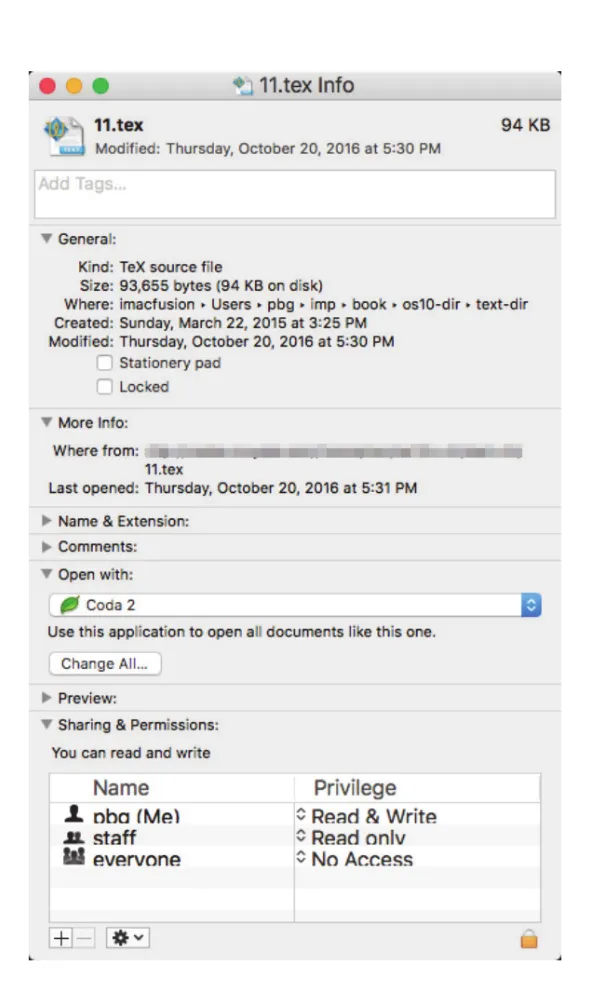
Figure 13.1 · PDF p. 661 · file name, type, size, timestamps 같은 attributes가 user-visible metadata로 표시되는 예
File attributes에 대한 정보는 directory structure에 저장된다. Directory entry는 보통 file name과 unique identifier를 담고, identifier가 나머지 attributes를 찾게 한다. File metadata는 file마다 1KB 이상일 수 있고, files가 많으면 directory 자체도 megabytes/gigabytes가 될 수 있다. Directory는 files와 같은 volatility를 가져야 하므로 device에 저장되고, 필요할 때 piecemeal로 memory에 올라온다.
13.1.2 File Operations
File은 abstract data type이므로 어떤 operations가 가능한지 정의해야 한다. OS가 제공하는 기본 file operations는 create, open, write, read, reposition, delete, truncate다.
| Operation | OS가 해야 하는 일 |
|---|---|
create | file system 안 free space를 찾고, directory에 new file entry를 만든다. |
open | file name을 directory에서 찾고 permissions를 검사한 뒤 open-file table entry를 만들고 file handle을 반환한다. |
write | open file handle과 data를 받아 current position에 쓰고 write/current-file-position pointer를 갱신한다. |
read | open file handle과 memory destination을 받아 next block을 읽고 read/current-file-position pointer를 갱신한다. |
reposition, seek | open file의 current-file-position pointer를 특정 값으로 바꾼다. 실제 I/O가 필요 없을 수 있다. |
delete | directory entry를 찾아 file space를 release하고 directory entry를 erase 또는 free mark한다. Hard links가 있으면 last link 삭제 전까지 contents는 남는다. |
truncate | attributes는 유지하면서 file length를 0으로 만들고 file space를 release한다. |
대부분의 file operations는 named file에 대응되는 directory entry를 찾아야 한다. 이 search를 매번 반복하지 않기 위해 많은 systems는 file 사용 전 open()을 요구한다. open()은 directory entry를 open-file table로 복사하고, 이후 I/O operations는 file name이 아니라 open-file table index 또는 pointer, 즉 file handle을 사용한다. create()와 delete()는 open file이 아니라 closed file name에 대해 동작하는 system calls다.
open()은 file name뿐 아니라 access-mode information, 예를 들어 create, read-only, read-write, append-only를 받을 수 있다. OS는 requested mode를 file permissions와 비교하고, 허용되면 process에 대해 file을 open한다. 이 방식은 name lookup, permission checking, directory access를 open() 시점에 집중시켜 이후 read/write interface를 단순하게 만든다.
여러 processes가 같은 file을 동시에 open할 수 있으므로 OS는 보통 two-level internal tables를 사용한다.
| Table | 저장 정보 | 이유 |
|---|---|---|
per-process open-file table | process가 연 files, current file pointer, process-specific access rights/accounting | process마다 file offset과 access mode가 다를 수 있음 |
system-wide open-file table | file location on disk/server/RAM drive, file size, access dates, open count | process-independent file metadata를 공유하고 중복을 줄임 |
한 process가 이미 열린 file을 다른 process가 open()하면, 새 process open-file table entry가 system-wide table의 existing entry를 가리킨다. file-open count는 몇 processes가 file을 열고 있는지 추적한다. 각 close()는 count를 줄이고, count가 0이 되면 system-wide open-file entry를 제거할 수 있다.
Open file에는 몇 가지 중요한 정보가 붙는다.
File pointer: read/write offset이 system call 인자에 없을 때 per-process current-file-position pointer로 추적한다.File-open count: 마지막 close 전까지 open-file table entry를 유지하기 위해 opens/closes 수를 추적한다.Location of the file: mass storage, file server, RAM drive 등 file data 위치 정보를 memory에 유지해 매번 directory에서 다시 읽지 않게 한다.Access rights: process가 file을 어떤 mode로 열었는지 저장해 이후 I/O를 allow/deny한다.
File locks는 shared files에서 여러 processes의 access를 조정한다. shared lock은 reader lock처럼 여러 processes가 동시에 획득할 수 있고, exclusive lock은 writer lock처럼 한 process만 획득할 수 있다. 모든 OS가 두 종류를 모두 제공하는 것은 아니다.
mandatory locking에서는 process가 exclusive lock을 얻으면 OS가 다른 process의 access를 막는다. advisory locking에서는 OS가 강제하지 않고, applications가 스스로 lock을 acquire/release하도록 작성되어야 한다. 일반적으로 Windows는 mandatory locking에 가깝고 UNIX systems는 advisory locks를 사용한다. File locks도 일반 synchronization처럼 deadlock 위험이 있으므로, exclusive lock을 필요한 동안만 잡고 lock acquisition order에 주의해야 한다.
13.1.3 File Types
File system design에서는 OS가 file types를 recognize/support할지 결정해야 한다. OS가 file type을 알면 reasonable operations를 선택할 수 있다. 예를 들어 binary object program을 text로 출력하면 garbage가 나오므로, OS나 application이 type을 알면 이런 misuse를 줄일 수 있다.
가장 흔한 file type 구현은 file name extension이다. Name과 extension을 period로 나누어, user와 OS/application이 name만 보고 type을 추정한다. resume.docx, server.c, ReaderThread.cpp 같은 names가 예다.
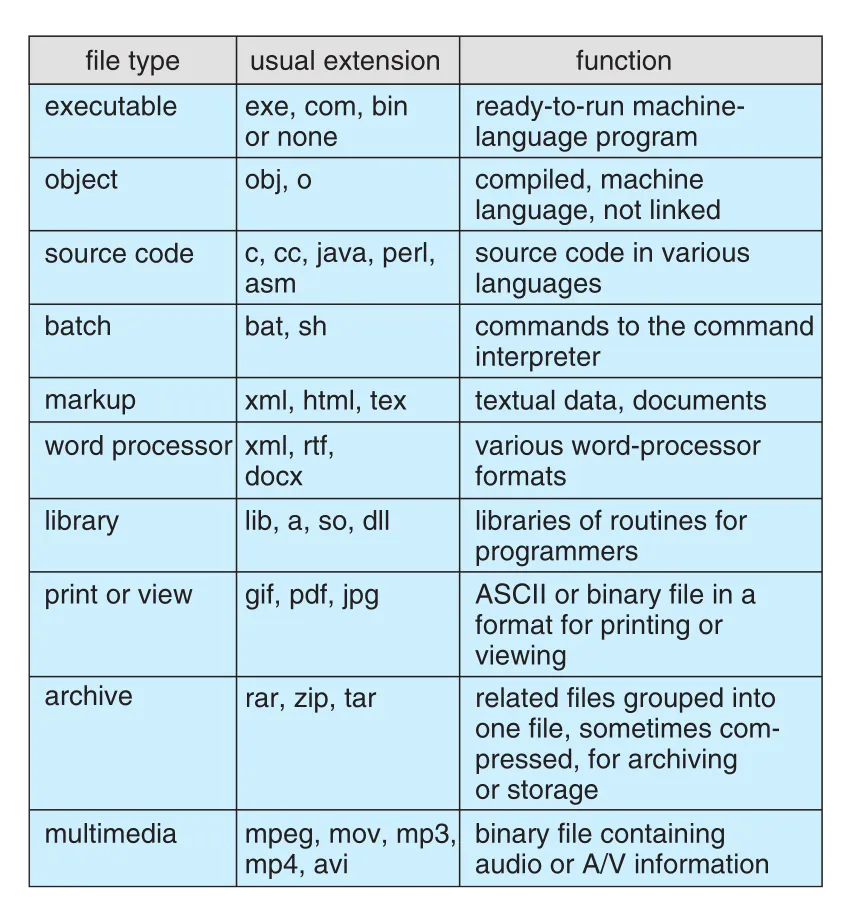
Figure 13.3 · PDF p. 667 · executable, source code, archive, multimedia 등 common file types와 usual extensions
Extensions는 system이 강하게 enforce할 수도 있고, applications를 위한 hint일 수도 있다. .com, .exe, .sh는 executable candidates로 취급될 수 있고, Java compiler는 .java, word processor는 .doc/.docx를 기대할 수 있다. 하지만 extension이 OS에 의해 enforce되지 않으면 application programmer가 해석할 뿐이다.
macOS는 file type과 creator attribute를 system-supported metadata로 사용한다. File을 double-click하면 creator/program 정보에 따라 application이 자동으로 열린다. UNIX는 일부 binary/text files 시작 부분의 magic number로 type을 나타내기도 하지만, 모든 files가 magic number를 갖는 것은 아니다. UNIX는 filename extensions를 허용하지만 OS가 의존하거나 강제하지 않고, 주로 user/application hints로 본다.
13.1.4 File Structure
File type은 file 내부 구조를 나타내는 데도 쓰일 수 있다. Source/object files는 그것을 읽는 programs가 기대하는 structures를 가진다. Executable file은 OS loader가 memory에 어디에 load하고 first instruction이 어디인지 알 수 있도록 specific structure를 가져야 한다.
OS가 여러 file structures를 직접 support하면 application 개발이 쉬워질 수 있지만, OS가 커지고 둔해진다. 다섯 가지 file structures를 정의하면 OS는 그 structures를 지원하는 code를 모두 포함해야 하고, 새 application이 OS가 모르는 structure를 요구하면 문제가 생긴다. 예를 들어 OS가 text file과 executable binary만 지원한다고 할 때, encrypted file은 text도 executable도 아니어서 file-type mechanism을 우회하거나 misuse해야 할 수 있다.
UNIX, Windows 등 많은 systems는 최소한의 file structure만 impose/support한다. UNIX는 file을 8-bit bytes sequence로 보고, OS는 bits를 해석하지 않는다. 이 방식은 maximum flexibility를 제공하지만 support는 적다. 각 application이 input file structure를 스스로 해석해야 한다. 그래도 모든 OS는 적어도 executable file structure는 알아야 한다. Programs를 load/run해야 하기 때문이다.
13.1.5 Internal File Structure
File 안 offset을 physical storage에 연결하는 일은 내부적으로 복잡할 수 있다. Disk systems는 sector size로 결정되는 fixed block size를 갖고, 모든 disk I/O는 one block 또는 physical record 단위로 수행된다. 하지만 application이 원하는 logical record length는 physical block size와 정확히 맞지 않을 수 있고, logical records는 variable length일 수도 있다.
공통 해결책은 여러 logical records를 physical blocks에 packing하는 것이다. UNIX는 모든 files를 byte streams로 보고 각 byte를 file beginning 또는 end로부터 offset으로 addressable하게 한다. 이 경우 logical record size는 1 byte이고, file system이 512 bytes/block 같은 physical disk blocks로 자동 packing/unpacking한다.
Logical record size, physical block size, packing technique은 physical block당 logical records 수를 결정한다. Packing은 application이 할 수도 있고 OS가 할 수도 있다. 어느 쪽이든 file은 blocks sequence로 볼 수 있고, basic I/O functions는 blocks 관점에서 동작한다.
Disk space는 항상 blocks 단위로 allocate되므로 각 file의 last block 일부는 낭비될 수 있다. 예를 들어 block이 512 bytes이고 file이 1,949 bytes라면 4 blocks, 즉 2,048 bytes가 allocate되고 마지막 99 bytes는 unused가 된다. 이 낭비가 internal fragmentation이다. 모든 file systems는 internal fragmentation을 겪고, block size가 클수록 fragmentation도 커진다.
13.2 Access Methods
File에 저장된 information은 memory로 읽혀 사용된다. 이 information에 접근하는 방식이 access method다. 어떤 systems는 하나의 access method만 제공하고, mainframe OS 같은 systems는 여러 access methods를 제공한다. Application 특성에 맞는 access method 선택은 file-system interface design의 중요한 문제다.
13.2.1 Sequential Access
sequential access는 가장 단순한 access method다. Information을 one record after another, 즉 순서대로 처리한다. Editors와 compilers는 보통 files를 이런 방식으로 access한다.
Sequential file에서 read/write의 핵심은 current position이다. read next()는 file의 next portion을 읽고 file pointer를 자동 advance한다. write next()는 file end에 append하고 newly written material의 end로 pointer를 advance한다. File은 beginning으로 reset될 수 있고, 일부 systems는 n records forward/backward skip을 제공하기도 한다.
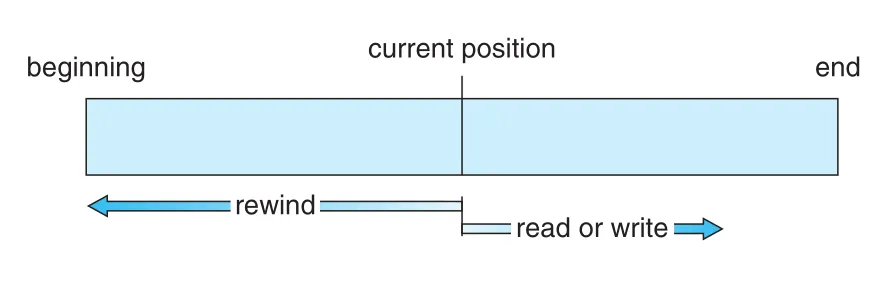
Figure 13.4 · PDF p. 669 · current position에서 read/write가 진행되고 rewind로 beginning으로 돌아가는 sequential-access file model
Sequential access는 tape model에 기반하지만, random-access device에서도 잘 동작한다. 즉 storage device가 disk라고 해서 application이 반드시 direct access를 써야 하는 것은 아니다.
13.2.2 Direct Access
direct access 또는 relative access에서는 file을 fixed-length logical records의 numbered sequence로 본다. Disk가 arbitrary block random access를 지원하므로 direct-access method는 disk model에 기반한다. Direct-access file에서는 block 14를 읽고, block 53을 읽고, block 7을 쓰는 식의 임의 순서 access가 가능하다.
Direct access는 large information에 즉시 접근해야 하는 applications에 유용하다. Database가 대표적이다. 예를 들어 airline reservation system에서 flight 713의 정보를 reservation file의 block 713에 둔다면, query가 들어왔을 때 해당 block을 직접 읽으면 된다. 사람 이름처럼 key space가 더 복잡한 경우 hash function이나 small in-memory index로 target block을 찾을 수 있다.
Direct access에서는 file operations가 block number를 parameter로 받아야 한다. read(n), write(n)처럼 직접 block number를 받거나, position file(n)으로 position을 옮긴 뒤 read next()/write next()를 사용할 수 있다.
User가 OS에 제공하는 block number는 보통 relative block number다. File beginning 기준 index이며, 첫 block이 0 또는 1에서 시작한다. Relative block number를 사용하면 OS가 actual file placement, 즉 allocation problem을 결정할 수 있고, user가 자기 file에 속하지 않는 absolute disk address에 접근하는 것을 막을 수 있다.
Fixed logical record length가 L이고 record number가 N이면, record N request는 file 안 location L * N에서 L bytes를 읽는 I/O request로 변환된다. Logical records가 fixed size라면 read/write/delete가 단순해진다.
Direct-access file 위에 sequential access를 simulate하는 것은 쉽다. Current position 변수 cp를 두고 read_next를 read cp; cp = cp + 1로 구현하면 된다.
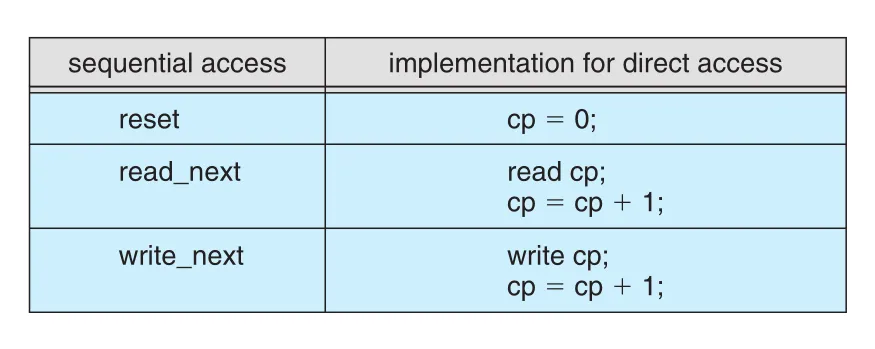
Figure 13.5 · PDF p. 671 · direct-access file 위에서 current position 변수로 sequential access를 흉내 내는 방식
반대로 sequential-access file 위에 direct-access file을 simulate하는 것은 매우 비효율적이고 clumsy하다. 이 차이는 “더 강한 access capability를 가진 abstraction 위에 약한 abstraction을 얹기는 쉽지만, 반대는 어렵다”는 설계 감각을 보여준다.
13.2.3 Other Access Methods
다른 access methods는 direct access 위에 build될 수 있다. 대표적으로 index를 사용한다. Index는 책 뒤 index처럼 file의 various blocks를 가리키는 pointers를 담는다. 원하는 record를 찾기 위해 먼저 index를 search하고, pointer를 사용해 file block에 direct access한다.
Retail-price file 예시는 indexed access의 이점을 보여준다. 각 record가 10-digit UPC와 6-digit price로 구성되어 16 bytes이고, disk block이 1,024 bytes라면 block당 64 records를 담는다. 120,000 records file은 약 2,000 blocks가 된다. File을 UPC로 sort하고 각 block의 first UPC를 index로 유지하면 index는 2,000 entries, 약 20,000 bytes라 memory에 둘 수 있다. 특정 item price를 찾을 때 index를 binary search해 target block을 찾고, 그 block만 read하면 된다.
Large file에서는 index file 자체도 memory에 두기 어려울 수 있다. 이때 index에 대한 index를 만든다. Primary index가 secondary index blocks를 가리키고, secondary index blocks가 actual file blocks를 가리킨다. IBM ISAM (indexed sequential-access method)은 small master index → secondary index blocks → actual file blocks 구조를 사용한다. Defined key로 file을 sorted 상태로 유지하고, master index와 secondary index에서 binary search를 수행한 뒤 target block을 sequentially search한다. 원문 예시에서는 어떤 record도 key로부터 at most two direct-access reads로 찾을 수 있다.
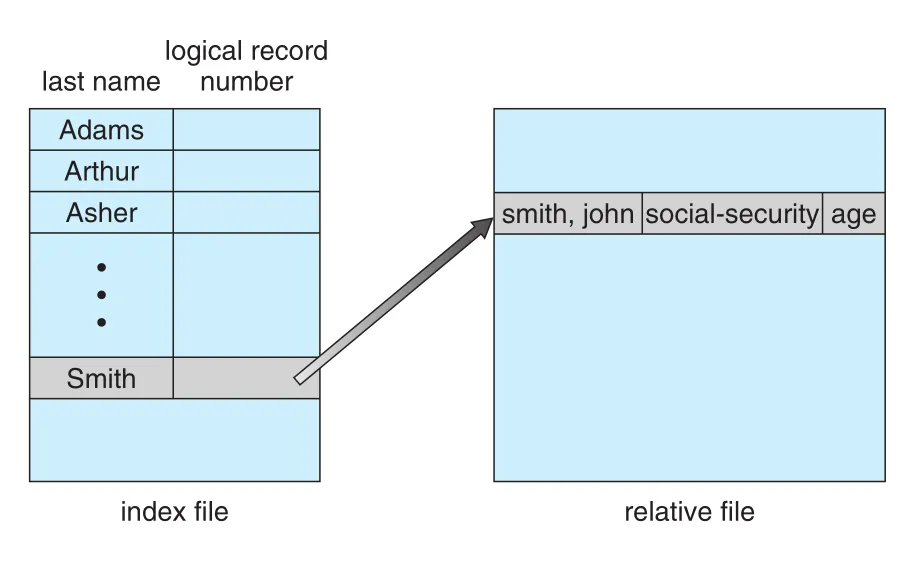
Figure 13.6 · PDF p. 672 · index file이 key를 relative file의 record 위치로 연결해 direct access를 돕는 구조
13.3 Directory Structure
Directory는 file names를 file control blocks (FCBs)로 번역하는 symbol table처럼 볼 수 있다. Directory organization은 file lookup뿐 아니라 create/delete/list/rename/traverse 비용과 sharing semantics를 결정한다.
Directory가 지원해야 하는 기본 operations는 다음과 같다.
| Operation | 의미 |
|---|---|
search for a file | symbolic name이나 pattern에 맞는 file entry를 찾음 |
create a file | new file을 만들고 directory에 entry 추가 |
delete a file | file이 필요 없을 때 directory에서 제거. Directory hole/defragmentation 문제가 생길 수 있음 |
list a directory | directory 안 files와 entries contents를 나열 |
rename a file | file contents/use가 바뀔 때 name을 바꾸고, 경우에 따라 directory 위치도 변경 |
traverse the file system | backup, archival, cleanup, statistics를 위해 모든 directories/files를 방문 |
13.3.1 Single-Level Directory
single-level directory는 모든 files가 같은 directory에 들어가는 가장 단순한 구조다.
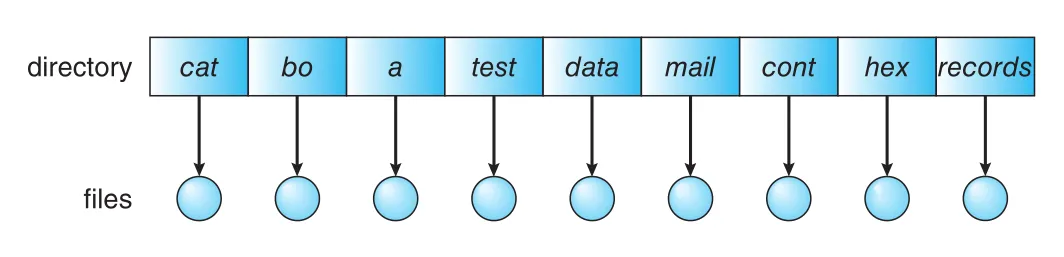
Figure 13.7 · PDF p. 673 · 모든 files가 하나의 directory namespace에 놓이는 single-level directory
장점은 구현과 이해가 쉽다는 것이다. 하지만 files 수가 늘거나 users가 여러 명이면 한계가 크다. 모든 files가 같은 directory에 있으므로 names가 globally unique해야 한다. 서로 다른 users가 test.txt나 prog2.c 같은 같은 이름을 쓰면 충돌한다. 또한 한 user만 있어도 files가 hundreds/thousands로 늘면 names를 기억하고 관리하기 어렵다.
13.3.2 Two-Level Directory
two-level directory는 user마다 별도 UFD (user file directory)를 만들고, MFD (master file directory)가 user name 또는 account number로 각 UFD를 가리키게 한다.
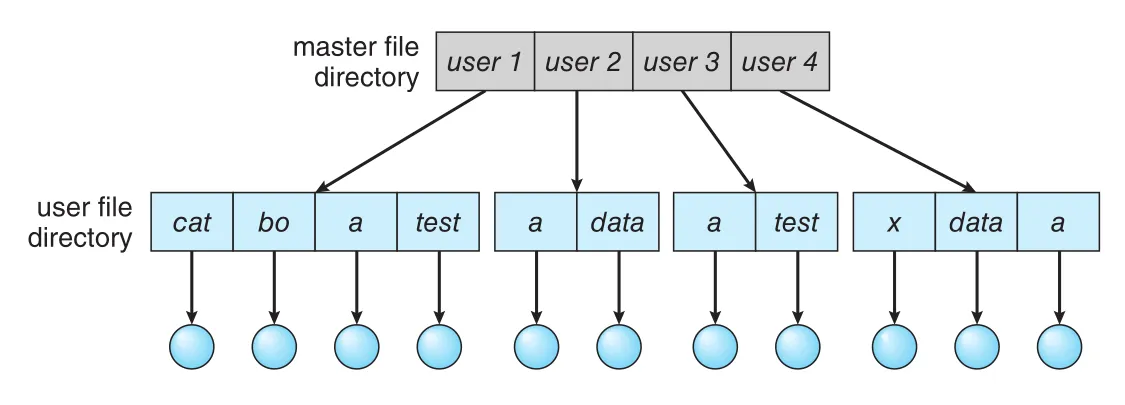
Figure 13.8 · PDF p. 673 · MFD가 각 user의 UFD를 가리키고 각 UFD가 해당 user files를 담는 구조
User가 file을 참조하면 자기 UFD만 search한다. 따라서 user A와 user B가 각각 test.txt를 가져도 충돌하지 않는다. File create/delete도 해당 user의 UFD 안에서만 검사하므로 다른 user의 same-name file을 실수로 삭제하지 않는다.
문제는 isolation이다. Users가 완전히 independent하면 장점이지만, 공동 작업으로 다른 user files에 접근해야 할 때 불편하다. Access를 허용하려면 user name과 file name을 함께 지정해야 한다. Two-level directory는 height 2 tree로 볼 수 있고, root는 MFD, children은 UFDs, leaves는 files다. 특정 file을 unique하게 이름 붙이려면 path name이 필요하다. 예를 들어 user A가 user B의 test.txt를 access하려면 /userb/test.txt 같은 syntax를 사용할 수 있다.
Volume name까지 포함하면 pathname syntax는 OS마다 달라진다. Windows는 C:\userb\test처럼 volume letter와 colon을 사용하고, UNIX/Linux는 volume name을 directory name 일부처럼 treat해 /u/pgalvin/test 같은 path를 사용할 수 있다. 중요한 점은 file identity가 name, user/directory, volume namespace의 조합으로 정해진다는 것이다.
System files, 예를 들어 loaders, compilers, utilities, libraries를 모든 UFD에 copy하면 공간 낭비가 크다. 표준 해결책은 special user directory에 system files를 두고, command/file name lookup 시 local UFD를 먼저 찾은 뒤 없으면 special directory를 search하는 것이다. 이 sequence가 search path다. UNIX와 Windows는 search path를 확장해 command name을 여러 directories에서 찾을 수 있게 한다.
13.3.3 Tree-Structured Directories
Two-level directory를 generalize하면 arbitrary height의 tree-structured directory가 된다. 이 구조가 가장 흔하다. Tree는 root directory를 가지며, every file은 unique path name을 가진다.
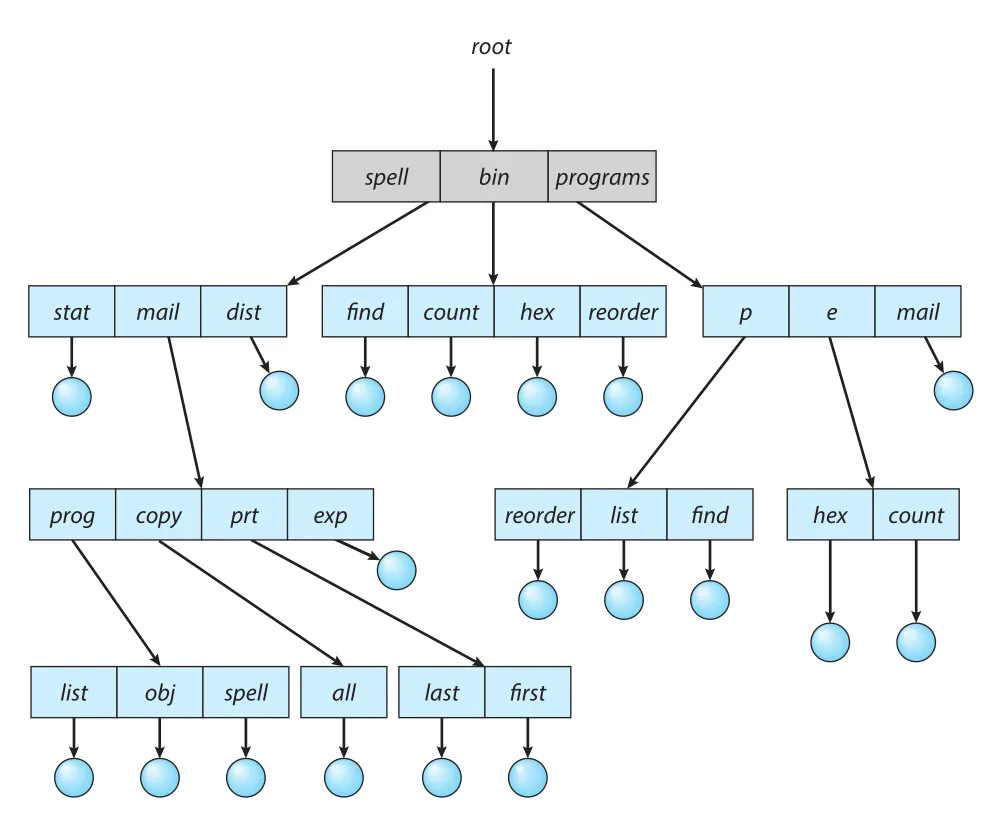
Figure 13.9 · PDF p. 675 · root 아래 subdirectories와 files가 arbitrary height tree를 이루는 directory structure
Directory 또는 subdirectory는 files와 subdirectories의 set을 담는다. 많은 implementations에서 directory는 special file로 취급된다. Directory entry마다 file인지 subdirectory인지 나타내는 bit를 둘 수 있고, create/delete directory에는 special system calls가 사용된다.
각 process는 보통 current directory를 가진다. File reference가 relative name이면 current directory를 search한다. 다른 directory의 file이 필요하면 path name을 지정하거나 current directory를 바꾼다. Login shell의 initial current directory는 user account information에 지정된 initial directory에서 시작하고, spawned subprocess는 보통 parent의 current directory를 inherit한다.
Path names는 두 종류다.
| Path type | 의미 | 예 |
|---|---|---|
absolute path name | root에서 시작해 target까지 내려가는 path | /spell/mail/prt/first |
relative path name | current directory에서 시작하는 path | current가 /spell/mail이면 prt/first |
Tree-structured directory는 user가 topic, project, file type 등에 맞춰 subdirectories를 만들 수 있게 한다. 예를 들어 source programs는 programs, executables는 bin에 둘 수 있다.
Directory deletion policy는 중요한 설계 선택이다. Empty directory는 parent directory entry만 지우면 된다. Nonempty directory는 두 방식이 있다. 어떤 systems는 empty가 아니면 delete를 거부해 user가 files/subdirectories를 먼저 모두 지우게 한다. UNIX rm처럼 option을 제공해 directory 아래 모든 files/subdirectories를 recursive하게 삭제할 수도 있다. 후자는 편하지만 실수하면 전체 directory structure를 한 명령으로 잃을 수 있어 위험하다.
Tree-structured system에서는 다른 user files도 path name으로 access할 수 있다. User B는 user A의 file을 absolute/relative path로 지정하거나, current directory를 user A의 directory로 바꿔 file name만으로 access할 수 있다. 물론 실제 접근 가능 여부는 protection policy에 달려 있다.
13.3.4 Acyclic-Graph Directories
Tree는 file/directory sharing을 금지한다. 공동 프로젝트에서 두 programmers가 같은 project subdirectory를 각자 home directory 아래에 두고 싶다면, directory가 두 위치에 동시에 존재해야 한다. acyclic graph는 cycles 없이 shared files/subdirectories를 허용하는 tree의 자연스러운 일반화다.
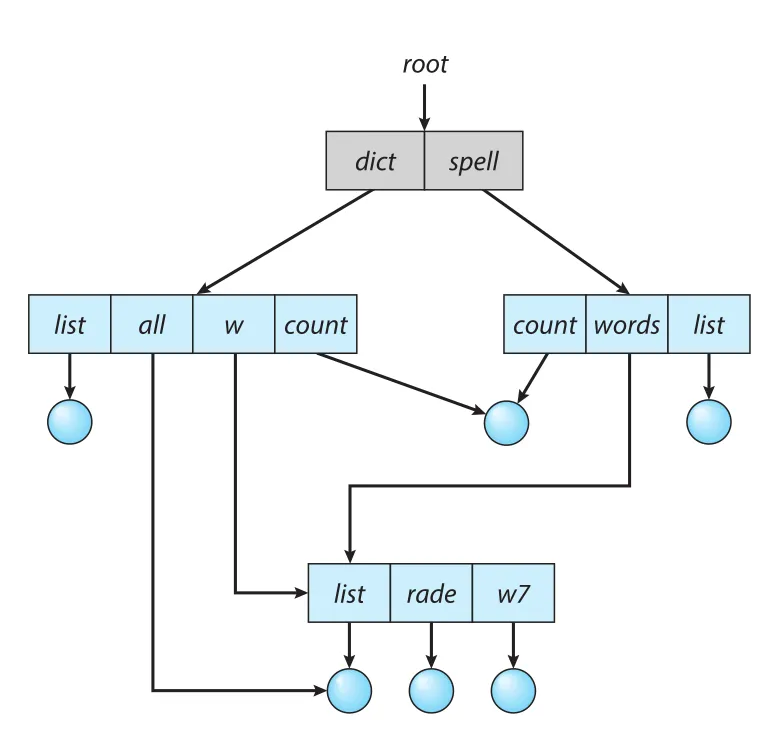
Figure 13.10 · PDF p. 677 · cycles 없이 동일 file/subdirectory가 여러 directories에서 공유되는 acyclic-graph directory
Shared file은 두 copies와 다르다. 두 copies는 한쪽 변경이 다른 쪽에 반영되지 않지만, shared file은 actual file이 하나뿐이므로 한 사용자의 변경이 즉시 다른 사용자에게 보인다. Shared subdirectory에서는 한 사용자가 새 file을 만들면 공유된 모든 위치에서 보인다.
Shared files/subdirectories 구현 방식은 크게 두 가지다.
| 방식 | 특징 | 문제 |
|---|---|---|
symbolic link | directory entry가 real file/subdirectory path를 가리키는 indirect pointer | original 삭제 시 dangling link가 남을 수 있음 |
| duplicate directory entries 또는 hard-link style sharing | sharing directories의 entries가 같은 file information을 가리킴 | original/copy 구분이 어렵고 modification consistency/deletion 관리가 복잡 |
Acyclic graph는 tree보다 flexible하지만 aliasing을 만든다. 서로 다른 absolute path names가 같은 file을 가리킬 수 있다. File system traversal, statistics, backup에서는 shared structures를 두 번 traverse하면 안 된다.
Deletion도 복잡하다. 누군가 shared file을 delete했다고 바로 file space를 deallocate하면 dangling pointers가 남을 수 있다. Symbolic link 방식에서는 link 삭제는 original file에 영향이 없지만, original file이 삭제되면 links는 dangling 상태가 된다. UNIX와 Windows는 symbolic links를 남겨 두고, 사용 시점에 real target이 없으면 illegal file name처럼 처리한다.
다른 방식은 all references가 없어질 때까지 file을 보존하는 것이다. Full reference list는 커질 수 있으므로, 보통 reference count만 유지한다. New link/directory entry가 생기면 count를 증가시키고, 삭제되면 감소시킨다. Count가 0이면 file을 delete할 수 있다. UNIX는 nonsymbolic links, 즉 hard links에 대해 inode 안 reference count를 유지한다. Directories에 대한 multiple references를 사실상 금지하면 acyclic graph structure를 유지하기 쉬워진다.
13.3.5 General Graph Directory
Links를 허용하면 tree structure가 graph structure로 바뀐다. 문제는 cycles를 막지 않으면 general graph directory가 되어 traversal과 deletion이 어려워진다는 점이다.
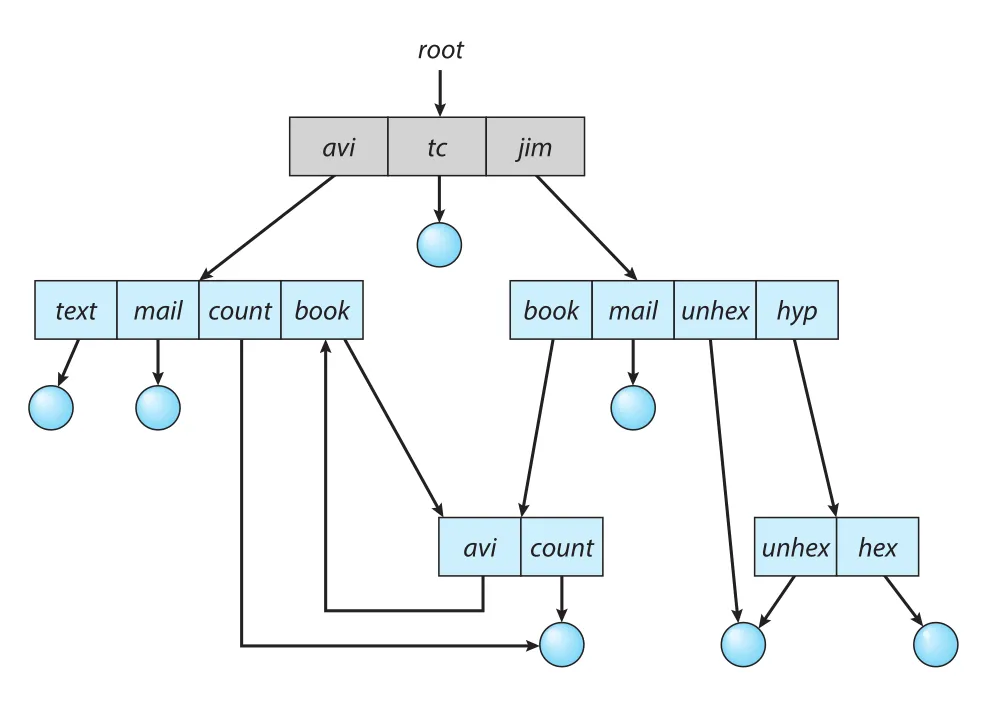
Figure 13.11 · PDF p. 680 · links가 cycles를 만들 수 있는 general graph directory 구조
Acyclic graph의 장점은 traversal과 “더 이상 file reference가 없는지” 판단하는 algorithms가 비교적 단순하다는 점이다. Shared section을 두 번 traverse하지 않으면 된다. 하지만 cycles가 있으면 correctness 문제가 생긴다. Poorly designed search algorithm은 cycle을 계속 돌며 infinite loop에 빠질 수 있다. Arbitrary limit을 두어 search 중 접근할 directories 수를 제한하는 방법도 있지만 근본 해결은 아니다.
Deletion에서도 cycles는 문제다. Acyclic graph에서는 reference count가 0이면 더 이상 references가 없다는 뜻이다. 그러나 cycles가 있으면 실제로 외부에서 접근할 수 없는 directory/file이어도 cycle 내부 references 때문에 count가 0이 아닐 수 있다. 이 경우 disk space 회수를 위해 garbage collection이 필요하다. Garbage collection은 entire file system을 traverse해 reachable objects를 mark하고, second pass에서 unmarked objects를 free space list에 넣는다. Disk-based file system에서 이 작업은 매우 expensive하므로 드물게 사용된다.
결론적으로 cycles를 피하는 것이 훨씬 쉽다. New link가 cycle을 만드는지 graph algorithms로 검사할 수 있지만 disk-based graph에서는 비용이 크다. 특수한 directory/link 상황에서는 directory traversal 중 links를 bypass하는 단순 정책으로 cycles와 overhead를 피할 수 있다.
13.4 Protection
Information이 computer system에 저장되면 두 가지 의미에서 안전해야 한다. 하나는 physical damage나 failure로부터 지키는 reliability이고, 다른 하나는 improper access로부터 지키는 protection이다.
Reliability는 duplicate copies와 backup으로 제공되는 경우가 많다. Disk files를 tape, secondary storage, network, cloud로 정기적으로 copy해 file system이 손상되었을 때 복구할 수 있게 한다. Hardware read/write errors, power failure, head crash, dirt, temperature extremes, vandalism, accidental deletion, file-system software bugs가 data loss를 만들 수 있다. 이 reliability 문제는 Chapter 11의 RAID/backup 맥락과 연결된다.
Protection은 valid users라도 allowed operations만 수행하게 하는 문제다. Laptop에서는 username/password authentication, secondary storage encryption, network firewalling 같은 protection이 필요하고, multiuser system에서는 data별로 더 세밀한 access control이 필요하다.
13.4.1 Types of Access
File protection의 필요성은 files에 access할 수 있기 때문에 생긴다. 다른 users의 files에 접근을 전혀 허용하지 않으면 protection 문제는 단순하지만 협업이 어렵고, free access를 허용하면 안전하지 않다. 일반적인 목표는 controlled access다.
Protection mechanism은 요청된 access type에 따라 허용/거부를 결정한다. Controlled access 대상은 다음과 같다.
| Access type | 의미 |
|---|---|
Read | file에서 data를 읽음 |
Write | file에 쓰거나 rewrite |
Execute | file을 memory로 load하고 실행 |
Append | file 끝에 new information을 추가 |
Delete | file을 삭제하고 space를 free |
List | file name과 attributes를 listing |
Attribute change | file attributes 변경 |
Rename, copy, edit 같은 higher-level operations도 controlled될 수 있지만, 많은 systems에서는 lower-level system calls의 조합으로 구현된다. 예를 들어 copy는 read requests sequence로 구현될 수 있으므로, read access가 있으면 copy/print도 사실상 가능해질 수 있다. 따라서 protection policy는 “어떤 high-level action을 막는가”보다 “어떤 primitive access를 허용하는가”를 기준으로 이해해야 한다.
13.4.2 Access Control
가장 일반적인 protection 방식은 access를 user identity에 의존하게 하는 것이다. 가장 general한 scheme은 각 file/directory에 ACL (access-control list)을 붙여 user names와 allowed access types를 명시하는 것이다. User가 access를 요청하면 OS는 file의 ACL을 확인하고, 해당 user에게 requested access가 있으면 허용하고 없으면 protection violation으로 거부한다.
ACL의 장점은 complex access methodology를 표현할 수 있다는 점이다. 문제는 길이다. Everyone에게 read access를 주고 싶으면 모든 users를 list해야 할 수 있고, user 수를 미리 모르면 list construction이 번거롭다. Directory entry도 fixed size에서 variable size로 바뀌어 space management가 복잡해진다.
이를 줄이기 위해 많은 systems는 users를 세 categories로 나눈다.
| Classification | 의미 |
|---|---|
Owner | file을 created한 user |
Group | file을 공유하고 similar access가 필요한 users set |
Other, universe | system의 나머지 모든 users |
현대적 접근은 owner/group/other scheme을 기본으로 두고, 더 fine-grained access가 필요할 때 ACL을 추가하는 것이다. 예를 들어 Solaris는 three categories access를 기본으로 제공하면서 specific files/directories에 ACL을 붙일 수 있다.
UNIX-style protection은 owner, group, other 각각에 대해 rwx 세 bits를 둔다. r은 read, w는 write, x는 execute를 의미한다. Directory에서도 유사하게 적용되며, directory content를 list하려면 해당 field의 r bit가 필요하고, directory를 current directory로 change하려면 x bit가 필요하다.
Sara가 book.tex를 쓰고, Jim/Dawn/Jill은 read/write만 가능하며, all other users는 read-only로 두는 예를 생각해 보자. 새 group text를 만들고 Jim/Dawn/Jill을 넣은 뒤, book.tex에 owner Sara는 all bits, group text는 r/w, other는 r만 설정한다. Temporary visitor에게 Chapter 1만 access를 주고 싶다면 group에 넣을 수 없다. Group에 넣으면 모든 chapters 접근이 가능해지기 때문이다. 이때 file-specific ACL이 유용하다.
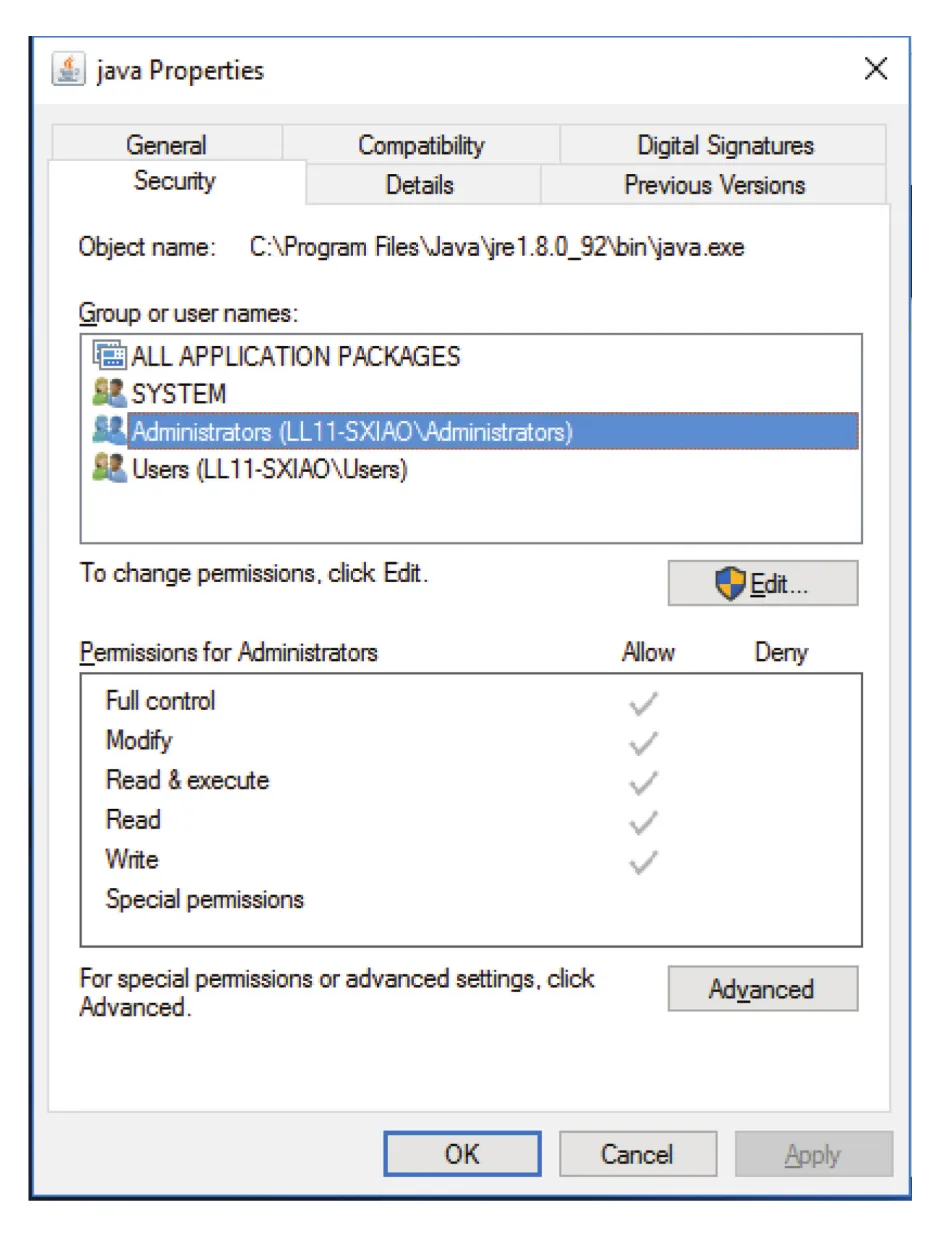
Figure 13.12 · PDF p. 685 · file-specific users/groups에 대해 allow/deny permissions를 설정하는 ACL 관리 예
ACL과 basic permissions가 충돌할 때 precedence도 정책 문제다. 예를 들어 group permission은 read-only인데 특정 user ACL은 read/write를 허용한다면 write를 허용해야 하는가? Solaris 등은 ACL이 더 fine-grained이고 default가 아니므로 ACL에 precedence를 둔다. 이는 더 specific한 rule이 우선한다는 일반 원칙과 맞다.
13.4.3 Other Protection Approaches
다른 protection 방식은 file마다 password를 붙이는 것이다. Random하게 선택하고 자주 바꾸면 접근 제한에 효과가 있을 수 있지만, 단점이 크다. File마다 password를 기억해야 하면 practical하지 않고, 모든 files에 하나의 password를 쓰면 password가 노출되는 순간 all files가 accessible해진다. 일부 systems는 file 대신 subdirectory에 password를 붙이기도 한다. 더 흔하고 강한 방식은 partition 또는 individual files encryption이지만, password/key management가 핵심이다.
Multilevel directory structure에서는 individual files뿐 아니라 subdirectories와 directory operations도 보호해야 한다. Directory에서는 file creation/deletion뿐 아니라 file existence/name을 알 수 있는지, 즉 listing도 보호 대상이다. 어떤 file의 존재 자체가 민감한 정보일 수 있다. Path name이 어떤 file을 가리키려면 user는 target file뿐 아니라 path에 있는 directories에도 적절한 access를 가져야 한다.
Acyclic/general graph처럼 file에 numerous path names가 있을 수 있는 systems에서는 같은 file이라도 사용한 path name에 따라 access rights가 달라질 수 있다. 따라서 protection은 file object 하나만의 문제가 아니라 namespace traversal과 directory permissions까지 포함하는 문제다.
13.5 Memory-Mapped Files
File access의 또 다른 중요한 방식은 memory mapping a file이다. Standard open(), read(), write()로 disk file을 sequentially 읽으면 각 file access마다 system call과 disk access overhead가 발생한다. Memory mapping은 Chapter 10의 virtual memory techniques를 이용해 file I/O를 routine memory access처럼 다루게 한다. Process virtual address space의 일부를 file과 logically associate하고, access 시 page fault/demand paging으로 file contents를 memory에 가져온다.
13.5.1 Basic Mechanism
Memory mapping은 disk block을 memory page 또는 pages에 map하여 수행된다. Mapped file의 initial access는 ordinary demand paging처럼 page fault를 일으킨다. OS는 file system에서 page-sized portion, 또는 더 큰 chunk를 physical page로 읽어 온다. 이후 file에 대한 reads/writes는 read()/write() system calls가 아니라 memory load/store처럼 처리된다. 이 방식은 system call overhead를 줄이고 file usage를 단순화한다.
Writes to memory-mapped file이 반드시 secondary storage에 즉시 synchronous write되는 것은 아니다. 일반적으로 systems는 memory image의 changes를 file close 시점에 file로 write back한다. Memory pressure가 있으면 intermediate changes를 잃지 않기 위해 swap space 등에 보존할 수 있다. File이 close되면 memory-mapped data가 secondary storage file로 write back되고 process virtual memory에서 제거된다.
일부 OS는 specific system call, 예를 들어 mmap()으로 명시된 경우에만 memory mapping을 제공한다. 다른 systems는 ordinary open(), read(), write()를 사용해도 internally memory map을 활용할 수 있다. Solaris 예시에서는 mmap()으로 열면 process address space에 map하고, ordinary file I/O는 kernel address space에 map한다. 결과적으로 모든 file I/O를 efficient memory subsystem 경로로 처리하고 traditional read/write system call overhead를 줄인다.
Multiple processes는 같은 file을 동시에 map할 수 있다. 이 경우 한 process의 writes는 virtual memory의 shared data를 modify하고, 같은 file section을 map한 다른 processes도 볼 수 있다. 구현은 각 process의 virtual memory map이 같은 physical page, 즉 disk block copy를 담은 page를 가리키는 방식이다.
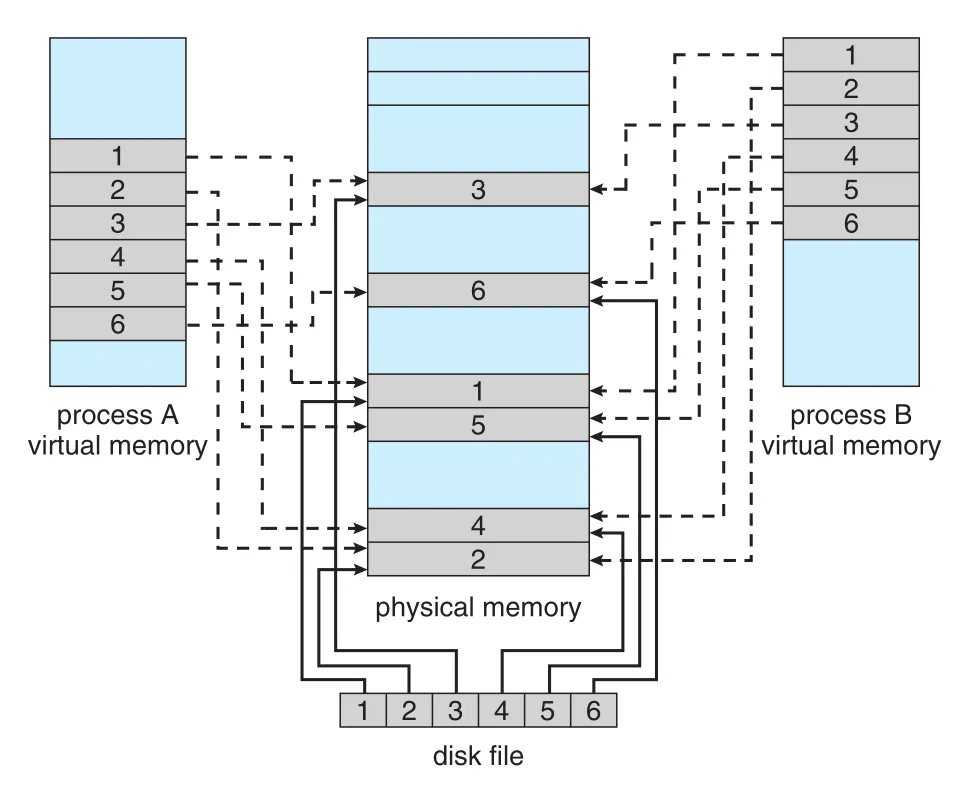
Figure 13.13 · PDF p. 687 · 여러 process virtual memory mappings가 같은 physical pages와 disk file blocks에 연결되는 memory-mapped file 구조
Memory-mapping system calls는 copy-on-write도 지원할 수 있다. Processes가 file을 read-only로 share하다가 어떤 process가 modify하면 그 process만 private copy를 갖게 한다. Shared data에 대한 coordination은 Chapter 6의 mutual exclusion mechanisms를 사용해야 한다.
Shared memory는 종종 memory-mapped files로 구현된다. Communicating processes가 같은 file 또는 shared-memory object를 각자 virtual address space에 memory-map하면, 그 mapped file region이 processes 사이 shared memory가 된다.
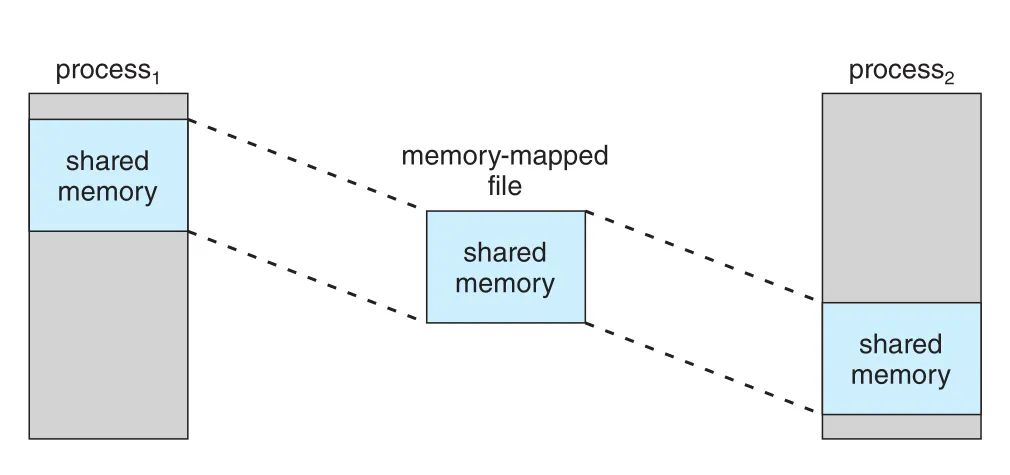
Figure 13.14 · PDF p. 687 · 두 processes가 같은 memory-mapped file을 통해 shared memory region을 공유하는 구조
POSIX shared-memory object도 이런 방식으로 이해할 수 있다. Shared object를 만들고 communicating processes가 그 object를 address space에 map하면, file-system-like object가 IPC shared memory region 역할을 한다.
13.5.2 Shared Memory in the Windows API
Windows API에서 memory-mapped files를 사용해 shared memory를 만드는 흐름은 다음과 같다.
- Producer process가
CreateFile()로 mapping할 file을 열어 fileHANDLE을 얻는다. CreateFileMapping()으로 file handle에 대한 file mapping object를 만든다. Named shared-memory object, 예를 들어SharedObject를 만들 수 있다.MapViewOfFile()로 mapped file의 view를 process virtual address space에 만든다. Entire file 또는 offset/size로 지정한 subsection만 map할 수 있다.- Producer는 returned pointer가 가리키는 memory에 write한다. 이 access는 memory-mapped file access다.
- Consumer process는
OpenFileMapping()으로 same named object를 열고,MapViewOfFile()로 자기 address space에 view를 만든 뒤 memory에서 message를 read한다. - 두 processes는 사용이 끝나면
UnmapViewOfFile()로 view를 제거하고 handles를 close한다.
중요한 점은 mapping이 established되었다고 entire file이 즉시 memory에 loaded되는 것은 아니라는 것이다. Mapped file은 demand-paged될 수 있고, pages는 실제 access될 때 memory에 들어온다.
13.6 Summary
File은 OS가 define/implement하는 abstract data type이다. File은 logical records의 sequence이고, logical record는 byte, line, fixed/variable-length record, 더 복잡한 data item일 수 있다. OS는 다양한 record/file structures를 직접 support할 수도 있고, 대부분을 application program에 맡길 수도 있다.
OS의 큰 일은 logical file concept를 HDD/NVM 같은 physical storage devices에 map하는 것이다. Physical record size와 logical record size가 다를 수 있으므로, logical records를 physical records/blocks에 packing해야 한다. 이 작업도 OS가 지원하거나 application이 맡을 수 있다.
Directories는 files를 organize하기 위한 structure다. Single-level directory는 단순하지만 multiuser system에서 name collision 문제가 있다. Two-level directory는 user별 UFD로 이를 완화하지만 sharing이 어렵다. Tree-structured directory는 arbitrary subdirectories를 허용해 가장 일반적이다. Acyclic-graph directory는 shared files/subdirectories를 허용하지만 searching/deletion이 복잡해지고, general graph는 flexibility가 크지만 cycle 때문에 garbage collection이 필요할 수 있다.
File protection은 multiuser systems에서 필수다. Access는 read, write, execute, append, delete, list, attribute change처럼 operation type별로 제어될 수 있다. Protection은 ACLs, owner/group/other permission bits, passwords, encryption 등으로 제공될 수 있으며, directory traversal과 namespace visibility도 protection 대상이다.
Memory-mapped files는 file I/O를 virtual memory access로 바꾸어 system call overhead를 줄이고 shared memory IPC까지 제공할 수 있다. 하지만 mapped writes의 write-back timing, shared mapping synchronization, copy-on-write semantics를 이해해야 한다.
연결 관계
- Chapter 11과 연결된다. File abstraction은 HDD/NVM의 physical blocks 위에 올라가며, internal fragmentation과 block size trade-off는 storage device structure와 직접 관련된다.
- Chapter 12와 연결된다. File I/O는 kernel I/O subsystem, buffer cache, memory-mapped I/O, device drivers를 통해 실제 hardware operation으로 변환된다.
- Chapter 10과 연결된다.
memory-mapped file, demand paging, copy-on-write, shared pages는 virtual memory mechanism을 file-system interface에 적용한 것이다. - Chapter 3/6과 연결된다. Memory-mapped shared files는 IPC shared memory로 쓰이고, shared mapped data에는 mutual exclusion이 필요하다.
- Chapter 14/15와 연결된다. 이 장은 interface와 logical structures를 다루고, 다음 장들은 file-system implementation, allocation, free-space management, mounting/recovery를 더 자세히 다룬다.
- Chapter 17과 연결된다. File protection의 ACL, permissions, controlled access는 general protection/security mechanism의 구체적 사례다.
오해하기 쉬운 내용
- File name은 file의 human-readable handle일 뿐, OS 내부 식별자는 보통
identifier, inode, FCB 같은 non-human-readable structure다. open()은 단순히 file을 “열었다”는 표시가 아니라, name lookup과 permission checking을 수행하고 open-file table entry를 만들어 이후 I/O 비용을 줄이는 operation이다.hard link와 copy는 다르다. Hard link는 같은 actual file에 대한 또 다른 directory entry이고, copy는 독립적인 file contents다.symbolic link와 hard link도 다르다. Symbolic link는 pathname을 담은 indirect pointer라 target 삭제 시 dangling link가 될 수 있고, hard link는 reference count로 file lifetime에 직접 관여한다.nonempty directory deletion은 단순 구현 문제가 아니라 policy 문제다. Convenience와 data-loss 위험 사이의 trade-off다.- ACL이 항상 owner/group/other permissions보다 약한 보조 기능은 아니다. 많은 systems에서는 더 specific한 ACL에 precedence를 둔다.
memory-mapped file에 write했다고 즉시 disk file에 synchronous write되는 것은 아니다. Write-back timing과 durability는 OS 정책에 달려 있다.
면접 질문
- OS가 physical storage device 위에
fileabstraction을 제공하는 이유는 무엇인가? - File attributes에는 어떤 정보가 포함되며, directory entry와 identifier는 어떤 관계인가?
open()이 필요한 이유를 directory search, permission checking, open-file table 관점에서 설명하라.- Per-process open-file table과 system-wide open-file table을 나누는 이유는 무엇인가?
- Shared lock과 exclusive lock, mandatory locking과 advisory locking의 차이를 설명하라.
- OS가 file types/file structures를 많이 지원할 때의 장단점은 무엇인가?
internal fragmentation이 file system에서 왜 생기며 block size와 어떤 trade-off가 있는가?- Sequential access와 direct access의 차이를 file pointer, block number, application 예시로 설명하라.
- Indexed access/ISAM이 large file search I/O를 줄이는 방식을 설명하라.
- Single-level, two-level, tree-structured directory의 장단점을 비교하라.
- Acyclic-graph directory에서 sharing이 가능한 이유와 aliasing/deletion 문제가 무엇인지 설명하라.
- General graph directory에서 cycles가 traversal과 deletion을 어렵게 만드는 이유는 무엇인가?
- ACL과 owner/group/other permission model을 비교하고, 두 방식이 충돌할 때 specificity 원칙을 설명하라.
- Memory-mapped file의 basic mechanism을 demand paging, page fault, write-back 관점에서 설명하라.
- Memory-mapped files가 shared memory IPC로 사용될 수 있는 이유와 synchronization 필요성을 설명하라.